DLL Injection
DLL (Dynamic Link Library) injection is a technique in which arbitrary code is ran from within a legitimate process. This is a very sneaky way to execute malicious code and get around poorly implemented security measures. It does have its drawbacks other than the WinAPIs used being heavily monitored by EDR it also leaves artifacts on disk. Although classic DLL injection has seen less and less use by malware developers over the years, while learning about it I felt like it was worth sharing.
What is a DLL
A DLL is a file that contains code or data that can be executed by other applications to assist in their function. These DLLs can also be used by multiple applications simultaneously, increasing efficiency in regard to memory and disk space usage. Instead of including the same block of code in 5 different applications, each application can just import 1 DLL that contains that block of code.
How DLL injection Works
For a threat actor to inject their malicious DLL into a legitimate running process a couple things have to happen.
- The malicious DLL has to be somewhere accessible on the disk.
- The target process has to be running at the time.
- The user that triggered the execution of the DLL must have adequate permissions to the target process.
With all of the above true a malicious DLL can coerce a legitimate process into executing its code. This is achievable via a few WinAPIs namely VirtualAllocEx, WriteProcessMemory, and CreateRemoteProcess. VirtualAllocEx - Is similar to VirtualAlloc except it allocates memory in a remote process. WriteProcessMemory - Writes the DLLs to the remote process. CreateRemoteThread - Creates a thread in a remote process.
Before all this can happen a target process needs to be found. To figure out what is running on a victims machine its processes have to be enumerated. Microsoft actually provides a way of enumerating processes within their own documentation. The functions that stick out are the CreateToolhelp32Snapshot, Process32First, and Process32Next. These functions are vital to process injection, because without them the malware would be shooting in the dark and most likely fail. CreateToolhelp32Snapshot - Creates a snapshot of the running processes on a system. Process32First - Grabs the info on the first process in a snapshot. Process32Next - Grabs, well you guessed it, the next one.
Now loading the DLL into the target process can almost be achieved. I say almost because the target process will need to execute LoadLibraryW locally targeting the malicious DLL. The question is how would you get the target process to do something that can only be executed locally? Well because LoadLibraryW is a WinAPI its address is the same regardless of what is running, this way it can be called by multiple processes. This means the address for LoadLibraryW can be stored in something like pLoadLibrary and used in a thread remotely created in the target process.
pLoadLibrary = GetProcAddress(GetModuleHandle(L"kernel32.dll"), "LoadLibraryW");
Finally with everything above successfully executed the malicious DLL can not only be called by the target process but has the allocated space to be executed.
The Reverse
Now that I know what is required for a DLL to be injected into another process. I can run a (very simply built) program that will perform this type of injection and know what to look for in a debugger.
First off the malware will need to look for a commonly used process running on the machine. As the above has stated finding this will more than likely be a comparison of whats running with what is being targeted. In the wild the target process would probably be something like svchost.exe. notepad.exe is just part of my example.
With this in mind I want to set a breakpoint at Process32First to see if it is being compared to a process name. Since Process32First is a WinAPI I can easily find it in the malware’s “Symbols” tab. From here select your malicious exe, sort by type import, find Process32First, and set your breakpoint.
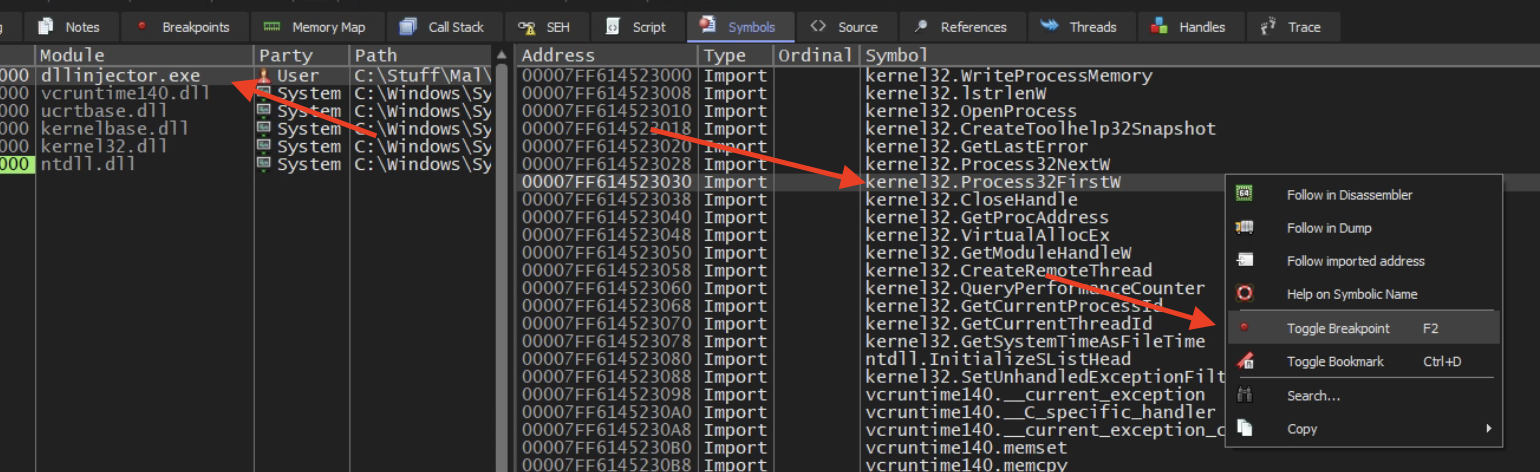
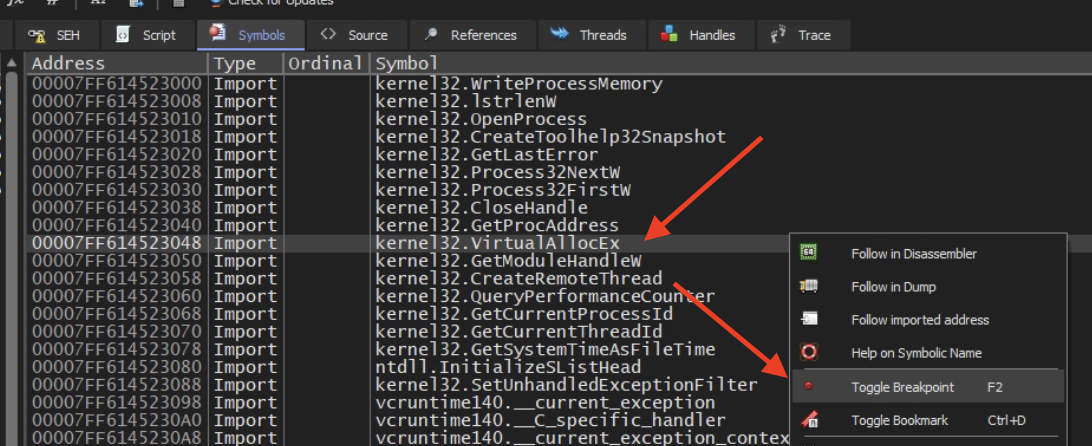
Before running the debugger though I wanted to also set a breakpoint at VirtualAllocEX, this will tell me what it is trying to be inject since it needs to allocate space for it.
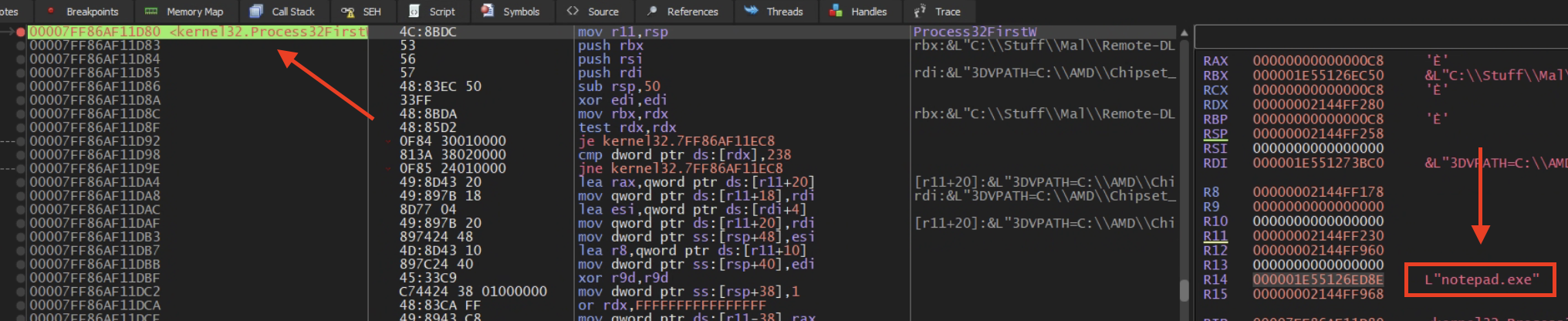
With these two set we can run the debugger and see what we get. The first breakpoint we set gets hit and as expected we see the targeted process being held in a general register R14 and that target is notepad.exe!
Now on to the VirtualAllocEx breakpoint to see what is trying to be injected into notepad. Nice we have the malicious DLL location!

With this information we can stop the debugger (if this was malware you wouldn’t want to let it run) go find that malicious DLL and start the reverse engineering process all over again.
Conclusion
I looked further into why R14 was being used and found out that R14 itself is pretty arbitrary, but the use for general registers like this is to hold data while multiple functions are being called. This is so that the stack isn’t unnecessarily manipulated, and at the same time saving the data for later use by the function initially called. This one was really interesting to me as DLL injection was a big deal for awhile, I think now Reflective DLL Injection is more widely used but I haven’t gotten there yet. Till next time…